
• Wrong document? Swap it for free
  • Written by students who passed
  • Immediately available after payment
  • Read online or as PDF
Sell
Where do you study
Your language
Document preview thumbnail
Preview 1 out of 3 pages
Other

Manipulating a Vector

Document preview thumbnail
Preview 1 out of 3 pages

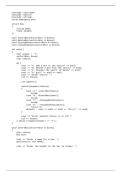
The provided code is a C++ program that manages a collection of "Box" objects using a vector. Here's a breakdown of its components and functionality: 1. **Includes and Namespaces**: - The program includes necessary libraries such as `iostream` for input/output operations, `vector` for using vectors, and `string` for string manipulation. The `std` namespace is used to simplify code. 2. **Box Structure**: - A `struct` named `Box` is defined, containing two properties: a `string` for the box's name and a `float` for its height. 3. **Function Declarations**: - Four functions are declared to handle the main operations: - `insertBox`: To add a new box to the collection. - `deleteBox`: To remove a box based on its name. - `displayBoxes`: To display information about all boxes in the vector. - `eraseAllBoxes`: To clear all boxes from the vector. 4. **Main Function**: - A loop allows the user to choose from a menu to add, delete, display boxes or quit the program. - User input is processed, and the appropriate function is called based on the user's choice. 5. **Insert Box Functionality**: - This function prompts the user for box details (name and height) and asks whether to add the box to the front or back of the vector. It handles edge cases, such as when the vector is empty. 6. **Delete Box Functionality**: - This function displays all boxes and asks the user for the name of the box they want to delete. If the box is found, it removes it and provides feedback. 7. **Display Boxes Functionality**: - This function shows the current capacity, size, and details of each box in the vector, including its name and height. 8. **Erase All Boxes Functionality**: - This function removes all boxes from the vector and provides feedback on the names of the boxes being erased, ensuring the vector is empty afterward. The program effectively demonstrates basic operations with vectors in C++, alongside user interaction and basic data management. It uses a simple command-line interface for users to manage their collection of boxes.

Content preview

#include <iostream>
#include <vector>
#include <string>
using namespace std;

struct Box
{
string name;
float height;
};

void insertBox(vector<Box> & boxes);
void deleteBox(vector<Box> & boxes);
void displayBoxes(vector<Box> & boxes);
void eraseAllBoxes(vector<Box> & boxes);

int main()
{
char answer = 'Y';
vector<Box> boxes;
char choice;

do {
cout << "A. add a box to the vector" << endl;
cout << "B. delete a box from the vector" << endl;
cout << "C. display the vector of boxes" << endl;
cout << "D. quit" << endl << endl;
cout << "Enter choice: ";
cin >> choice;

cin.ignore();

switch(toupper(choice))
{
case 'A': insertBox(boxes);
break;
case 'B': deleteBox(boxes);
break;
case 'C' : displayBoxes(boxes);
break;
case 'D' : eraseAllBoxes(boxes);
return 0;
default : cout << endl << endl << "Error!" << endl;
}

cout << "Enter another choice (Y or N)? ";
cin >> answer;
} while (toupper(answer) == 'Y');
}

void insertBox(vector<Box> & boxes)
{
char choice;
Box box;

cout << "Enter a name for a box: ";
getline(cin, box.name);

cout << "Enter the height of the box in inches: ";

Connected book
 image
Publisher: 2017 ISBN: 9780134498379 Edition: Unknown

Document information

Uploaded on
November 6, 2025
Number of pages
3
Written in
2025/2026
Type
Other
Person
Unknown
$15.99

Wrong document? Swap it for free Within 14 days of purchase and before downloading, you can choose a different document. You can simply spend the amount again.
Written by students who passed
Immediately available after payment
Read online or as PDF

Sold
0
Followers
0
Items
68
Last sold
-


Why students choose Stuvia

Created by fellow students, verified by reviews

Quality you can trust: written by students who passed their tests and reviewed by others who've used these notes.

Didn't get what you expected? Choose another document

No worries! You can instantly pick a different document that better fits what you're looking for.

Pay as you like, start learning right away

No subscription, no commitments. Pay the way you're used to via credit card and download your PDF document instantly.

Student with book image

“Bought, downloaded, and aced it. It really can be that simple.”

Alisha Student

Working on your references?

Create accurate citations in APA, MLA and Harvard with our free citation generator.

Working on your references?

Frequently asked questions

