

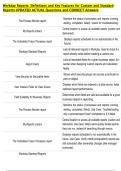
Workday Reports: Definitions and Key Features for Custom and Standard
Reports UPDATED ACTUAL Questions and CORRECT Answers
Monitors the status of processes and reports (running,
The Process Monitor report
waiting, completed, failed). Useful for troubleshooting.
Central location to access all available reports (custom and
My Reports Library
delivered).
Displays reports scheduled to run automatically in the
The Scheduled Future Processes report
future.
Lists all delivered reports in Workday. Used to check if a
Workday Standard Reports
report already exists before creating a custom one.
Lists all reportable fields for a given business object. Es-
Report Fields sential when designing custom reports and calculated
fields.
Shows which security groups can access a particular re-
View Security for Securable Items
port or object.
Displays which fields are indexed in a data source; helps
View Indexed Fields for Data Source
optimize report performance.
Determines which fields are valid and available for a given
Field Suitability for Business Objects
business object in reporting.
Monitors the status of processes and reports (running,
The Process Monitor report waiting, completed, failed). Use Case: Troubleshooting
why a process/report hasn't completed or if it failed.
Central location to access all available reports (custom and
My Reports Library delivered). Use Case: Helps users quickly locate reports
they can run, instead of searching through menus.
Displays reports scheduled to run automatically in the
future. Use Case: Verify month-end/quarterly reports are
The Scheduled Future Processes report
still scheduled after ownership changes (like manager
turnover).
Workday Standard Reports
,Lists all delivered reports in Workday. Use Case: Prevents
duplication — check if a similar report already exists
before building a custom one.
Review and validate which data sources are available for
Maintain Custom Report Data Source building reports. Use Case: Helps choose the correct data
source if a field isn't showing up in your custom report.
Shows which security groups can access a particular re-
View Security for Securable Items port or object. Use Case: Troubleshooting when a user
says "I can't see/run this report" ’they may lack that group.
Displays which fields are indexed in a data source. Use
Case: Report running too slow? Use indexed fields in filters
View Indexed Fields for Data Source to improve performance. Fields can be Indexed for Filter,
Facets, Aggregations, and Group By. Not all fields are
indexed for all (e.g., Job Code only indexed for Filter).
Determines which fields are valid and available for a given
business object in reporting. Use Case: Prevents errors
Field Suitability for Business Objects
when building reports by knowing which fields can be
used.
Shows which security groups a specific user belongs to.
View Security for Groups User Use Case: Troubleshoot access issues — confirm if a user
is missing a required security group.
Provides a detailed breakdown of which groups have ac-
Security Analysis for Securable Items cess to a given securable item. Use Case: Security audit —
check if the right groups have access to sensitive reports.
Provides a combined view of securable items and user ac-
Security Analysis for Securable Items/User counts. Use Case: Audit why a user has access to sensitive
data, or confirm who has access to a restricted item.
Maintain Trended Workers
, Used to configure which worker attributes (headcount,
terminations, hires, etc.) are stored in the Workday trend-
ed data tables. Helps solve: Enables trending reports (like
headcount over time) to work correctly; if data isn't trend-
ing, this task is the fix.
Displays all the fields, relationships, and parent/child ob-
jects for a selected business object. Helps solve: When
Business Object Details
building reports and you're unsure what fields exist or
how objects link (e.g., Worker ’Position ’Job Profile).
Defines how subreports are joined (common key such
Control Field as Worker ID or Position ID). Ensures data aligns across
subreports. Used in Composite Reporting
Must be an instance field (e.g., Worker, Position, Super-
visory Org). Free-text fields cannot be used because they
Control Field Rules
aren't stable keys and don't represent Workday objects.
Used in Composite Reporting
Allows unique formatting, sorting, and display options for
Subreport Properties
each subreport. Used in Composite Reporting
Provides drill-down capability into levels of a hierarchy
Expansion Hierarchy (e.g., Org ’Department ’Manager). Used in Composite
Reporting
Combines multiple subreports (Matrix, Advanced, Trend-
Composite Report ing) into one consolidated output. Used in Advanced
Workday Reporting
The output fields selected in a report (e.g., Worker Name,
Hire Date). Each column represents one data element
Data Columns (General Reports)
displayed in the report results. Used in Advanced, Matrix,
and Trending Reports
Data Columns (Composite Reports)
Reports UPDATED ACTUAL Questions and CORRECT Answers
Monitors the status of processes and reports (running,
The Process Monitor report
waiting, completed, failed). Useful for troubleshooting.
Central location to access all available reports (custom and
My Reports Library
delivered).
Displays reports scheduled to run automatically in the
The Scheduled Future Processes report
future.
Lists all delivered reports in Workday. Used to check if a
Workday Standard Reports
report already exists before creating a custom one.
Lists all reportable fields for a given business object. Es-
Report Fields sential when designing custom reports and calculated
fields.
Shows which security groups can access a particular re-
View Security for Securable Items
port or object.
Displays which fields are indexed in a data source; helps
View Indexed Fields for Data Source
optimize report performance.
Determines which fields are valid and available for a given
Field Suitability for Business Objects
business object in reporting.
Monitors the status of processes and reports (running,
The Process Monitor report waiting, completed, failed). Use Case: Troubleshooting
why a process/report hasn't completed or if it failed.
Central location to access all available reports (custom and
My Reports Library delivered). Use Case: Helps users quickly locate reports
they can run, instead of searching through menus.
Displays reports scheduled to run automatically in the
future. Use Case: Verify month-end/quarterly reports are
The Scheduled Future Processes report
still scheduled after ownership changes (like manager
turnover).
Workday Standard Reports
,Lists all delivered reports in Workday. Use Case: Prevents
duplication — check if a similar report already exists
before building a custom one.
Review and validate which data sources are available for
Maintain Custom Report Data Source building reports. Use Case: Helps choose the correct data
source if a field isn't showing up in your custom report.
Shows which security groups can access a particular re-
View Security for Securable Items port or object. Use Case: Troubleshooting when a user
says "I can't see/run this report" ’they may lack that group.
Displays which fields are indexed in a data source. Use
Case: Report running too slow? Use indexed fields in filters
View Indexed Fields for Data Source to improve performance. Fields can be Indexed for Filter,
Facets, Aggregations, and Group By. Not all fields are
indexed for all (e.g., Job Code only indexed for Filter).
Determines which fields are valid and available for a given
business object in reporting. Use Case: Prevents errors
Field Suitability for Business Objects
when building reports by knowing which fields can be
used.
Shows which security groups a specific user belongs to.
View Security for Groups User Use Case: Troubleshoot access issues — confirm if a user
is missing a required security group.
Provides a detailed breakdown of which groups have ac-
Security Analysis for Securable Items cess to a given securable item. Use Case: Security audit —
check if the right groups have access to sensitive reports.
Provides a combined view of securable items and user ac-
Security Analysis for Securable Items/User counts. Use Case: Audit why a user has access to sensitive
data, or confirm who has access to a restricted item.
Maintain Trended Workers
, Used to configure which worker attributes (headcount,
terminations, hires, etc.) are stored in the Workday trend-
ed data tables. Helps solve: Enables trending reports (like
headcount over time) to work correctly; if data isn't trend-
ing, this task is the fix.
Displays all the fields, relationships, and parent/child ob-
jects for a selected business object. Helps solve: When
Business Object Details
building reports and you're unsure what fields exist or
how objects link (e.g., Worker ’Position ’Job Profile).
Defines how subreports are joined (common key such
Control Field as Worker ID or Position ID). Ensures data aligns across
subreports. Used in Composite Reporting
Must be an instance field (e.g., Worker, Position, Super-
visory Org). Free-text fields cannot be used because they
Control Field Rules
aren't stable keys and don't represent Workday objects.
Used in Composite Reporting
Allows unique formatting, sorting, and display options for
Subreport Properties
each subreport. Used in Composite Reporting
Provides drill-down capability into levels of a hierarchy
Expansion Hierarchy (e.g., Org ’Department ’Manager). Used in Composite
Reporting
Combines multiple subreports (Matrix, Advanced, Trend-
Composite Report ing) into one consolidated output. Used in Advanced
Workday Reporting
The output fields selected in a report (e.g., Worker Name,
Hire Date). Each column represents one data element
Data Columns (General Reports)
displayed in the report results. Used in Advanced, Matrix,
and Trending Reports
Data Columns (Composite Reports)


