Application Programmer Review Test.
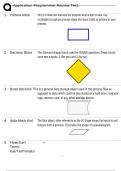
1. Process Block Part of a flowchart that tells the program what action to take. Use
rectangles to capture process steps like basic tasks or actions in your
process
2. Decision Block The diamond-shaped block used for YES/NO questions. These blocks
have two outputs: 1 (for yes) and 2 (for no).
3. Stored Data block This is a general data storage object used in the process flow as
opposed to data which could be also stored on a hard drive, magnetic
tape, memory card, of any other storage device.
4. data block (i/o) The Data object, often referred to as the I/O Shape shows the Inputs to and
Outputs from a process. This takes the shape of a parallelogram.
5. Flowchart r
Termi-
nal/Terminato
, Application Programmer Review Test.
The terminator shows
where your process begins
or ends. You can use
words like 'Start', 'Begin',
'End' inside the terminator
shape to make things
more obvious.
, Application Programmer Review Test.
6. Flowchart Document object is a rectangle with a wave-like base. This shape is used to
Docu- ment represent a Document or Report in a process flow.
7. Direct Data Direct Data object in a process flow represents information stored
which can be accessed directly. This object represents a computer's hard
drive. Usually cylinder or cone shaped laying on its side.
8. internal storage This is a shape which is commonly found in programming flowcharts to
illustrate the information stored in memory, as opposed to on a file.
This shape is often referred to as the magnetic core memory of early
computers; or the random access memory (RAM) as we call it today.
9. sequential access A method of data access used by tape drives, whereby data is written
or read
sequentially from the beginning to the end of the tape or until the
1. Process Block Part of a flowchart that tells the program what action to take. Use
rectangles to capture process steps like basic tasks or actions in your
process
2. Decision Block The diamond-shaped block used for YES/NO questions. These blocks
have two outputs: 1 (for yes) and 2 (for no).
3. Stored Data block This is a general data storage object used in the process flow as
opposed to data which could be also stored on a hard drive, magnetic
tape, memory card, of any other storage device.
4. data block (i/o) The Data object, often referred to as the I/O Shape shows the Inputs to and
Outputs from a process. This takes the shape of a parallelogram.
5. Flowchart r
Termi-
nal/Terminato
, Application Programmer Review Test.
The terminator shows
where your process begins
or ends. You can use
words like 'Start', 'Begin',
'End' inside the terminator
shape to make things
more obvious.
, Application Programmer Review Test.
6. Flowchart Document object is a rectangle with a wave-like base. This shape is used to
Docu- ment represent a Document or Report in a process flow.
7. Direct Data Direct Data object in a process flow represents information stored
which can be accessed directly. This object represents a computer's hard
drive. Usually cylinder or cone shaped laying on its side.
8. internal storage This is a shape which is commonly found in programming flowcharts to
illustrate the information stored in memory, as opposed to on a file.
This shape is often referred to as the magnetic core memory of early
computers; or the random access memory (RAM) as we call it today.
9. sequential access A method of data access used by tape drives, whereby data is written
or read
sequentially from the beginning to the end of the tape or until the