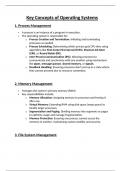
Key Concepts of Operating Systems
1. Process Management
A process is an instance of a program in execution.
The operating system is responsible for:
o Process Creation and Termination: Initiating and terminating
processes as needed.
o Process Scheduling: Determining which process gets CPU time using
algorithms like First-Come-First-Served (FCFS), Shortest Job Next
(SJN), or Round Robin (RR).
o Inter-Process Communication (IPC): Allowing processes to
communicate and synchronize with one another using mechanisms
like pipes, message queues, shared memory, or signals.
o Deadlock Handling: Ensuring processes don’t end up in a state where
they cannot proceed due to resource contention.
2. Memory Management
Manages the system's primary memory (RAM).
Key responsibilities include:
o Memory Allocation: Assigning memory to processes and freeing it
after use.
o Virtual Memory: Extending RAM using disk space (swap space) to
handle larger processes.
o Segmentation and Paging: Dividing memory into segments or pages
to optimize usage and manage fragmentation.
o Memory Protection: Ensuring one process cannot access the
memory of another, maintaining system stability and security.
3. File System Management
, An OS organizes and manages data storage on devices like HDDs, SSDs, and
USB drives.
Responsibilities:
o File Organization: Providing a hierarchical directory structure for
data storage.
o File Operations: Enabling creation, deletion, reading, writing, and
modification of files.
o Access Control: Implementing permissions to secure files from
unauthorized access.
o Disk Management: Allocating disk blocks and ensuring efficient
storage utilization.
4. Input/Output (I/O) Management
Handles communication between the system and external devices (e.g.,
keyboards, mice, printers).
Key aspects:
o Device Drivers: Interface between hardware and the OS, enabling
the OS to communicate with devices.
o Buffering: Temporarily storing data to ensure smooth data transfer
between devices with differing speeds.
o Spooling: Managing I/O tasks by queuing them for sequential
processing, often used in printing.
5. Resource Management
The OS acts as a resource manager for CPU, memory, storage, and I/O
devices.
Multiprogramming: Running multiple processes simultaneously by
allocating resources efficiently.
Priority Scheduling: Allocating resources based on process priority to
ensure critical tasks are addressed promptly.
1. Process Management
A process is an instance of a program in execution.
The operating system is responsible for:
o Process Creation and Termination: Initiating and terminating
processes as needed.
o Process Scheduling: Determining which process gets CPU time using
algorithms like First-Come-First-Served (FCFS), Shortest Job Next
(SJN), or Round Robin (RR).
o Inter-Process Communication (IPC): Allowing processes to
communicate and synchronize with one another using mechanisms
like pipes, message queues, shared memory, or signals.
o Deadlock Handling: Ensuring processes don’t end up in a state where
they cannot proceed due to resource contention.
2. Memory Management
Manages the system's primary memory (RAM).
Key responsibilities include:
o Memory Allocation: Assigning memory to processes and freeing it
after use.
o Virtual Memory: Extending RAM using disk space (swap space) to
handle larger processes.
o Segmentation and Paging: Dividing memory into segments or pages
to optimize usage and manage fragmentation.
o Memory Protection: Ensuring one process cannot access the
memory of another, maintaining system stability and security.
3. File System Management
, An OS organizes and manages data storage on devices like HDDs, SSDs, and
USB drives.
Responsibilities:
o File Organization: Providing a hierarchical directory structure for
data storage.
o File Operations: Enabling creation, deletion, reading, writing, and
modification of files.
o Access Control: Implementing permissions to secure files from
unauthorized access.
o Disk Management: Allocating disk blocks and ensuring efficient
storage utilization.
4. Input/Output (I/O) Management
Handles communication between the system and external devices (e.g.,
keyboards, mice, printers).
Key aspects:
o Device Drivers: Interface between hardware and the OS, enabling
the OS to communicate with devices.
o Buffering: Temporarily storing data to ensure smooth data transfer
between devices with differing speeds.
o Spooling: Managing I/O tasks by queuing them for sequential
processing, often used in printing.
5. Resource Management
The OS acts as a resource manager for CPU, memory, storage, and I/O
devices.
Multiprogramming: Running multiple processes simultaneously by
allocating resources efficiently.
Priority Scheduling: Allocating resources based on process priority to
ensure critical tasks are addressed promptly.