PRO TOOLS 101: CERTIFICATION TEST STUDY GUIDE |LATEST 2024/2025
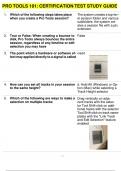
Which of the following steps takes place when you create a Pro Tools session? 2. True or False: When creating a bounce to disk, Pro Tools always bounces the entire session, regardless of any timeline or edit selection you may have 3. The point which a hardware or software effect may applied directly to a signal is called 4. How can you set all tracks in your session to the same height? 5. Which of the following are ways to make a selection on multiple tracks The system creates a top-level session folder and various subfolders; the system creates a session file with a ptx extension. False insert d. Hold Alt (Windows) or Option (Mac) while selecting a Track Height selector Drag vertically on adjacent tracks with the selector Tool Shift-click on additional tracks with the selector Tool Shift-click on track nameplates with the "Link Track and Edit Selection" feature enabled PRO TOOLS 101: CERTIFICATION TEST STUDY GUIDE 2 / 13 6. Pro Tools subdivides the bars and beats of a session into ticks. How many ticks comprises a quarter note? 7. The Avid Dynamics Il Plug-in suite includes which of the following processors? 8. The Bounce to disk function in ProTools 11 and later allows 9. The "bounced files" folder in Pro Tools 11 and later is: 10. The avid video engine introduced in Pro Tools 11... 11. What key would you press to reverse the direction of the trim Tool? 12. Which of the following can be undone with the Undo command? 13. Which edit mode should you use if you want clips to "snap" to each other when moved without overlapping? 960 Compressor/Limiter Expander/Gate Faster than real-time bounces Bouncing to AlFF or WAV format Creating a simultaneous MP3 version of the bounce The default location for the files created by the Pro Tools Bounce to Disk function supports playback of video in a wide range of Avid MXF video formats including DNXHD Alt (Win)/Option (Mac) Trimming a clip Shuffle PRO TOOLS 101: CERTIFICATION TEST STUDY GUIDE 3 / 13 14. Which of the following options are available directly within the Bounce to Disk dialog box in Pro Tools? 15. A mono 441.kHz, 16-Bit audio file consumes approximately 5 MB of disk space per minute. How much disk space is consumed by a mono 88.2 kHz, 16-bit audio file? Add to iTunes Library 10 M8
Written for
- Institution
- PRO TOOLS 101
- Course
- PRO TOOLS 101
Document information
- Uploaded on
- June 4, 2024
- Number of pages
- 13
- Written in
- 2023/2024
- Type
- Exam (elaborations)
- Contains
- Questions & answers
Subjects
- pro tools 101
-
pro tools 101 certification test study guide

Also available in package deal