
Roland UDVARLAKI
Unit 22 – Computer Games
P4 - Develop a computer game for a given specification
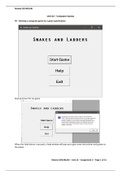
Startup Screen for my game
When the Help button is pressed, a help window will pop-up to give some instructions and guides to
the player.
Roland UDVARLAKI – Unit 22 – Assignment 3 – Page 1 of 31
,Roland UDVARLAKI
When the Start button is pressed, this is how the game will load-up upon start.
The Dice images, Label showing player turns, dice value counter will appear below the board once
the “Roll Dice” button has been pressed.
Roland UDVARLAKI – Unit 22 – Assignment 3 – Page 2 of 31
,Roland UDVARLAKI
Players are visible to be able to jump up on the ladder and move down from the snake.
A window will pop-up on the screen once one of the two players have won the game. The window
will show a message saying who the player is.
Roland UDVARLAKI – Unit 22 – Assignment 3 – Page 3 of 31
, Roland UDVARLAKI
Code:
Roland UDVARLAKI – Unit 22 – Assignment 3 – Page 4 of 31
Unit 22 – Computer Games
P4 - Develop a computer game for a given specification
Startup Screen for my game
When the Help button is pressed, a help window will pop-up to give some instructions and guides to
the player.
Roland UDVARLAKI – Unit 22 – Assignment 3 – Page 1 of 31
,Roland UDVARLAKI
When the Start button is pressed, this is how the game will load-up upon start.
The Dice images, Label showing player turns, dice value counter will appear below the board once
the “Roll Dice” button has been pressed.
Roland UDVARLAKI – Unit 22 – Assignment 3 – Page 2 of 31
,Roland UDVARLAKI
Players are visible to be able to jump up on the ladder and move down from the snake.
A window will pop-up on the screen once one of the two players have won the game. The window
will show a message saying who the player is.
Roland UDVARLAKI – Unit 22 – Assignment 3 – Page 3 of 31
, Roland UDVARLAKI
Code:
Roland UDVARLAKI – Unit 22 – Assignment 3 – Page 4 of 31


