Task Five: Evaluate the performance of a computer system [M3] and explain and justify
improvements that could be made to a computer system [D2].
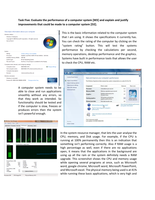
This is the basic information related to the computer system
that I am using. It shows the specifications it currently has.
You can check the rating of the computer by clicking on the
“system rating” button. This will test the systems
performance by checking the calculations per second,
memory operations, desktop performance and the graphics.
Systems have built in performance tools that allows the user
to check the CPU, RAM etc.
A computer system needs to be
able to close and run applications
smoothly without any errors, so
that they work as intended. So
functionality should be tested and
if the computer is slow, freezes or
produces errors then the system
isn’t powerful enough.
In the system resource manager, that lets the user analyse the
CPU, memory, and Disk usage. For example, if the CPU is
running at 100% permanently then this is an indication that
something isn’t performing correctly. Also if RAM usage is a
high percentage as well, even if there are no applications
open, it means that the applications in the background are
using up all the ram or the system definitely needs a RAM
upgrade. This screenshot shows the CPU and memory usage
while opening several programs at once, such as Microsoft
word, google chrome, Microsoft word, Microsoft PowerPoint,
and Microsoft excel. The physical memory being used is at 41%
while running these basic applications, which is very high and
improvements that could be made to a computer system [D2].
This is the basic information related to the computer system
that I am using. It shows the specifications it currently has.
You can check the rating of the computer by clicking on the
“system rating” button. This will test the systems
performance by checking the calculations per second,
memory operations, desktop performance and the graphics.
Systems have built in performance tools that allows the user
to check the CPU, RAM etc.
A computer system needs to be
able to close and run applications
smoothly without any errors, so
that they work as intended. So
functionality should be tested and
if the computer is slow, freezes or
produces errors then the system
isn’t powerful enough.
In the system resource manager, that lets the user analyse the
CPU, memory, and Disk usage. For example, if the CPU is
running at 100% permanently then this is an indication that
something isn’t performing correctly. Also if RAM usage is a
high percentage as well, even if there are no applications
open, it means that the applications in the background are
using up all the ram or the system definitely needs a RAM
upgrade. This screenshot shows the CPU and memory usage
while opening several programs at once, such as Microsoft
word, google chrome, Microsoft word, Microsoft PowerPoint,
and Microsoft excel. The physical memory being used is at 41%
while running these basic applications, which is very high and