

1 Information representation
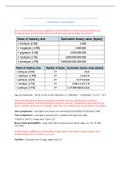
Show understanding of binary magnitudes and the difference between binary prefixes and
decimal prefixes including kibi and kilo, mebi and mega, gibi and giga, tebi and tera
Sign and magnitude – the bit on the far left represents +/-, 10001001 = -9, 00001001 = 9 (-127 – 127)
Show understanding of the basis of different number systems, including binary, denary,
hexadecimal, Binary Coded Decimal(BCD), and one’s and two’s complement representation for
binary numbers, and convert an integer value from one number base/representation to another
One’s complement – each digit in the binary are inverted (01011010 (90)) → (10100101 (-90))
Two’s complement – each digit is inverted and 1 is added to the right most digit
-128 64 32 16 8 4 2 1 range from -128 to 127
Binary Coded Decimal(BCD) – using 4-bit code to represent each denary digit, e.g., 571 → 0101
0111 0001
Perform binary addition and subtraction, using positive and negative binary integers, and
understanding of how overflow can occur
Overflow – calculation out of range, larger than 127
,Describe practical applications where Binary Coded Decimal (BCD) and Hexadecimal are used
BCD is used when denary numbers need to be electronically coded, showing digits on a calculator
display, that is, decimal and fractions can be accurately represented.
Hexadecimal – used when developing new software or when trying to trace errors in programs,
more manageable than binary
Memory dump – contents of a computer memory output to printer/monitoring
Show understanding of and be able to represent character data in its internal binary form,
depending on the character set used (American Standard Code for Information Interchange),
ASCII, extended ASCII, Unicode)
ASCII – The standard ASCII code character set consists of 7-bits codes(0-127), represent the letter
numbers, character, control sets
Extended ASCII – 8-bit code, 0-255, non-English and drawing character
Unicode – 2-4 bytes per character, provides a unique number for every character
Character set -- A list of characters recognised by the computer hardware and software
Show understanding of how data for a bitmapped image are encoded
Pixel – smallest picture elements that make up an image
File header – store data of the file contents, contain information such as file type, file size, image
resolution, bit depth, type of data compression, date stamp, types of encoding
Image resolution – number of pixels that make up an image (4096 x 3192)
Screen resolution – number of horizontal and vertical pixels that make up a screen display
Colour depth – number of possible colours that can be used, 8-bit depth can represent 256 colours,
with each colour is represented by a number
Bit depth – number of bits that use to encode a single pixel
,Bitmapped image – are made up of pixels, each pixel will be a particular colour and each pixel’s
colour will be stored as a binary number
Perform calculations to estimate the file size for a bitmap image
A full screen with a resolution of 1920 x 1080 pixels with a bit depth of 24 bits requires 1920 x 1080 x
24 = 49766400 bits for full screen image
Show understanding of the effects of changing elements of a bitmap image on the image quality
and file size
reduce pixels →decrease in image quality//image resolution
reduce colour depth → decrease in image quality//image resolution
Show understanding of how data for a vector graphic (svg) are encoded
Drawing objects – Vector graphics is made up of a number of drawing objects
Property – The objects have properties, determining the size and appearance and held in the
drawing list// if is it resized its properties are simply recalculated. It is scalable if the resized object
didn’t lose its definition
Drawing list – includes relative position for each object, the attributes that define the properties
that make up the object, the command used for each object that makes up the graphic image
Vector graphics is made up of a number of drawing objects, including Basic shapes and computer
shapes // uses 2D points to describe lines and curves and their properties that are grouped to form
geometric shape
Justify the use of a bitmap image or a vector graphic for a given task
, - when scaling up, vector image has no loss of the original quality
Show understanding of how sound is represented and encoded
sampling – amplitudes of sound waves taken at different point at a time//measurement of value of
analogue signal at regular time intervals
sampling rate – number of sound samples taken per second, the higher the sampling rate, the
greater the file size, the more accurate the digital representation, less quantisation error
sampling resolution – known as bit depth, number of bits that used to represent the amplitude of
the sound
analogue and digital data – sound is an analogue value; it needs to be digitalised to store sound in a
computer using ADC
Show understanding of the impact of changing the sampling rate and resolution, on file size and
accuracy
**higher sampling rate → larger dynamic range, less sound distortion, better sound quality //larger
file size, takes longer time to transmit/download files, requires greater processing power
Show understanding of the need for and examples of the use of compression
//compression techniques will encode data in a way that results in fewer bytes for the file
//save storage space, reduce time taken to stream, transmit data from one device to another
Example: common archive files like ZIP
Show understanding of lossy and lossless compression and justify the use of a method in a given
situation
lossless compression – file compression techniques where the original file can be restored following
decompression, based on some form of replacement
lossy compression – file compression technique parts of the original file cannot be recovered during
decompression, some of the original detail is lost, a technique that decide which part is important
and then discard certain information
Show understanding of binary magnitudes and the difference between binary prefixes and
decimal prefixes including kibi and kilo, mebi and mega, gibi and giga, tebi and tera
Sign and magnitude – the bit on the far left represents +/-, 10001001 = -9, 00001001 = 9 (-127 – 127)
Show understanding of the basis of different number systems, including binary, denary,
hexadecimal, Binary Coded Decimal(BCD), and one’s and two’s complement representation for
binary numbers, and convert an integer value from one number base/representation to another
One’s complement – each digit in the binary are inverted (01011010 (90)) → (10100101 (-90))
Two’s complement – each digit is inverted and 1 is added to the right most digit
-128 64 32 16 8 4 2 1 range from -128 to 127
Binary Coded Decimal(BCD) – using 4-bit code to represent each denary digit, e.g., 571 → 0101
0111 0001
Perform binary addition and subtraction, using positive and negative binary integers, and
understanding of how overflow can occur
Overflow – calculation out of range, larger than 127
,Describe practical applications where Binary Coded Decimal (BCD) and Hexadecimal are used
BCD is used when denary numbers need to be electronically coded, showing digits on a calculator
display, that is, decimal and fractions can be accurately represented.
Hexadecimal – used when developing new software or when trying to trace errors in programs,
more manageable than binary
Memory dump – contents of a computer memory output to printer/monitoring
Show understanding of and be able to represent character data in its internal binary form,
depending on the character set used (American Standard Code for Information Interchange),
ASCII, extended ASCII, Unicode)
ASCII – The standard ASCII code character set consists of 7-bits codes(0-127), represent the letter
numbers, character, control sets
Extended ASCII – 8-bit code, 0-255, non-English and drawing character
Unicode – 2-4 bytes per character, provides a unique number for every character
Character set -- A list of characters recognised by the computer hardware and software
Show understanding of how data for a bitmapped image are encoded
Pixel – smallest picture elements that make up an image
File header – store data of the file contents, contain information such as file type, file size, image
resolution, bit depth, type of data compression, date stamp, types of encoding
Image resolution – number of pixels that make up an image (4096 x 3192)
Screen resolution – number of horizontal and vertical pixels that make up a screen display
Colour depth – number of possible colours that can be used, 8-bit depth can represent 256 colours,
with each colour is represented by a number
Bit depth – number of bits that use to encode a single pixel
,Bitmapped image – are made up of pixels, each pixel will be a particular colour and each pixel’s
colour will be stored as a binary number
Perform calculations to estimate the file size for a bitmap image
A full screen with a resolution of 1920 x 1080 pixels with a bit depth of 24 bits requires 1920 x 1080 x
24 = 49766400 bits for full screen image
Show understanding of the effects of changing elements of a bitmap image on the image quality
and file size
reduce pixels →decrease in image quality//image resolution
reduce colour depth → decrease in image quality//image resolution
Show understanding of how data for a vector graphic (svg) are encoded
Drawing objects – Vector graphics is made up of a number of drawing objects
Property – The objects have properties, determining the size and appearance and held in the
drawing list// if is it resized its properties are simply recalculated. It is scalable if the resized object
didn’t lose its definition
Drawing list – includes relative position for each object, the attributes that define the properties
that make up the object, the command used for each object that makes up the graphic image
Vector graphics is made up of a number of drawing objects, including Basic shapes and computer
shapes // uses 2D points to describe lines and curves and their properties that are grouped to form
geometric shape
Justify the use of a bitmap image or a vector graphic for a given task
, - when scaling up, vector image has no loss of the original quality
Show understanding of how sound is represented and encoded
sampling – amplitudes of sound waves taken at different point at a time//measurement of value of
analogue signal at regular time intervals
sampling rate – number of sound samples taken per second, the higher the sampling rate, the
greater the file size, the more accurate the digital representation, less quantisation error
sampling resolution – known as bit depth, number of bits that used to represent the amplitude of
the sound
analogue and digital data – sound is an analogue value; it needs to be digitalised to store sound in a
computer using ADC
Show understanding of the impact of changing the sampling rate and resolution, on file size and
accuracy
**higher sampling rate → larger dynamic range, less sound distortion, better sound quality //larger
file size, takes longer time to transmit/download files, requires greater processing power
Show understanding of the need for and examples of the use of compression
//compression techniques will encode data in a way that results in fewer bytes for the file
//save storage space, reduce time taken to stream, transmit data from one device to another
Example: common archive files like ZIP
Show understanding of lossy and lossless compression and justify the use of a method in a given
situation
lossless compression – file compression techniques where the original file can be restored following
decompression, based on some form of replacement
lossy compression – file compression technique parts of the original file cannot be recovered during
decompression, some of the original detail is lost, a technique that decide which part is important
and then discard certain information


