
Solution and Answer Guide: Chapman, MATLAB Programming for Engineers, 7e, CY2025, 9798214001531; Chapter 1:
Solution and Answer Guide
Chapman, MATLAB Programming for Engineers, 7e, CY2025, 9798214001531; Chapter 1:
1 Introduction to MATLAB
1.1 The following MATLAB statements plot the function y( x) = 4e−0.3x for the range
0 x 10 .
x = 0:0.1:10;
y = 4 * exp( -0.3 * x);
plot(x,y);
Use the MATLAB Edit/Debug Window to create a new empty script, type these
statements into the script, and save the file with the name test1.m. Then, execute the
program by typing the name test1 in the Command Window or clicking the Run
button. What result do you get?
Solution
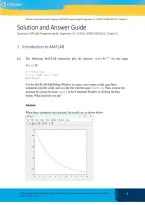
When these statements are executed, the results are as shown below:
© 2025 Cengage. All Rights Reserved. May not be scanned, copied or duplicated, or posted to a publicly accessible 1
website, in whole or in part.
, Solution and Answer Guide:
1.2 Exercise 1.2 is a procedural exercise, and there is no solution in this Solutions Manual.
1.3 Exercise 1.3 is a procedural exercise, and there is no solution in this Solutions Manual.
1.4 Calculate the results of the following expressions using the MATLAB Command Window:
−3
1 3
(a) 2 + − 1
5 2
(b) 2 − 0.5
1 1 1 1
(c) 1+ + 2 + 3 + 4
2 2 3 2
Solution
(a)
>> (1/(5^2) + 3/2*pi - 1)^(-3)
ans =
0.0189
(b)
>> 2*pi - pi^0.5
ans =
4.5107
(c)
>> 1 + 1/2 + 1/2^2 + 1/3^3 + 1/2^4
ans =
1.8495
1.5 Suppose that u = 1 and v = 3. Evaluate the following expressions using the MATLAB
Command Window:
4u
(a)
3v
2v −2
(b)
(u + v )
2
v3
(c)
v3 − u 3
© 2025 Cengage. All Rights Reserved. May not be scanned, copied or duplicated, or posted to a publicly accessible 2
website, in whole or in part.
, Solution and Answer Guide:
4
(d) v2
3
(e) u v +1
v+u
(f) log10
v−u
Solution
>> u=1;
>> v=3;
>> (4*u) / (3*v)
ans =
0.4444
>> (2*v^-2) / (u+v)^2
ans =
0.0139
>> v^3/(v^3 - u^3)
ans =
1.0385
>> (4/3)*pi*v^2
ans =
37.6991
>> u*sqrt(v) + 1
ans =
2.7321
>> log10( (v+u) / (v-u) )
ans =
0.3010
1.6 Evaluate the expressions in Exercise 1.5 by creating a single script file that calculates and
displays all six results. Execute the script file and observe the results.
Solution
An appropriate script file named test.m is shown below:
u = 1;
v = 3;
(4*u) / (3*v)
(2*v^-2) / (u+v)^2
v^3/(v^3 - u^3)
(4/3)*pi*v^2
u*sqrt(v) + 1
log10( (v+u) / (v-u) )
When this file is executed, the results are;
© 2025 Cengage. All Rights Reserved. May not be scanned, copied or duplicated, or posted to a publicly accessible 3
website, in whole or in part.
, Solution and Answer Guide:
>> test
ans =
0.4444
ans =
0.0139
ans =
1.0385
ans =
37.6991
ans =
2.7321
ans =
0.3010
1.7 Suppose that x = 2 and y = –1. Evaluate the following expressions using MATLAB:
(a) 2x 3
4
(b) 4
2 y3
Note that MATLAB evaluates expressions with complex or imaginary answers
transparently.
Solution
(a)
>> (2 * x^3) ^ (1/4)
ans =
2
(b)
>> (2 * y^3) ^ (1/4)
ans =
0.8409 + 0.8409i
1.8 The equation of an ellipse centered at the origin is:
x2 y 2
+ =1 (0.1)
a 2 b2
where a and b are distances from the center along the x and y axes, respectively. The area
of this ellipse can be calculated from the equation
© 2025 Cengage. All Rights Reserved. May not be scanned, copied or duplicated, or posted to a publicly accessible 4
website, in whole or in part.
Solution and Answer Guide
Chapman, MATLAB Programming for Engineers, 7e, CY2025, 9798214001531; Chapter 1:
1 Introduction to MATLAB
1.1 The following MATLAB statements plot the function y( x) = 4e−0.3x for the range
0 x 10 .
x = 0:0.1:10;
y = 4 * exp( -0.3 * x);
plot(x,y);
Use the MATLAB Edit/Debug Window to create a new empty script, type these
statements into the script, and save the file with the name test1.m. Then, execute the
program by typing the name test1 in the Command Window or clicking the Run
button. What result do you get?
Solution
When these statements are executed, the results are as shown below:
© 2025 Cengage. All Rights Reserved. May not be scanned, copied or duplicated, or posted to a publicly accessible 1
website, in whole or in part.
, Solution and Answer Guide:
1.2 Exercise 1.2 is a procedural exercise, and there is no solution in this Solutions Manual.
1.3 Exercise 1.3 is a procedural exercise, and there is no solution in this Solutions Manual.
1.4 Calculate the results of the following expressions using the MATLAB Command Window:
−3
1 3
(a) 2 + − 1
5 2
(b) 2 − 0.5
1 1 1 1
(c) 1+ + 2 + 3 + 4
2 2 3 2
Solution
(a)
>> (1/(5^2) + 3/2*pi - 1)^(-3)
ans =
0.0189
(b)
>> 2*pi - pi^0.5
ans =
4.5107
(c)
>> 1 + 1/2 + 1/2^2 + 1/3^3 + 1/2^4
ans =
1.8495
1.5 Suppose that u = 1 and v = 3. Evaluate the following expressions using the MATLAB
Command Window:
4u
(a)
3v
2v −2
(b)
(u + v )
2
v3
(c)
v3 − u 3
© 2025 Cengage. All Rights Reserved. May not be scanned, copied or duplicated, or posted to a publicly accessible 2
website, in whole or in part.
, Solution and Answer Guide:
4
(d) v2
3
(e) u v +1
v+u
(f) log10
v−u
Solution
>> u=1;
>> v=3;
>> (4*u) / (3*v)
ans =
0.4444
>> (2*v^-2) / (u+v)^2
ans =
0.0139
>> v^3/(v^3 - u^3)
ans =
1.0385
>> (4/3)*pi*v^2
ans =
37.6991
>> u*sqrt(v) + 1
ans =
2.7321
>> log10( (v+u) / (v-u) )
ans =
0.3010
1.6 Evaluate the expressions in Exercise 1.5 by creating a single script file that calculates and
displays all six results. Execute the script file and observe the results.
Solution
An appropriate script file named test.m is shown below:
u = 1;
v = 3;
(4*u) / (3*v)
(2*v^-2) / (u+v)^2
v^3/(v^3 - u^3)
(4/3)*pi*v^2
u*sqrt(v) + 1
log10( (v+u) / (v-u) )
When this file is executed, the results are;
© 2025 Cengage. All Rights Reserved. May not be scanned, copied or duplicated, or posted to a publicly accessible 3
website, in whole or in part.
, Solution and Answer Guide:
>> test
ans =
0.4444
ans =
0.0139
ans =
1.0385
ans =
37.6991
ans =
2.7321
ans =
0.3010
1.7 Suppose that x = 2 and y = –1. Evaluate the following expressions using MATLAB:
(a) 2x 3
4
(b) 4
2 y3
Note that MATLAB evaluates expressions with complex or imaginary answers
transparently.
Solution
(a)
>> (2 * x^3) ^ (1/4)
ans =
2
(b)
>> (2 * y^3) ^ (1/4)
ans =
0.8409 + 0.8409i
1.8 The equation of an ellipse centered at the origin is:
x2 y 2
+ =1 (0.1)
a 2 b2
where a and b are distances from the center along the x and y axes, respectively. The area
of this ellipse can be calculated from the equation
© 2025 Cengage. All Rights Reserved. May not be scanned, copied or duplicated, or posted to a publicly accessible 4
website, in whole or in part.


