Eliot Hunter (ID: 16002495) Assignment C Unit 02 Computer Systems
Configuration Changes to Meet Users’ Needs
1. Customize Mouse Pointer
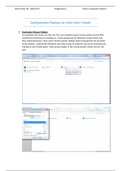
To customise the mouse, for the user. The user wanted a larger mouse pointer so that they
would know what they are clicking on. I did by going into the Windows Control Panel and
then selecting Mouse. I then went into the pointer settings which changed the size and look
of the pointer. I selected the Windows Aero Extra Large to make the user know what they are
clicking on and it looks good. I then pressed apply so the mouse pointer would save for the
user.
, Eliot Hunter (ID: 16002495) Assignment C Unit 02 Computer Systems
Configuration Changes to Meet Users’ Needs
1. Customize Mouse Pointer
To customise the mouse, for the user. The user wanted a larger mouse pointer so that they
would know what they are clicking on. I did by going into the Windows Control Panel and
then selecting Mouse. I then went into the pointer settings which changed the size and look
of the pointer. I selected the Windows Aero Extra Large to make the user know what they are
clicking on and it looks good. I then pressed apply so the mouse pointer would save for the
user.
, Eliot Hunter (ID: 16002495) Assignment C Unit 02 Computer Systems