Configuration of Computer [P6]
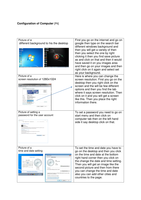
Picture of a First you go on the internet and go on
different background to his the desktop google then type on the search bar
different windows background and
then you will get a variety of then
then you select the one by right
clicking it then you find save picture
as and click on that and then it would
have saved it on you images area
and then go on your images and then
right click on it again and select set
as your background.
Picture of a Here is where you can change the
screen resolution of 1280x1024 screen resolution. First you go on the
desktop then you right click on the
screen and the will be few different
options and then you find the tab
where it says screen resolution. Then
click on it and you will get a screen
like this. Then you place the right
information there.
Picture of setting a To set a password you need to go on
password for the user account start menu and then click on
computer tab then on the left hand
side it say desktop click on that.
Picture of a To set the time and date you have to
time and date setting go on the desktop and then you click
on the time and date at the bottom
right hand corner then you click on
the change the date and time setting.
Then you will get an image like the
second picture and then from there
you can change the time and date
also you can add other cities and
countries to the page.
Picture of a First you go on the internet and go on
different background to his the desktop google then type on the search bar
different windows background and
then you will get a variety of then
then you select the one by right
clicking it then you find save picture
as and click on that and then it would
have saved it on you images area
and then go on your images and then
right click on it again and select set
as your background.
Picture of a Here is where you can change the
screen resolution of 1280x1024 screen resolution. First you go on the
desktop then you right click on the
screen and the will be few different
options and then you find the tab
where it says screen resolution. Then
click on it and you will get a screen
like this. Then you place the right
information there.
Picture of setting a To set a password you need to go on
password for the user account start menu and then click on
computer tab then on the left hand
side it say desktop click on that.
Picture of a To set the time and date you have to
time and date setting go on the desktop and then you click
on the time and date at the bottom
right hand corner then you click on
the change the date and time setting.
Then you will get an image like the
second picture and then from there
you can change the time and date
also you can add other cities and
countries to the page.