

Version 1.0
CMIT 351 Project 1
Name: Justin Phillips
Course: CMIT 351 Class 6368
Date: 09/13/2022
Part 1: Design the Local Area Network
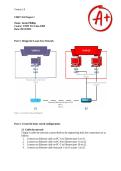
Figure 1. Local Area Network Diagram
Part 2: Create the basic switch configurations
2.1 Cable the network
I begin to cable the network as prescribed by the engineering lead; the connections are as
follows:
1. I connect an Ethernet cable on PC-A to Ethernet port 6 on S1.
2. I connect an Ethernet cable on PC-B to Ethernet port 11 on S2.
3. I connect an Ethernet cable on PC-C to Ethernet port 18 on S2.
4. I connect an Ethernet cable from port 1 on S1 to port 1 on S2.
CMIT 351 Project 1
Name: Justin Phillips
Course: CMIT 351 Class 6368
Date: 09/13/2022
Part 1: Design the Local Area Network
Figure 1. Local Area Network Diagram
Part 2: Create the basic switch configurations
2.1 Cable the network
I begin to cable the network as prescribed by the engineering lead; the connections are as
follows:
1. I connect an Ethernet cable on PC-A to Ethernet port 6 on S1.
2. I connect an Ethernet cable on PC-B to Ethernet port 11 on S2.
3. I connect an Ethernet cable on PC-C to Ethernet port 18 on S2.
4. I connect an Ethernet cable from port 1 on S1 to port 1 on S2.


