

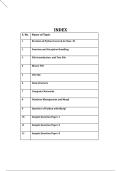
INDEX
S. No. Name of Topic
1 Revision of Python Covered in Class- XI
2 Function and Exception Handling
3 File Introduction and Text File
4 Binary File
5 CSV File
6 Data Structure
7 Computer Networks
8 Database Management and Mysql
9 Interface of Python with Mysql
10 Sample Question Paper-1
11 Sample Question Paper-2
12 Sample Question Paper-3
, Unit : 1 Review of Class - 11 Introduction to
Python Programming Language
Python features:
• Interpreter based programming language: Line by line execution of Source code.
• Free and Open source: Source code is available free of cost. Free to use for commercial
purposes.
• Portable: Same code can be used for different machines.
• Object Oriented Support: Supports both procedural and OOPs.
• Extensible: Python code can be written in other languages.
• Dynamically typed: Variable datatype can be decided at runtime.
• Robust Standard Library: Extensive standard library available for anyone to use.
• Easy to code and read: Simple syntax, indented blocks make it easy to read and code.
Coding modes in python:
• Interactive mode: Interactive mode is used when a user wants to run one single line or one
block of code. In interactive mode, commands typed at the IDL prompt are executed when the
Enter key is pressed.
• Script mode: Script mode is where you put a bunch of commands into a file (a script), and then
tell Python to run the file. Script mode runs your commands sequentially.
Indentation:
• Indentation refers to the spaces at the beginning of a code line. Where in other programming
languages the indentation in code is for readability only, the indentation in Python is very
important. Python uses indentation to indicate a block of code.
Python Comments:
• Comments are statements in python code that are ignored by the interpreter.
• Comments can be used to explain Python code.
• Comments can be used to make the code more readable.
• Single line comments: These are the statements that start with #
, • Multiline comments: Since Python will ignore string literals that are not assigned to a variable,
you can add a multiline string (triple quotes) in your code, and place your comment inside it:
Python character set:
• A character set is a set of valid characters acceptable by a programming language in scripting.
• Python supports all ASCII / Unicode characters that include:
o Alphabets: All capital (A-Z) and small (a-z) alphabets.
o Digits: All digits from 0-9. o Alphabets: All capital (A-Z) and small (a-z) alphabets. o
Special Symbols: Python supports all kinds of special symbols - " ' l ; : ! ~ @ # $ % ^
`&*()_+–={}[]\.
o White Spaces: White spaces like tab space, blank space, newline, and carriage return.
o Other: All ASCII and UNICODE characters are supported by Python that constitutes
the Python character set.
Python Tokens: A token is the smallest individual unit in a
python program.
• All statements and instructions in a program are built with tokens.
• Token Types:
o Keywords: Keywords are reserved by python environment and cannot be used as
identifier. There are 35 keywords in python. You may try to use the following code to
get a list of keywords supported in your python version.
['False', 'None', 'True', 'and', 'as', 'assert', 'async', 'await', 'break', 'class', 'continue', 'def',
'del', 'elif', 'else', 'except', 'finally', 'for', 'from', 'global', 'if', 'import', 'in', 'is',
'lambda', 'nonlocal', 'not', 'or', 'pass', 'raise', 'return', 'try', 'while', 'with', 'yield'] o
Identifier: Identifiers are the names given to any variable, function, class, list,
methods, etc. for their identification. Python is a case-sensitive language, and it has
some rules and regulations to name an identifier. Here are the rules.
An Identifier starts with a capital letter (A-Z) , a small letter (a-z) or an
underscore( _ ).
It can have digits but cannot start with a digit.
An identifier can’t be a keyword.
My_name, __init__, Seven10 are valid examples.
, 20dollers, my.var, True are invalid examples.
o Literals: Literals are the values stored in program memory and are often referred to
by an identifier.
String Literals: The text written in single, double, or triple quotes represents the
string literals in Python.
• Escape characters: To insert characters that are illegal in a string, use an escape character. An
escape character is a backslash \ followed by the character you want to insert. Some of the
escape characters are as under:
Escape Character Result
\' Single Quote
\" Double Quote
\\ Backslash
\n New Line
\t Tab
\b Back space
Numeric Literals: A number represented in various forms is a Numeric Literal.
o Integer Literal: It includes both positive and negative
numbers along with 0. It doesn’t include fractional parts. It
can also include binary, decimal, octal, hexadecimal literal.
o Float Literal: It includes both positive and negative real
numbers. It also includes fractional parts. 99.62, 0.35E-7 are
valid float literals. o Complex Literal: It includes a+bi
numeral, here a represents the real part and b represents the
complex part.
Boolean Literal: Boolean literals have only two values in Python. These are
True and False.
Special (None) Literal: Python has a special literal ‘None’. It is used to
denote nothing, no values, or the absence of value.
Collection Literal: Literals collections in python includes list, tuple,
dictionary, and sets.
o Operators: Operators are responsible for performing various operations in
Python. The operators are of two types Unary (Operates on single operand)
and Operators that operates on two operands (binary).
o Arithmetic Operators: Arithmetic operators are used with numeric values
to perform common mathematical operations:
Operators Name Example
+ Addition 10+20 gives 30
- Subtraction 20-10 gives 10
* Multiplication 30*2 gives 60
S. No. Name of Topic
1 Revision of Python Covered in Class- XI
2 Function and Exception Handling
3 File Introduction and Text File
4 Binary File
5 CSV File
6 Data Structure
7 Computer Networks
8 Database Management and Mysql
9 Interface of Python with Mysql
10 Sample Question Paper-1
11 Sample Question Paper-2
12 Sample Question Paper-3
, Unit : 1 Review of Class - 11 Introduction to
Python Programming Language
Python features:
• Interpreter based programming language: Line by line execution of Source code.
• Free and Open source: Source code is available free of cost. Free to use for commercial
purposes.
• Portable: Same code can be used for different machines.
• Object Oriented Support: Supports both procedural and OOPs.
• Extensible: Python code can be written in other languages.
• Dynamically typed: Variable datatype can be decided at runtime.
• Robust Standard Library: Extensive standard library available for anyone to use.
• Easy to code and read: Simple syntax, indented blocks make it easy to read and code.
Coding modes in python:
• Interactive mode: Interactive mode is used when a user wants to run one single line or one
block of code. In interactive mode, commands typed at the IDL prompt are executed when the
Enter key is pressed.
• Script mode: Script mode is where you put a bunch of commands into a file (a script), and then
tell Python to run the file. Script mode runs your commands sequentially.
Indentation:
• Indentation refers to the spaces at the beginning of a code line. Where in other programming
languages the indentation in code is for readability only, the indentation in Python is very
important. Python uses indentation to indicate a block of code.
Python Comments:
• Comments are statements in python code that are ignored by the interpreter.
• Comments can be used to explain Python code.
• Comments can be used to make the code more readable.
• Single line comments: These are the statements that start with #
, • Multiline comments: Since Python will ignore string literals that are not assigned to a variable,
you can add a multiline string (triple quotes) in your code, and place your comment inside it:
Python character set:
• A character set is a set of valid characters acceptable by a programming language in scripting.
• Python supports all ASCII / Unicode characters that include:
o Alphabets: All capital (A-Z) and small (a-z) alphabets.
o Digits: All digits from 0-9. o Alphabets: All capital (A-Z) and small (a-z) alphabets. o
Special Symbols: Python supports all kinds of special symbols - " ' l ; : ! ~ @ # $ % ^
`&*()_+–={}[]\.
o White Spaces: White spaces like tab space, blank space, newline, and carriage return.
o Other: All ASCII and UNICODE characters are supported by Python that constitutes
the Python character set.
Python Tokens: A token is the smallest individual unit in a
python program.
• All statements and instructions in a program are built with tokens.
• Token Types:
o Keywords: Keywords are reserved by python environment and cannot be used as
identifier. There are 35 keywords in python. You may try to use the following code to
get a list of keywords supported in your python version.
['False', 'None', 'True', 'and', 'as', 'assert', 'async', 'await', 'break', 'class', 'continue', 'def',
'del', 'elif', 'else', 'except', 'finally', 'for', 'from', 'global', 'if', 'import', 'in', 'is',
'lambda', 'nonlocal', 'not', 'or', 'pass', 'raise', 'return', 'try', 'while', 'with', 'yield'] o
Identifier: Identifiers are the names given to any variable, function, class, list,
methods, etc. for their identification. Python is a case-sensitive language, and it has
some rules and regulations to name an identifier. Here are the rules.
An Identifier starts with a capital letter (A-Z) , a small letter (a-z) or an
underscore( _ ).
It can have digits but cannot start with a digit.
An identifier can’t be a keyword.
My_name, __init__, Seven10 are valid examples.
, 20dollers, my.var, True are invalid examples.
o Literals: Literals are the values stored in program memory and are often referred to
by an identifier.
String Literals: The text written in single, double, or triple quotes represents the
string literals in Python.
• Escape characters: To insert characters that are illegal in a string, use an escape character. An
escape character is a backslash \ followed by the character you want to insert. Some of the
escape characters are as under:
Escape Character Result
\' Single Quote
\" Double Quote
\\ Backslash
\n New Line
\t Tab
\b Back space
Numeric Literals: A number represented in various forms is a Numeric Literal.
o Integer Literal: It includes both positive and negative
numbers along with 0. It doesn’t include fractional parts. It
can also include binary, decimal, octal, hexadecimal literal.
o Float Literal: It includes both positive and negative real
numbers. It also includes fractional parts. 99.62, 0.35E-7 are
valid float literals. o Complex Literal: It includes a+bi
numeral, here a represents the real part and b represents the
complex part.
Boolean Literal: Boolean literals have only two values in Python. These are
True and False.
Special (None) Literal: Python has a special literal ‘None’. It is used to
denote nothing, no values, or the absence of value.
Collection Literal: Literals collections in python includes list, tuple,
dictionary, and sets.
o Operators: Operators are responsible for performing various operations in
Python. The operators are of two types Unary (Operates on single operand)
and Operators that operates on two operands (binary).
o Arithmetic Operators: Arithmetic operators are used with numeric values
to perform common mathematical operations:
Operators Name Example
+ Addition 10+20 gives 30
- Subtraction 20-10 gives 10
* Multiplication 30*2 gives 60


