
Written by students who passed Immediately available after payment Read online or as PDF Wrong document? Swap it for free 4.6 TrustPilot
logo-home
Other

Working with Accessing Deques

Rating
-
Sold
-
Pages
1
Uploaded on
06-11-2025
Written in
2025/2026

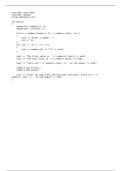
The provided code snippet demonstrates the use of a `deque` (double-ended queue) in C++. Let's break down the functionality step by step: 1. **Include Directives and Namespace**: ```cpp #include iostream #include deque using namespace std; ``` The code starts by including the necessary headers for input/output streaming (`iostream`) and for using the deque container (`deque`). The `using namespace std;` statement allows us to use standard library features without needing to prefix them with `std::`. 2. **Main Function**: ```cpp int main() { ``` The program's execution begins in the main function. 3. **Creating a Deque**: ```cpp dequeint numbers(5, 0); ``` Here, a `deque` named `numbers` is created with an initial size of 5, where all elements are initialized to 0. 4. **Iterating with an Iterator**: ```cpp dequeint::iterator it; for(it = (); it != (); it++) { cout "Enter a number: "; cin *it; } ``` An iterator `it` is declared to traverse the `deque`. In this loop, the program prompts the user to enter numbers, which are stored in the `deque` at the corresponding positions. 5. **Displaying the Contents**: ```cpp for (int i = 0; i 5; i++) { cout numbers[i] "t" endl; } ``` This loop prints each element of the `deque` followed by a tab and a newline. 6. **Accessing Front and Back Values**: ```cpp cout "The front value is " () endl; cout "The back value is " () endl; ``` The front and back elements of the `deque` are printed using the `front()` and `back()` member functions. 7. **Getting the Size**: ```cpp cout "There are " () " on the deque" endl; ``` The total number of elements in the `deque` is displayed using the `size()` method. 8. **Removing Elements**: ```cpp _front(); _back(); ``` The `pop_front()` and `pop_back()` functions remove the first and last elements respectively. 9. **Displaying the New Size**: ```cpp cout "After the pop_front and pop_back functions, there are " () " on the deque" endl; ``` Finally, the new size of the `deque` is printed after the removals. This code provides a simple interactive demonstration of how to use a `deque` in C++, including adding, accessing, and removing elements.

Show more Read less

Content preview

#include <iostream>
#include <deque>
using namespace std;

int main()
{
deque<int> numbers(5, 0);
deque<int>::iterator it;

for(it = numbers.begin(); it != numbers.end(); it++)
{
cout << "Enter a number: ";
cin >> *it;
}
for (int i = 0; i < 5; i++)
{
cout << numbers[i] << "\t" << endl;
}

cout << "The front value is " << numbers.front() << endl;
cout << "The back value is " << numbers.back() << endl;

cout << "There are " << numbers.size() << " on the deque" << endl;

numbers.pop_front();
numbers.pop_back();

cout << "After the pop_front and pop_back functions, there are " <<
numbers.size() << " on the deque" << endl;
}


Written for

Document information

Uploaded on
November 6, 2025
Number of pages
1
Written in
2025/2026
Type
OTHER
Person
Unknown
$8.49
Get access to the full document:

Wrong document? Swap it for free Within 14 days of purchase and before downloading, you can choose a different document. You can simply spend the amount again.
Written by students who passed
Immediately available after payment
Read online or as PDF

Get to know the seller
Seller avatar
tinahuynh

Get to know the seller

Seller avatar
tinahuynh California State University, Long Beach
View profile
Follow You need to be logged in order to follow users or courses
Sold
-
Member since
8 months
Number of followers
0
Documents
68
Last sold
-

0.0

0 reviews

5
0
4
0
3
0
2
0
1
0

Why students choose Stuvia

Created by fellow students, verified by reviews

Quality you can trust: written by students who passed their tests and reviewed by others who've used these notes.

Didn't get what you expected? Choose another document

No worries! You can instantly pick a different document that better fits what you're looking for.

Pay as you like, start learning right away

No subscription, no commitments. Pay the way you're used to via credit card and download your PDF document instantly.

Student with book image

“Bought, downloaded, and aced it. It really can be that simple.”

Alisha Student

Working on your references?

Create accurate citations in APA, MLA and Harvard with our free citation generator.

Working on your references?

Frequently asked questions
