

8/10/25, 6:04 PM Relativity Review Management Specialist 2025 EXAM QUESTIONS AND VERIFIED SOLUTIONS |ELABORATED &DETAILED AN…
Relativity Review Management Specialist 2025
EXAM QUESTIONS AND VERIFIED SOLUTIONS
|ELABORATED &DETAILED ANSWERS!!
Save
Terms in this set (187)
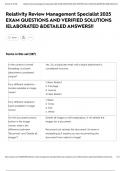
In the context of email Yes. So, a duplicate email with a blank attachment is
threading, is a blank considered inclusive.
attachment considered
unique?
1. Basic Redact
Four different redaction
2. Full page
modes available in image
3. Inverse
viewer
4.Mass Redact
1. Black
Four different redaction
2. Cross
types available in image
3. Text
viewer
4. White
On the document actions Delete all images is self-explanatory: it will delete the
button in the image images for a document.
viewer, what is the
difference between Reconvert just reloads the document. Its name is
'Reconvert' and 'Delete all misleading as it implies you are reconverting the
images'? document from native to image!
https://quizlet.com/1064895486/relativity-review-management-specialist-2025-exam-questions-and-verified-solutions-elaborated-detailed-answers-fla… 1/34
,8/10/25, 6:04 PM Relativity Review Management Specialist 2025 EXAM QUESTIONS AND VERIFIED SOLUTIONS |ELABORATED &DETAILED AN…
1. Related items (e.g. family group, duplicate, email
thread)
2. Document history
What is included in the
3. Production
related items toolbar?
4. Linked
5. Search results
6. Batch sets
In the image viewer, how Using the markup visibility button.
do you change the
visibility of markups from
hidden to transparent?
When you rotate a page, Yes
does that rotation persist
after you have exited the
document?
How do you view markup Right-click on any markup and press 'View Markup
history? History'.
How do you mass-delete On the image viewer, press the bin icon.
markups?
Navigate to the Markup Set tab and press 'copy'.
Note: when you copy a markup set, the markups
associated with that document are also copied.
For example, you redact documents with the markup
How do you copy a
set Attorney, and then you copy this markup set, and
markup set?
rename it Expert. In the viewer, you open a document
previously redacted with the Attorney markup set, but
now you select the Expert markup set. The viewer
displays the document with the redactions previously
applied with the Attorney markup set.
https://quizlet.com/1064895486/relativity-review-management-specialist-2025-exam-questions-and-verified-solutions-elaborated-detailed-answers-fla… 2/34
,8/10/25, 6:04 PM Relativity Review Management Specialist 2025 EXAM QUESTIONS AND VERIFIED SOLUTIONS |ELABORATED &DETAILED AN…
Details: Shows the location of the markup that was
created, reverted, or accepted/rejected.
Created On: The time that the action took place.
What columns display on
the Redact audits tab? Created By: Name of the user who took the action/
Document: Document where the action took place.
Action: The type of action taken by the user.
Yes, it can support over 100 languages although when
initially installed it only supports English.
If there is a chance that multiple languages could be
Does the Redact
combined together in the documents, you can ensure
application support
the languages receive the appropriate markups by
languages other than
adding a + between each language code. For
English?
example, entering spa+eng causes Spanish and
English to receive markups by a project.
Language codes are prioritized from left to right so
the left-most code will be given the highest priority.
in the Redact application, It allows you to determine what text displays in text
what does the Redact redaction options in the Redact right-click menu, e.g.
Settings tab allow you to 'Privileged', 'Confidential' etc.
do?
What field do you use to Redact - Has External Markups
search for documents
which have been
externally redacted in
association with a markup
set?
What field do you use to Redact - Has Native Highlights
search for documents
which have spreadsheet
or PDF highlights?
https://quizlet.com/1064895486/relativity-review-management-specialist-2025-exam-questions-and-verified-solutions-elaborated-detailed-answers-fla… 3/34
, 8/10/25, 6:04 PM Relativity Review Management Specialist 2025 EXAM QUESTIONS AND VERIFIED SOLUTIONS |ELABORATED &DETAILED AN…
What field do you use to Redact - Has Manual Native Markups
search for markup sets
which have documents
with manually placed
markups?
What field do you use to
search for markup sets
which have spreadsheets
or PDFs redactions?
Once a spreadsheet or This list is automatically generated once the project
PDF Redact project has finishes running.
finished running, how do
you determine the
documents where Redact
could not apply a markup
for quality control
purposes?
How do you determine Use the Tally/sum/average mass operation. Select the
the size of a Redact Relativity Image Count field.
project?
https://quizlet.com/1064895486/relativity-review-management-specialist-2025-exam-questions-and-verified-solutions-elaborated-detailed-answers-fla… 4/34
Relativity Review Management Specialist 2025
EXAM QUESTIONS AND VERIFIED SOLUTIONS
|ELABORATED &DETAILED ANSWERS!!
Save
Terms in this set (187)
In the context of email Yes. So, a duplicate email with a blank attachment is
threading, is a blank considered inclusive.
attachment considered
unique?
1. Basic Redact
Four different redaction
2. Full page
modes available in image
3. Inverse
viewer
4.Mass Redact
1. Black
Four different redaction
2. Cross
types available in image
3. Text
viewer
4. White
On the document actions Delete all images is self-explanatory: it will delete the
button in the image images for a document.
viewer, what is the
difference between Reconvert just reloads the document. Its name is
'Reconvert' and 'Delete all misleading as it implies you are reconverting the
images'? document from native to image!
https://quizlet.com/1064895486/relativity-review-management-specialist-2025-exam-questions-and-verified-solutions-elaborated-detailed-answers-fla… 1/34
,8/10/25, 6:04 PM Relativity Review Management Specialist 2025 EXAM QUESTIONS AND VERIFIED SOLUTIONS |ELABORATED &DETAILED AN…
1. Related items (e.g. family group, duplicate, email
thread)
2. Document history
What is included in the
3. Production
related items toolbar?
4. Linked
5. Search results
6. Batch sets
In the image viewer, how Using the markup visibility button.
do you change the
visibility of markups from
hidden to transparent?
When you rotate a page, Yes
does that rotation persist
after you have exited the
document?
How do you view markup Right-click on any markup and press 'View Markup
history? History'.
How do you mass-delete On the image viewer, press the bin icon.
markups?
Navigate to the Markup Set tab and press 'copy'.
Note: when you copy a markup set, the markups
associated with that document are also copied.
For example, you redact documents with the markup
How do you copy a
set Attorney, and then you copy this markup set, and
markup set?
rename it Expert. In the viewer, you open a document
previously redacted with the Attorney markup set, but
now you select the Expert markup set. The viewer
displays the document with the redactions previously
applied with the Attorney markup set.
https://quizlet.com/1064895486/relativity-review-management-specialist-2025-exam-questions-and-verified-solutions-elaborated-detailed-answers-fla… 2/34
,8/10/25, 6:04 PM Relativity Review Management Specialist 2025 EXAM QUESTIONS AND VERIFIED SOLUTIONS |ELABORATED &DETAILED AN…
Details: Shows the location of the markup that was
created, reverted, or accepted/rejected.
Created On: The time that the action took place.
What columns display on
the Redact audits tab? Created By: Name of the user who took the action/
Document: Document where the action took place.
Action: The type of action taken by the user.
Yes, it can support over 100 languages although when
initially installed it only supports English.
If there is a chance that multiple languages could be
Does the Redact
combined together in the documents, you can ensure
application support
the languages receive the appropriate markups by
languages other than
adding a + between each language code. For
English?
example, entering spa+eng causes Spanish and
English to receive markups by a project.
Language codes are prioritized from left to right so
the left-most code will be given the highest priority.
in the Redact application, It allows you to determine what text displays in text
what does the Redact redaction options in the Redact right-click menu, e.g.
Settings tab allow you to 'Privileged', 'Confidential' etc.
do?
What field do you use to Redact - Has External Markups
search for documents
which have been
externally redacted in
association with a markup
set?
What field do you use to Redact - Has Native Highlights
search for documents
which have spreadsheet
or PDF highlights?
https://quizlet.com/1064895486/relativity-review-management-specialist-2025-exam-questions-and-verified-solutions-elaborated-detailed-answers-fla… 3/34
, 8/10/25, 6:04 PM Relativity Review Management Specialist 2025 EXAM QUESTIONS AND VERIFIED SOLUTIONS |ELABORATED &DETAILED AN…
What field do you use to Redact - Has Manual Native Markups
search for markup sets
which have documents
with manually placed
markups?
What field do you use to
search for markup sets
which have spreadsheets
or PDFs redactions?
Once a spreadsheet or This list is automatically generated once the project
PDF Redact project has finishes running.
finished running, how do
you determine the
documents where Redact
could not apply a markup
for quality control
purposes?
How do you determine Use the Tally/sum/average mass operation. Select the
the size of a Redact Relativity Image Count field.
project?
https://quizlet.com/1064895486/relativity-review-management-specialist-2025-exam-questions-and-verified-solutions-elaborated-detailed-answers-fla… 4/34


