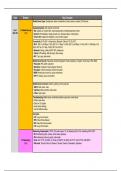
Core Domain Key Concepts
Mobile Device Types: Smartphones, tablets, smartwatches, fitness trackers, e-readers, GPS devices.
Operating Systems: iOS, Android, Chrome OS.
Core 1 1.0 Mobile Devices • iOS: Updates via iTunes/Finder, iCloud backup/restore, restrictions/parental controls.
220-1101 (15%) • Android: APK installation, Google account sync, developer options, rooting (risks).
• Chrome OS: Google Drive integration, Linux (Crostini) support.
Connectivity: Wi-Fi (802.11 a/b/g/n/ac/ax), Bluetooth, Cellular (LTE, 5G), NFC.
• Wi-Fi: 802.11a (54 Mbps, 5 GHz), 802.11b (11 Mbps, 2.4 GHz), 802.11g (54 Mbps, 2.4 GHz), 802.11n (300 Mbps, 2.4/5
GHz), 802.11ac (1.3 Gbps, 5 GHz), 802.11ax (Wi-Fi 6).
• Bluetooth: Pairing, profiles (A2DP, HSP), interference.
• Cellular: APN settings, SIM card types, data roaming.
• NFC: Tap to pay, data transfer.
Mobile Device Security: Passcodes, biometrics (fingerprint, facial recognition), encryption, remote wipe, VPNs, MDM.
• Passcodes: PIN, pattern, password.
• Biometrics: Fingerprint, facial recognition (Face ID).
• Encryption: Full-disk encryption, file-level encryption.
• MDM: Remote wipe, device lock, policy enforcement.
• VPN: IP masking, secure connections.
Mobile Device Connectors: USB-C, Lightning, 3.5mm audio jack.
• USB-C: Data, power, video.
• Lightning: Apple proprietary, data, power.
• 3.5mm: Audio output.
Troubleshooting: Battery issues, connectivity problems, app errors, screen issues.
• Perform hard resets.
• Check for OS updates.
• Verify network settings.
• Test with different cables.
Acronyms:
• LTE: Long-Term Evolution
• VPN: Virtual Private Network
• NFC: Near Field Communication
• LTE: Long-Term Evolution
Networking Fundamentals: TCP/IP, OSI model (Layers 1-4), IP addressing (IPv4, IPv6), subnetting, DNS, DHCP.
• IPv4: Addressing (public, private), subnet masks, gateways.
• IPv6: Addressing (link-local, global), prefix length.
2.0 Networking • Ports: 20/21 (FTP), 22 (SSH), 23 (Telnet), 25 (SMTP), 53 (DNS), 80 (HTTP), 443 (HTTPS), 3389 (RDP).
(20%) • OSI model: Physical, Data Link, Network, Transport, Session, Presentation, Application.
, 2.0 Networking
(20%)
Network Devices: Routers, switches, firewalls, access points, modems.
• Routers: NAT, port forwarding, QoS.
• Switches: VLANs, MAC address tables.
• Firewalls: Port blocking, intrusion detection.
• Wireless Access Points: Channel selection, security protocols.
Network Cabling: Ethernet (Cat5e, Cat6), RJ-45, fiber optic.
• Ethernet: TIA/EIA 568A/B standards, crossover cables.
• Fiber: Single-mode, multi-mode, connectors (LC, SC).
Wireless Networking: 802.11 standards, wireless security (WPA2/3), SSID.
Network Troubleshooting: Ping, tracert, ipconfig/ifconfig, nslookup.
• ping: Connectivity testing.
• tracert/traceroute: Route tracing.
• ipconfig/ifconfig: IP configuration.
• nslookup/dig: DNS resolution.
• netstat: Network statistics.
Troubleshooting:
• Check physical connections.
• Verify IP configuration.
• Test network connectivity.
• Analyze network traffic.
Acronyms:
• TCP/IP: Transmission Control Protocol/Internet Protocol
• OSI: Open Systems Interconnection
• DNS: Domain Name System
• DHCP: Dynamic Host Configuration Protocol
• WPA: Wi-Fi Protected Access
• SSID: Service Set Identifier.
Motherboard Components: CPU, RAM (DDR4/5), BIOS/UEFI, CMOS battery, expansion slots (PCIe).
• CPU: Socket types, clock speeds, cores/threads.
• RAM: DIMM types, speeds (DDR4/5), latency.
3.0 Hardware • BIOS/UEFI: Boot order, firmware updates.
(25%) • Expansion slots: PCIe lanes, speeds (x1, x4, x16).
Storage Devices: HDD, SSD (SATA, NVMe), RAID configurations.
• HDD: RPM, cache, SATA interfaces.
• SSD: SATA, NVMe (M.2), read/write speeds.
• RAID: 0, 1, 5, 10.
Input/Output Devices: Keyboards, mice, monitors, printers, scanners.
• USB versions: 2.0, 3.0, 3.1, 3.2.
• Video outputs: HDMI, DisplayPort, VGA, DVI.
Power Supplies: Wattage, connectors (ATX).
• ATX standards, wattage ratings, modular vs. non-modular.
Cooling Systems: Fans, liquid cooling.
Mobile Device Types: Smartphones, tablets, smartwatches, fitness trackers, e-readers, GPS devices.
Operating Systems: iOS, Android, Chrome OS.
Core 1 1.0 Mobile Devices • iOS: Updates via iTunes/Finder, iCloud backup/restore, restrictions/parental controls.
220-1101 (15%) • Android: APK installation, Google account sync, developer options, rooting (risks).
• Chrome OS: Google Drive integration, Linux (Crostini) support.
Connectivity: Wi-Fi (802.11 a/b/g/n/ac/ax), Bluetooth, Cellular (LTE, 5G), NFC.
• Wi-Fi: 802.11a (54 Mbps, 5 GHz), 802.11b (11 Mbps, 2.4 GHz), 802.11g (54 Mbps, 2.4 GHz), 802.11n (300 Mbps, 2.4/5
GHz), 802.11ac (1.3 Gbps, 5 GHz), 802.11ax (Wi-Fi 6).
• Bluetooth: Pairing, profiles (A2DP, HSP), interference.
• Cellular: APN settings, SIM card types, data roaming.
• NFC: Tap to pay, data transfer.
Mobile Device Security: Passcodes, biometrics (fingerprint, facial recognition), encryption, remote wipe, VPNs, MDM.
• Passcodes: PIN, pattern, password.
• Biometrics: Fingerprint, facial recognition (Face ID).
• Encryption: Full-disk encryption, file-level encryption.
• MDM: Remote wipe, device lock, policy enforcement.
• VPN: IP masking, secure connections.
Mobile Device Connectors: USB-C, Lightning, 3.5mm audio jack.
• USB-C: Data, power, video.
• Lightning: Apple proprietary, data, power.
• 3.5mm: Audio output.
Troubleshooting: Battery issues, connectivity problems, app errors, screen issues.
• Perform hard resets.
• Check for OS updates.
• Verify network settings.
• Test with different cables.
Acronyms:
• LTE: Long-Term Evolution
• VPN: Virtual Private Network
• NFC: Near Field Communication
• LTE: Long-Term Evolution
Networking Fundamentals: TCP/IP, OSI model (Layers 1-4), IP addressing (IPv4, IPv6), subnetting, DNS, DHCP.
• IPv4: Addressing (public, private), subnet masks, gateways.
• IPv6: Addressing (link-local, global), prefix length.
2.0 Networking • Ports: 20/21 (FTP), 22 (SSH), 23 (Telnet), 25 (SMTP), 53 (DNS), 80 (HTTP), 443 (HTTPS), 3389 (RDP).
(20%) • OSI model: Physical, Data Link, Network, Transport, Session, Presentation, Application.
, 2.0 Networking
(20%)
Network Devices: Routers, switches, firewalls, access points, modems.
• Routers: NAT, port forwarding, QoS.
• Switches: VLANs, MAC address tables.
• Firewalls: Port blocking, intrusion detection.
• Wireless Access Points: Channel selection, security protocols.
Network Cabling: Ethernet (Cat5e, Cat6), RJ-45, fiber optic.
• Ethernet: TIA/EIA 568A/B standards, crossover cables.
• Fiber: Single-mode, multi-mode, connectors (LC, SC).
Wireless Networking: 802.11 standards, wireless security (WPA2/3), SSID.
Network Troubleshooting: Ping, tracert, ipconfig/ifconfig, nslookup.
• ping: Connectivity testing.
• tracert/traceroute: Route tracing.
• ipconfig/ifconfig: IP configuration.
• nslookup/dig: DNS resolution.
• netstat: Network statistics.
Troubleshooting:
• Check physical connections.
• Verify IP configuration.
• Test network connectivity.
• Analyze network traffic.
Acronyms:
• TCP/IP: Transmission Control Protocol/Internet Protocol
• OSI: Open Systems Interconnection
• DNS: Domain Name System
• DHCP: Dynamic Host Configuration Protocol
• WPA: Wi-Fi Protected Access
• SSID: Service Set Identifier.
Motherboard Components: CPU, RAM (DDR4/5), BIOS/UEFI, CMOS battery, expansion slots (PCIe).
• CPU: Socket types, clock speeds, cores/threads.
• RAM: DIMM types, speeds (DDR4/5), latency.
3.0 Hardware • BIOS/UEFI: Boot order, firmware updates.
(25%) • Expansion slots: PCIe lanes, speeds (x1, x4, x16).
Storage Devices: HDD, SSD (SATA, NVMe), RAID configurations.
• HDD: RPM, cache, SATA interfaces.
• SSD: SATA, NVMe (M.2), read/write speeds.
• RAID: 0, 1, 5, 10.
Input/Output Devices: Keyboards, mice, monitors, printers, scanners.
• USB versions: 2.0, 3.0, 3.1, 3.2.
• Video outputs: HDMI, DisplayPort, VGA, DVI.
Power Supplies: Wattage, connectors (ATX).
• ATX standards, wattage ratings, modular vs. non-modular.
Cooling Systems: Fans, liquid cooling.