
Class Notes Science Lesson Notes - 2020
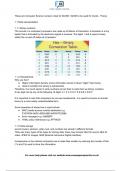
1.1.1 Binary systems The circuits in a computer's processor are made up of billions of transistors. A transistor is a tiny switch that is activated by the electronic signals it receives. The digits 1 and 0 used in binary reflect the on and off states of a transistor. 1.1.2 Hexadecimal Why use hex? ● Higher information density. (more information stored in fewer “digits” than binary. ● Used to simplify how binary is represented. Therefore, It is much easier to write numbers as hex than to write them as binary numbers. A hex digit can be any of the following 16 digits: 0 1 2 3 4 5 6 7 8 9 A B C D E F. It is important to note that computers do not use hexadecimal - it is used by humans to shorten binary to a more easily understandable form. Some examples of where hex is used include: ● MAC (media access control) addresses e.g F1D07654-A63C-4DF957F22888 ● Error messages e.g. 0x8899FF ● HTML colour references e.g. #FF6600 1.1.3 Data storage sound (music), pictures, video, text, and numbers are stored in different formats. There are many types of file types for storing data, these may include: Mp3 for sound, Mp4 for video, JPEG for images, MIDI (Musical Instrument Digital Interface). Compression is the method computers use to make files smaller by reducing the number of bits (1’s and 0’s) used to store the information. For more help please visit our website Compression can be lossy or lossless. Lossless compression means that as the file size is compressed, the picture quality remains the same - it does not get worse. Also, the file can be decompressed to its original quality. Lossy compression permanently removes data. For more help please visit our website 1.2 Communication and Internet technologies 1.2.1 Data transmission Data transmission refers to the process of transferring data between two or more digital devices. Data is transmitted from one device to another in analog or digital format. In serial transmission, Data is organized in a specific order and is sent one bit at a time. Serial transmission is slow but reliable as data will always be in the correct order. (USBs use this) In parallel data transmission, multiple bits are transmitted over multiple channels at the same time. Data is sent faster but runs the risk of becoming skewed (disordered). ( Integrated Circuits use this)
Document information
- Uploaded on
- July 4, 2024
- Number of pages
- 17
- Written in
- 2023/2024
- Type
- Class notes
- Professor(s)
- Leonard
- Contains
- All classes


