TestOut A.3 Client Pro Objective 2: Access | Verified | Guaranteed Success
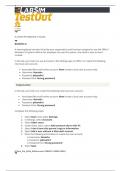
A.3 Client Pro Objective 2: Access Question 1: A new employee has been hired by your organization and has been assigned to use the Office1 Windows 10 system. Before this employee can use this system, she needs a user account created. In this lab, your task is to use Accounts in the Settings app on Office1 to create the following new local user account: Associated Microsoft online account: None (create a local user account only) Username: Natasha Password: p@ssw0rd Password hint: Strong password Explanation In this lab, your task is to create the following new local user account: Associated Microsoft online account: None (create a local user account only) Username: Natasha Password: p@ssw0rd Password hint: Strong password Complete the following steps: 1. Select Start; then select Settings. 2. In Settings, select Accounts. 3. Select Other users. 4. Under Other users, select Add someone else to this PC. 5. Select I don't have this person's sign-in information. 6. Select Add a user without a Microsoft account. 7. Enter the following information to create the user account: o Username: Natasha o Password: p@ssw0rd o Password hint: Strong password 8. Select Next. [Client_Pro_2016_AllS CREATE A NEW USER]Question 2: During a security audit, you discovered that the Susan user account on the Office2-lap Windows 10 notebook doesn't have a password assigned. This notebook is used to deliver sales presentations at client sites, so you want to assign a strong password to this account to prevent unauthorized users from accessing data on the system. In this scenario, you task is to perform the following:
Document information
- Uploaded on
- December 10, 2023
- Number of pages
- 20
- Written in
- 2023/2024
- Type
- Exam (elaborations)
- Contains
- Questions & answers