Introduction to Python
Python is one of the programming languages used worldwide. It was created in the 1990s. Has a wide
range of applications. People use Python to automate tasks develop web applications build machine
learning models and construct networks. Researchers, mathematicians and data scientists
particularly appreciate Python because it has a syntax that's easy to understand and supports
numerous open source packages. These packages are code libraries that anyone can utilize.
The syntax of Python is designed to be straightforward and easily grasped. It can be used on
operating systems such, as Windows, macOS and popular Linux distributions. The Python ecosystem
also offers a set of development tools for creating, testing and sharing programs written in Python.
Finally, Python is backed by a vibrant user base that is willing to support new programmers as they
learn how to use the language effectively rather than merely correctly follow syntactic rules.
Running Python code
Because Python is an interpreted language, the edit-test-debug cycle is shorter because no compilation
step is needed. You require a runtime environment or interpreter to run Python applications.Two
methods of running Python code are supported by the majority of runtime environments: When you
write a command in interactive mode, it is immediately translated and carried out, and each time you
press ENTER, the results are displayed. If you don't give the interpreter a filename, the interactive
mode is the default.
Script mode: In script mode, a text file with a.py extension contains a series of Python statements. The
Python interpreter is then launched, with the file as its target. Line by line, the program is run, and the
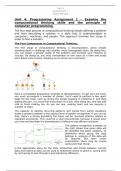
output is displayed. This image explains the simple process with python.
, Programming Exercises Python
Exercise 1: Calculating the sum of two numbers
Write a Python program that prompts the user for two numbers, and then displays the sum of the two
numbers.
# Ask the user to enter two numbers
number1 = float(input("Enter the first number: "))
number2 = float(input("Enter the second number: "))
# Calculate the sum of the two numbers
sum_result = number1 + number2
# Display the result
print("The sum of", number1, "and", number2, "is equal to", sum_result)
Exercise 2: Finding the square root of a number
Write a Python application that prompts the user for a number and then displays the number's square.
# Ask the user to enter a number
number = float(input("Enter a number: "))
# Calculate the square of the number
square = number ** 2
# Display the result
print("The square of", number, "is", square)
Exercise 3: Determine whether a number is odd or even.
Write Python software that prompts the user for a number and then indicates whether the number is
pair or impair.
# Ask the user to enter a number
number = int(input("Enter a number: "))
# Check if the number is even or odd if number % 2 == 0:
Python is one of the programming languages used worldwide. It was created in the 1990s. Has a wide
range of applications. People use Python to automate tasks develop web applications build machine
learning models and construct networks. Researchers, mathematicians and data scientists
particularly appreciate Python because it has a syntax that's easy to understand and supports
numerous open source packages. These packages are code libraries that anyone can utilize.
The syntax of Python is designed to be straightforward and easily grasped. It can be used on
operating systems such, as Windows, macOS and popular Linux distributions. The Python ecosystem
also offers a set of development tools for creating, testing and sharing programs written in Python.
Finally, Python is backed by a vibrant user base that is willing to support new programmers as they
learn how to use the language effectively rather than merely correctly follow syntactic rules.
Running Python code
Because Python is an interpreted language, the edit-test-debug cycle is shorter because no compilation
step is needed. You require a runtime environment or interpreter to run Python applications.Two
methods of running Python code are supported by the majority of runtime environments: When you
write a command in interactive mode, it is immediately translated and carried out, and each time you
press ENTER, the results are displayed. If you don't give the interpreter a filename, the interactive
mode is the default.
Script mode: In script mode, a text file with a.py extension contains a series of Python statements. The
Python interpreter is then launched, with the file as its target. Line by line, the program is run, and the
output is displayed. This image explains the simple process with python.
, Programming Exercises Python
Exercise 1: Calculating the sum of two numbers
Write a Python program that prompts the user for two numbers, and then displays the sum of the two
numbers.
# Ask the user to enter two numbers
number1 = float(input("Enter the first number: "))
number2 = float(input("Enter the second number: "))
# Calculate the sum of the two numbers
sum_result = number1 + number2
# Display the result
print("The sum of", number1, "and", number2, "is equal to", sum_result)
Exercise 2: Finding the square root of a number
Write a Python application that prompts the user for a number and then displays the number's square.
# Ask the user to enter a number
number = float(input("Enter a number: "))
# Calculate the square of the number
square = number ** 2
# Display the result
print("The square of", number, "is", square)
Exercise 3: Determine whether a number is odd or even.
Write Python software that prompts the user for a number and then indicates whether the number is
pair or impair.
# Ask the user to enter a number
number = int(input("Enter a number: "))
# Check if the number is even or odd if number % 2 == 0: