
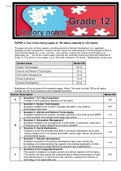
PAPER 2: One 3-hour theory paper of 150 marks (reduced to 100 marks)
The paper will cover all theory aspects, including elements of Solution Development (viz. application
packages and file management). A section will also assess the understanding of the technologies studied to
make informed decisions in a real – life end – user scenario, ranging from choices of technology to its
responsible use. This will be a written paper externally set, externally marked and externally moderated in
Grade 12. This will be a 3-hour paper, out of 150 marks, reduced to 100 marks. Weighting per content area
Content Areas Marks/150
System Technologies 60 ±3
Internet and Network Technologies 30 ±3
Information Management 15 ±3
Social Implications 15 ±3
Solution Development 30 ±3
Breakdown of the structure of the question paper: (Note: This does not total 150 as all topics
overlap into the Short Questions and Integrated Scenario)
Section Description Marks/150
• Questions 1 & 2: Short questions
A A range of short questions aligned to all the topics. ±25
• Question 3: System Technologies
Questions related to the content, concepts and skills in the systems ±25
technologies topic area.
• Question 4: Internet and Network Technologies
Questions related to the content, concepts and skills in the Internet and WWW, ±15
e-communication and network technology topic areas.
• Question 5: Information Management
Questions related to the management of information. In particular, using Input, ±10
B Processing and Output (Algorithms) to solve a problem.
• Question 6: Social Implications
Questions cover the concepts and skills in the social implications focus area,
±10
namely impact of ICTs on society and health, social, legal, ethical, security and
environmental issues.
• Question 7: Solution development
Questions focused on the solution development topic area, namely the
±15
knowledge and understanding that supports the practical application of skills.
Viz. the theoretical concepts behind the practical use of applications.
• Questions 8 & 9: Integrated Scenario
This section is based on a single scenario and will be aligned to all the topics.
C This section will also assess the understanding of these technologies to make ±50
informed decisions in a real-life end-user scenario, ranging from choices of
technology to its responsible use.
,Using wildcard in a search. * Represents any number of
characters.
*.xls will give Excel files with any
name.
? represents one character.
???.xls will give a Excel file with a
name like CAT.xls or LOL.xls,
consisting of 3 characters.
Right click on the file ➔ Properties Metadata = additional information
about the file.
Properties of a file:
- Type, size
Attributes of a file:
- Read-only or hidden
File ➔ info ➔ Password protection
File ➔ Export Exporting a file / changing the
type.
,Right click on the file ➔ send to ➔ compressed(zip) folder Reason:
- Reduce size of the file.
Decompress a file:
Right click ➔ extract all ➔ chose the destination to extract.
Storage sense
Automatically deletes unused files.
Disk optimising:
Terms used to refer to the
different techniques used to
optimise the type of Hard disk.
• SSD = TRIM
• HDD = defragmentation
Disk clean-up
Free-up storage space.
Power settings to contribute to
green computing.
File explorer ➔ this pc➔ Local This shows the storage space
drive (HDD/SSD)➔ right click available.
, File explorer ➔ this pc➔ right click Displays the devices specifications.
RAM Computers with 32-bit processors
are older, slower, and less
secure, while a 64-bit processor is
newer, faster, and more secure
which means it can use more RAM.
Folder: contains 1 or more
documents or subfolders
File: a single document.
Folder structure:
- Arrow before the main folder
indicates subfolders.
- Main folder has 3 sub-
folders
Other information:
• Enhance input: by using QR codes, using short-cuts
• Digital virtual assistants: Siri = iOS, Google
assistant, Cortana = Windows 10, Alexa = Amazon
• Regional setting: configures time, date, currency…
Enrichment: Read pg. 16-40 do activity on
pg.40 of Exploring CAT textbook
The paper will cover all theory aspects, including elements of Solution Development (viz. application
packages and file management). A section will also assess the understanding of the technologies studied to
make informed decisions in a real – life end – user scenario, ranging from choices of technology to its
responsible use. This will be a written paper externally set, externally marked and externally moderated in
Grade 12. This will be a 3-hour paper, out of 150 marks, reduced to 100 marks. Weighting per content area
Content Areas Marks/150
System Technologies 60 ±3
Internet and Network Technologies 30 ±3
Information Management 15 ±3
Social Implications 15 ±3
Solution Development 30 ±3
Breakdown of the structure of the question paper: (Note: This does not total 150 as all topics
overlap into the Short Questions and Integrated Scenario)
Section Description Marks/150
• Questions 1 & 2: Short questions
A A range of short questions aligned to all the topics. ±25
• Question 3: System Technologies
Questions related to the content, concepts and skills in the systems ±25
technologies topic area.
• Question 4: Internet and Network Technologies
Questions related to the content, concepts and skills in the Internet and WWW, ±15
e-communication and network technology topic areas.
• Question 5: Information Management
Questions related to the management of information. In particular, using Input, ±10
B Processing and Output (Algorithms) to solve a problem.
• Question 6: Social Implications
Questions cover the concepts and skills in the social implications focus area,
±10
namely impact of ICTs on society and health, social, legal, ethical, security and
environmental issues.
• Question 7: Solution development
Questions focused on the solution development topic area, namely the
±15
knowledge and understanding that supports the practical application of skills.
Viz. the theoretical concepts behind the practical use of applications.
• Questions 8 & 9: Integrated Scenario
This section is based on a single scenario and will be aligned to all the topics.
C This section will also assess the understanding of these technologies to make ±50
informed decisions in a real-life end-user scenario, ranging from choices of
technology to its responsible use.
,Using wildcard in a search. * Represents any number of
characters.
*.xls will give Excel files with any
name.
? represents one character.
???.xls will give a Excel file with a
name like CAT.xls or LOL.xls,
consisting of 3 characters.
Right click on the file ➔ Properties Metadata = additional information
about the file.
Properties of a file:
- Type, size
Attributes of a file:
- Read-only or hidden
File ➔ info ➔ Password protection
File ➔ Export Exporting a file / changing the
type.
,Right click on the file ➔ send to ➔ compressed(zip) folder Reason:
- Reduce size of the file.
Decompress a file:
Right click ➔ extract all ➔ chose the destination to extract.
Storage sense
Automatically deletes unused files.
Disk optimising:
Terms used to refer to the
different techniques used to
optimise the type of Hard disk.
• SSD = TRIM
• HDD = defragmentation
Disk clean-up
Free-up storage space.
Power settings to contribute to
green computing.
File explorer ➔ this pc➔ Local This shows the storage space
drive (HDD/SSD)➔ right click available.
, File explorer ➔ this pc➔ right click Displays the devices specifications.
RAM Computers with 32-bit processors
are older, slower, and less
secure, while a 64-bit processor is
newer, faster, and more secure
which means it can use more RAM.
Folder: contains 1 or more
documents or subfolders
File: a single document.
Folder structure:
- Arrow before the main folder
indicates subfolders.
- Main folder has 3 sub-
folders
Other information:
• Enhance input: by using QR codes, using short-cuts
• Digital virtual assistants: Siri = iOS, Google
assistant, Cortana = Windows 10, Alexa = Amazon
• Regional setting: configures time, date, currency…
Enrichment: Read pg. 16-40 do activity on
pg.40 of Exploring CAT textbook





