Hearts for Lives
1. Open your gameShell project
2. Add a Usercontrol call it Hearts.vb
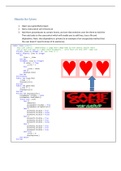
3. Add three pictureboxes to contain hearts, and one that stretches over the three to hold the
Then add code to the usercontrol which will enable you to add lives, lose a life and
displaylives. Note: that displaylives is private [ie an example of an encapsulate method that
the user doesn’t need to know of its existence]
Public Class ucHearts
'this user control - demonstrates a Large heart image made up from several smaller heart
'and as each life dies so a small heart disappears... until there are none left = Game over
Private _Lives As Integer = 0 'max lives is 3
Public Property lives As Integer
Get
lives = _Lives
End Get
Set(ByVal value As Integer)
If value > 3 Then
_Lives = 3
Else
_Lives = value
End If
displayLives()
End Set
End Property
Public Sub loseLife()
_Lives -= 1
displayLives()
End Sub
Public Sub gainLife()
_Lives += 1
displayLives()
End Sub
Private Sub displayLives()
picGameOver.Visible = False
picGameOver.SendToBack()
Select Case _Lives
Case 0
noHearts()
picGameOver.Visible = True
picGameOver.BringToFront()
Case 1
picHeart1.Visible = True
picHeart2.Visible = False
picHeart3.Visible = False
Case 2
picHeart1.Visible = True
picHeart2.Visible = True
picHeart3.Visible = False
Case 3
picHeart1.Visible = True
picHeart2.Visible = True
picHeart3.Visible = True
Case Else
_Lives = 0
displayLives()
End Select
End Sub
1. Open your gameShell project
2. Add a Usercontrol call it Hearts.vb
3. Add three pictureboxes to contain hearts, and one that stretches over the three to hold the
Then add code to the usercontrol which will enable you to add lives, lose a life and
displaylives. Note: that displaylives is private [ie an example of an encapsulate method that
the user doesn’t need to know of its existence]
Public Class ucHearts
'this user control - demonstrates a Large heart image made up from several smaller heart
'and as each life dies so a small heart disappears... until there are none left = Game over
Private _Lives As Integer = 0 'max lives is 3
Public Property lives As Integer
Get
lives = _Lives
End Get
Set(ByVal value As Integer)
If value > 3 Then
_Lives = 3
Else
_Lives = value
End If
displayLives()
End Set
End Property
Public Sub loseLife()
_Lives -= 1
displayLives()
End Sub
Public Sub gainLife()
_Lives += 1
displayLives()
End Sub
Private Sub displayLives()
picGameOver.Visible = False
picGameOver.SendToBack()
Select Case _Lives
Case 0
noHearts()
picGameOver.Visible = True
picGameOver.BringToFront()
Case 1
picHeart1.Visible = True
picHeart2.Visible = False
picHeart3.Visible = False
Case 2
picHeart1.Visible = True
picHeart2.Visible = True
picHeart3.Visible = False
Case 3
picHeart1.Visible = True
picHeart2.Visible = True
picHeart3.Visible = True
Case Else
_Lives = 0
displayLives()
End Select
End Sub