

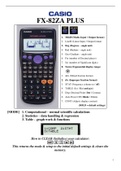
FX-82ZA PLUS
1. MthI0 (Maths Input / Output format)
2. LineI0 (Linear Input / Output format)
3. Deg (Degrees – angle unit)
4. Rad (Radians – angle unit)
5. Gra (Gradians – angle unit)
6. Fix (number of Decimal places)
7. Sci (number of Significant digits)
8. Norm (Exponential display range)
1. ab/c (Mixed fraction format)
2. d/c (Improper fraction format)
3. STAT (Frequency column on / off)
4. TABLE (f(x) / f(x) and g(x))
5. Disp (Decimal Point: Dot / Comma)
6. Auto Power Off (10min / 60min)
7. CONT (Adjusts display contrast)
(BOLD = default settings)
[MODE] 1. Computational – normal scientific calculations
2. Statistics – data handling & regression
3. Table – graph work & functions
How to CLEAR (Initialise) your calculator:
This returns the mode & setup to the initial default settings & clears the
memory.
1
, MODE 1: Computational
COMMON FRACTIONS
9 1
5 4
41
= Improper fraction Convert solution to a decimal
20
= 2,05 Decimal
1 Convert solution to a mixed number
=2 Mixed number
20
MIXED NUMBERS
3 5
2 4
4 12
583 7
= OR 12,14583333 OR 12
48 48
Casio Scientific Technology Tip
ONLY use when switching the scientific calculator on.
To clear your screen, rather use this saves your calculator’s temporary memory
(see the in the top right corner of the screen)
Use to review previous calculations.
EXPONENTS
26 + 32 ( 42 )5
= 73 = 1 048 576
2
1. MthI0 (Maths Input / Output format)
2. LineI0 (Linear Input / Output format)
3. Deg (Degrees – angle unit)
4. Rad (Radians – angle unit)
5. Gra (Gradians – angle unit)
6. Fix (number of Decimal places)
7. Sci (number of Significant digits)
8. Norm (Exponential display range)
1. ab/c (Mixed fraction format)
2. d/c (Improper fraction format)
3. STAT (Frequency column on / off)
4. TABLE (f(x) / f(x) and g(x))
5. Disp (Decimal Point: Dot / Comma)
6. Auto Power Off (10min / 60min)
7. CONT (Adjusts display contrast)
(BOLD = default settings)
[MODE] 1. Computational – normal scientific calculations
2. Statistics – data handling & regression
3. Table – graph work & functions
How to CLEAR (Initialise) your calculator:
This returns the mode & setup to the initial default settings & clears the
memory.
1
, MODE 1: Computational
COMMON FRACTIONS
9 1
5 4
41
= Improper fraction Convert solution to a decimal
20
= 2,05 Decimal
1 Convert solution to a mixed number
=2 Mixed number
20
MIXED NUMBERS
3 5
2 4
4 12
583 7
= OR 12,14583333 OR 12
48 48
Casio Scientific Technology Tip
ONLY use when switching the scientific calculator on.
To clear your screen, rather use this saves your calculator’s temporary memory
(see the in the top right corner of the screen)
Use to review previous calculations.
EXPONENTS
26 + 32 ( 42 )5
= 73 = 1 048 576
2


