

SAFE AND ETHICAL USE OF A COMPUTER
1.1. Generally, safety guideline
1.1.1. Ergonomics
Ergonomics refer to applied science of equipment design with the purpose of optimizing
discomfort and fatigue.
Ergonomic is science that deals with designing and arranging things that people can use easily
and safely.
1.1.2. Common health problems
Health and safe problem that can arise from long term computer use:
i) From monitor
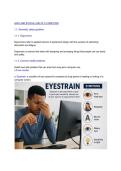
a. Eyestrain: a condition of eye caused for examples by long period of reading or looking of a
computer screen.
, Here are some ways to protect your vision and reduce eye strain:
1. Sit directly in front of your PC with the top of monitor at eye level. Your eye should be
approximately 20cm from the monitor.
2. Position your monitor perpendicular to the source light to minimize glare.
3. Adjust screen brightness to low and set the contrast to high.
4. Keep the screen clear.
5. Rest your eye occasionally.
6. Source documents should be at the same height and close to the monitor so that you can
avoid constant twisting and turning.
ii) From the keyboard and mouse
b) Repetitive strain injury (RSI)
1.1. Generally, safety guideline
1.1.1. Ergonomics
Ergonomics refer to applied science of equipment design with the purpose of optimizing
discomfort and fatigue.
Ergonomic is science that deals with designing and arranging things that people can use easily
and safely.
1.1.2. Common health problems
Health and safe problem that can arise from long term computer use:
i) From monitor
a. Eyestrain: a condition of eye caused for examples by long period of reading or looking of a
computer screen.
, Here are some ways to protect your vision and reduce eye strain:
1. Sit directly in front of your PC with the top of monitor at eye level. Your eye should be
approximately 20cm from the monitor.
2. Position your monitor perpendicular to the source light to minimize glare.
3. Adjust screen brightness to low and set the contrast to high.
4. Keep the screen clear.
5. Rest your eye occasionally.
6. Source documents should be at the same height and close to the monitor so that you can
avoid constant twisting and turning.
ii) From the keyboard and mouse
b) Repetitive strain injury (RSI)


