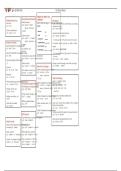
git--print-out Git Cheat Sheet
Ways to refer to a
Move Between Branches commit
Getting Started Start a Edit History
Switch branches: Every time we say
<commit>, you can use
new repo:
git switch <name> "Undo" the any
mostof
recent commit (keep your working
git init these: directory the same):
OR git checkout git reset HEAD^
Clone an existing repo: <name> ★a branch main
git clone <url> Squash the last 5 commits into one:
Create a branch: ★a tag v0.1 git rebase -i HEAD~6
git switch -c <name> ★a commit ID 3e887ab
Then change "pick" to "fixup" for any commit you want
OR git checkout -b
Prepare to Commit ★a remote branch origin/main
to combine with the previous one Undo a failed
<name>
Add untracked file or unstaged changes: ★ current commit HEAD rebase:
git add <file> List branches: git ★ 3 commits git reflog BRANCHNAME
ago HEAD^^^ or HEAD~3
branch
Add all untracked files and unstaged changes: Then manually find the right commit ID in the reflog,
git add . List branches by most recently committed to: then run:
git branch --sort=-committerdate git reset --hard <commit>
Choose which parts of a file to stage:
-p Delete a branch: Change a commit message (or add a file you forgot):
git branch -d <name> Discard Your Changes git commit --amend
Move file:
git mv <old> <new> Force delete a branch: git Delete unstaged changes to one file:
branch -D <name> git restore <file>
Delete file: OR git checkout
git rm <file> Code Archaeology
<file>
Tell Git to forget about a file without deleting it: Look at a branch's history:
Delete all staged and unstaged changes to one file:
Diff Staged/Unstaged Changes
rm --cached <file> git restore --staged --worktree git log <file>
main git log
Diff all staged and unstaged changes:
Unstage one file: git git diff HEAD OR git checkout HEAD --graph main git log
reset <file> <file> --oneline
Diff just staged changes: git
Unstage everything: git diff --staged Show every commit that modified a file:
Delete all staged and unstaged changes:
reset git reset --hard git log <file>
Diff just unstaged changes:
Check what you added: git diff Delete untracked files: git Show every commit that modified a file, including
git status clean before it was renamed:
git log --follow <file>
'Stash' all staged and unstaged changes:
git stash Find every commit that added or removed some text:
Diff Commits git log -G banana
Show diff between a commit and its parent:
git show <commit> Show who last changed each line of a file:
Make Commits git blame <file>
Make a commit (and open text editor
Diff two
to write
commits:
message): git commit git diff <commit> <commit>
Make a commit: Diff one file since a commit:
git commit -m 'message' git diff <commit> <file>
Commit all unstaged changes: Show a summary of a diff: git
commit -am 'message' diff <commit> --stat git
show <commit> --stat
Ways to refer to a
Move Between Branches commit
Getting Started Start a Edit History
Switch branches: Every time we say
<commit>, you can use
new repo:
git switch <name> "Undo" the any
mostof
recent commit (keep your working
git init these: directory the same):
OR git checkout git reset HEAD^
Clone an existing repo: <name> ★a branch main
git clone <url> Squash the last 5 commits into one:
Create a branch: ★a tag v0.1 git rebase -i HEAD~6
git switch -c <name> ★a commit ID 3e887ab
Then change "pick" to "fixup" for any commit you want
OR git checkout -b
Prepare to Commit ★a remote branch origin/main
to combine with the previous one Undo a failed
<name>
Add untracked file or unstaged changes: ★ current commit HEAD rebase:
git add <file> List branches: git ★ 3 commits git reflog BRANCHNAME
ago HEAD^^^ or HEAD~3
branch
Add all untracked files and unstaged changes: Then manually find the right commit ID in the reflog,
git add . List branches by most recently committed to: then run:
git branch --sort=-committerdate git reset --hard <commit>
Choose which parts of a file to stage:
-p Delete a branch: Change a commit message (or add a file you forgot):
git branch -d <name> Discard Your Changes git commit --amend
Move file:
git mv <old> <new> Force delete a branch: git Delete unstaged changes to one file:
branch -D <name> git restore <file>
Delete file: OR git checkout
git rm <file> Code Archaeology
<file>
Tell Git to forget about a file without deleting it: Look at a branch's history:
Delete all staged and unstaged changes to one file:
Diff Staged/Unstaged Changes
rm --cached <file> git restore --staged --worktree git log <file>
main git log
Diff all staged and unstaged changes:
Unstage one file: git git diff HEAD OR git checkout HEAD --graph main git log
reset <file> <file> --oneline
Diff just staged changes: git
Unstage everything: git diff --staged Show every commit that modified a file:
Delete all staged and unstaged changes:
reset git reset --hard git log <file>
Diff just unstaged changes:
Check what you added: git diff Delete untracked files: git Show every commit that modified a file, including
git status clean before it was renamed:
git log --follow <file>
'Stash' all staged and unstaged changes:
git stash Find every commit that added or removed some text:
Diff Commits git log -G banana
Show diff between a commit and its parent:
git show <commit> Show who last changed each line of a file:
Make Commits git blame <file>
Make a commit (and open text editor
Diff two
to write
commits:
message): git commit git diff <commit> <commit>
Make a commit: Diff one file since a commit:
git commit -m 'message' git diff <commit> <file>
Commit all unstaged changes: Show a summary of a diff: git
commit -am 'message' diff <commit> --stat git
show <commit> --stat