Asynchronous JavaScript
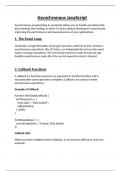
Asynchronous programming in JavaScript allows you to handle operations like
data fetching, file reading, or other I/O tasks without blocking the main thread,
improving the performance and responsiveness of your applications.
1. The Event Loop
JavaScript is single-threaded, meaning it executes code line by line. However,
asynchronous operations, like I/O tasks, run independently and use the event
loop to manage operations. The event loop checks for tasks to execute and
handles asynchronous code after the current execution stack is cleared.
2. Callback Functions
A callback is a function passed as an argument to another function and is
executed after some operation completes. Callbacks are used to handle
asynchronous operations.
Example of Callback:
function fetchData(callback) {
setTimeout(() => {
const data = "Data loaded";
callback(data);
}, 2000);
}
fetchData((data) => {
console.log(data); // Output: Data loaded
});
Callback Hell:
When you have multiple nested callbacks, it can become difficult to read and
maintain.
, fetchData((data) => {
processData(data, (processedData) => {
saveData(processedData, (result) => {
console.log(result);
});
});
});
3. Promises
A Promise represents the eventual completion (or failure) of an asynchronous
operation and its resulting value.
Creating a Promise:
const promise = new Promise((resolve, reject) => {
const success = true;
if (success) {
resolve("Operation was successful");
} else {
reject("Operation failed");
}
});
Using then and catch:
promise
.then((message) => {
console.log(message); // Output: Operation was successful
})
.catch((error) => {
console.log(error); // Output: Operation failed
});
Chaining Promises:
Promises can be chained to handle multiple asynchronous operations
sequentially.
Asynchronous programming in JavaScript allows you to handle operations like
data fetching, file reading, or other I/O tasks without blocking the main thread,
improving the performance and responsiveness of your applications.
1. The Event Loop
JavaScript is single-threaded, meaning it executes code line by line. However,
asynchronous operations, like I/O tasks, run independently and use the event
loop to manage operations. The event loop checks for tasks to execute and
handles asynchronous code after the current execution stack is cleared.
2. Callback Functions
A callback is a function passed as an argument to another function and is
executed after some operation completes. Callbacks are used to handle
asynchronous operations.
Example of Callback:
function fetchData(callback) {
setTimeout(() => {
const data = "Data loaded";
callback(data);
}, 2000);
}
fetchData((data) => {
console.log(data); // Output: Data loaded
});
Callback Hell:
When you have multiple nested callbacks, it can become difficult to read and
maintain.
, fetchData((data) => {
processData(data, (processedData) => {
saveData(processedData, (result) => {
console.log(result);
});
});
});
3. Promises
A Promise represents the eventual completion (or failure) of an asynchronous
operation and its resulting value.
Creating a Promise:
const promise = new Promise((resolve, reject) => {
const success = true;
if (success) {
resolve("Operation was successful");
} else {
reject("Operation failed");
}
});
Using then and catch:
promise
.then((message) => {
console.log(message); // Output: Operation was successful
})
.catch((error) => {
console.log(error); // Output: Operation failed
});
Chaining Promises:
Promises can be chained to handle multiple asynchronous operations
sequentially.