1. Operating system services:
An operating system provides an environment for the execution of programs.
It provides certain services to programs and to the users of those programs.
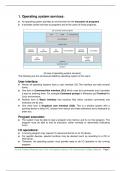
[A view of operating system services]
The following are the services provided by operating system to the users:
User interface:
Almost all operating systems have a user interface (UI).This interface can take several
forms.
One form is Command-line interface (CLI) which uses text commands and it provides
a way for entering them. For example-Command prompt in Windows and Terminal for
Linux environment.
Another form is Batch interface that receives files which contains commands and
executes one by one.
One more form is Graphical user interface (GUI). This is a window system with a
pointing device to direct I/O, choose from menus and make selections and a keyboard to
enter text.
Program execution:
The system must be able to load a program into memory and to run that program. The
program must be able to end its execution, either normally or abnormally (indicating
error).
I/O operations:
A running program may require I/O resources like file or an I/O device.
For specific devices, special functions may be desired (such as recording to a CD or
DVD drive).
Therefore, the operating system must provide away to do I/O operation to the running
program.
Sri Jyoti Prakash Mohanta, Asst. Prof. of Computer Science, F.M. Autonomous College, Balasore. Page 1
, File-system manipulation:
Operating system provides functionalities for create, open, read, write, close and delete
files.
Communications:
There are many circumstances in which one process needs to exchange information
with another process.
Such communication may occur between processes that are executing on the same
computer or between processes that are executing on different computer systems tied
together by a computer network.
Communications may be implemented via shared memory, in which two or more
processes read and write to a shared section of memory, or message passing, in which
packets of information in predefined formats are moved between processes by the
operating system.
Error detection:
Errors may occur in the CPU and memory hardware, in I/O devices and in the user
program (such as an arithmetic overflow, an attempt to access an illegal memory
location, or a too-great use of CPU time).
For each type of error, the operating system should take the appropriate action to ensure
correct and consistent computing.
Sometimes, it has no choice but to halt the system. At other times, it might terminate an
error-causing process or return an error code to a process for the process to detect and
possibly correct.
Resource allocation:
When there are multiple users or multiple jobs running at the same time, resources must
be allocated to each of them.
The operating system manages many different types of resources such as CPU cycles,
main memory, and file storage.
Accounting:
Operating system keeps track of which users use how much and what kinds of
computer resources.
Protection and security:
Operating system provides various protection and security mechanism to ensure that
only authorized process can access resource for execution.
2. System Calls:
System calls provide an interface to the services provided by an OS. These calls are
generally available as routines written in C, C++ and some may be using assembly-
language instructions.
Sri Jyoti Prakash Mohanta, Asst. Prof. of Computer Science, F.M. Autonomous College, Balasore. Page 2
An operating system provides an environment for the execution of programs.
It provides certain services to programs and to the users of those programs.
[A view of operating system services]
The following are the services provided by operating system to the users:
User interface:
Almost all operating systems have a user interface (UI).This interface can take several
forms.
One form is Command-line interface (CLI) which uses text commands and it provides
a way for entering them. For example-Command prompt in Windows and Terminal for
Linux environment.
Another form is Batch interface that receives files which contains commands and
executes one by one.
One more form is Graphical user interface (GUI). This is a window system with a
pointing device to direct I/O, choose from menus and make selections and a keyboard to
enter text.
Program execution:
The system must be able to load a program into memory and to run that program. The
program must be able to end its execution, either normally or abnormally (indicating
error).
I/O operations:
A running program may require I/O resources like file or an I/O device.
For specific devices, special functions may be desired (such as recording to a CD or
DVD drive).
Therefore, the operating system must provide away to do I/O operation to the running
program.
Sri Jyoti Prakash Mohanta, Asst. Prof. of Computer Science, F.M. Autonomous College, Balasore. Page 1
, File-system manipulation:
Operating system provides functionalities for create, open, read, write, close and delete
files.
Communications:
There are many circumstances in which one process needs to exchange information
with another process.
Such communication may occur between processes that are executing on the same
computer or between processes that are executing on different computer systems tied
together by a computer network.
Communications may be implemented via shared memory, in which two or more
processes read and write to a shared section of memory, or message passing, in which
packets of information in predefined formats are moved between processes by the
operating system.
Error detection:
Errors may occur in the CPU and memory hardware, in I/O devices and in the user
program (such as an arithmetic overflow, an attempt to access an illegal memory
location, or a too-great use of CPU time).
For each type of error, the operating system should take the appropriate action to ensure
correct and consistent computing.
Sometimes, it has no choice but to halt the system. At other times, it might terminate an
error-causing process or return an error code to a process for the process to detect and
possibly correct.
Resource allocation:
When there are multiple users or multiple jobs running at the same time, resources must
be allocated to each of them.
The operating system manages many different types of resources such as CPU cycles,
main memory, and file storage.
Accounting:
Operating system keeps track of which users use how much and what kinds of
computer resources.
Protection and security:
Operating system provides various protection and security mechanism to ensure that
only authorized process can access resource for execution.
2. System Calls:
System calls provide an interface to the services provided by an OS. These calls are
generally available as routines written in C, C++ and some may be using assembly-
language instructions.
Sri Jyoti Prakash Mohanta, Asst. Prof. of Computer Science, F.M. Autonomous College, Balasore. Page 2