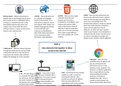
6.HTML – After you have typed 5.DNS – Once you have opened up your
8.Proxy Server – Before connecting to a 7.HTML – The world wide web
a domain name into your browser you will need to input a domain
website you can go through a proxy server is a collection of webpages
browser and it has been name for the web page you would like to
first. A proxy server is a dedicated system found on the internet. It is a
translated to an IP address, your access (e.g. www.google.com). The
running on a computer that acts as the web system of internet servers
browser will read the HTML Domain Name System is similar to a phone
intermediary between the device and that support HTML (Hyper Text
code on that domain name (IP book. They hold a directory of domain
another server from which the user is Markup Language) documents.
address). It will also read other names and translate them into IP
seeking resources. A proxy can be used to In the world wide web
code such as CSS and JavaScript. addresses. So when you type a domain
improve user response time. resources are identified by
This is what creates different name in your browser, it is translated to a
URLs which allows documents
text, colors, graphics etc. on the computer friendly version. Domain names
to be connected to other
website. are easy to remember for people, but
documents using hyperlinks.
devices access websites using IP addresses.
PART A
9.Web server – After the request has gone How elements link together to allow
through the whole process and has finally access to the internet
reached the web server, the web server
responds to the request which will then
display the webpage on to the computer
4.Browser – After you have
established your IP address and
you are connected to the
internet you can run a web
browser on your computer. The
browser is a software application
3.ISP – An internet service provider that is responsible for reading
2.Router – Your router is what
1. PC – The first thing you need and presenting information
provides your computer with a supplies you with a service for
is a computer through which resources. A resource is
connection. The router contains accessing the internet. They
you will access the internet. If identified by a URL. There a
your IP (Internet Protocol) provide you with your IP address.
you send a request to access number of web browsers but
address which identifies your There are many different ISP
the internet your computer will some perform better than others
computer on the internet. organizations with some providing
connect to your router.
8.Proxy Server – Before connecting to a 7.HTML – The world wide web
a domain name into your browser you will need to input a domain
website you can go through a proxy server is a collection of webpages
browser and it has been name for the web page you would like to
first. A proxy server is a dedicated system found on the internet. It is a
translated to an IP address, your access (e.g. www.google.com). The
running on a computer that acts as the web system of internet servers
browser will read the HTML Domain Name System is similar to a phone
intermediary between the device and that support HTML (Hyper Text
code on that domain name (IP book. They hold a directory of domain
another server from which the user is Markup Language) documents.
address). It will also read other names and translate them into IP
seeking resources. A proxy can be used to In the world wide web
code such as CSS and JavaScript. addresses. So when you type a domain
improve user response time. resources are identified by
This is what creates different name in your browser, it is translated to a
URLs which allows documents
text, colors, graphics etc. on the computer friendly version. Domain names
to be connected to other
website. are easy to remember for people, but
documents using hyperlinks.
devices access websites using IP addresses.
PART A
9.Web server – After the request has gone How elements link together to allow
through the whole process and has finally access to the internet
reached the web server, the web server
responds to the request which will then
display the webpage on to the computer
4.Browser – After you have
established your IP address and
you are connected to the
internet you can run a web
browser on your computer. The
browser is a software application
3.ISP – An internet service provider that is responsible for reading
2.Router – Your router is what
1. PC – The first thing you need and presenting information
provides your computer with a supplies you with a service for
is a computer through which resources. A resource is
connection. The router contains accessing the internet. They
you will access the internet. If identified by a URL. There a
your IP (Internet Protocol) provide you with your IP address.
you send a request to access number of web browsers but
address which identifies your There are many different ISP
the internet your computer will some perform better than others
computer on the internet. organizations with some providing
connect to your router.