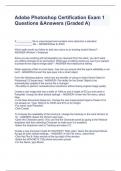
Adobe Photoshop Certification Exam 1 Questions &Answers (Graded A)
A ___________ file is unprocessed and contains more data than a standard _____________ file. - ANSWER-Raw & JPEG Which path would you follow to add new colors to an existing swatch library? - ANSWER-Window > Swatches Since you are working with photographs you received from the client, you don't want any editing changes to be permanent. What type of editing would you use if you wanted to preserve the original image data? - ANSWER-Non-destructive editing When applying a filter to a text layer, how can you ensure that the type's editability is not lost? - ANSWER-Convert the type layer into a smart object From the following options, which two are benefits of using a Linked Smart Object in Photoshop? (Choose two) - ANSWER--The ability for the Smart Object to be automatically updated if the source file is changed -The ability to perform nondestructive transforms without losing original image quality Create a new image that has a width of 1094 px and a height of 672 px and name it Pamphlet. Accept all other default settings. - ANSWER--Under the File menu, select New. -In the New Document dialog box, change the size measurement type to Pixels if it is not already so. Type 1094 px for Width and 672 px for Height. -For name, type Pamphlet. -Click Create. To increase the readability of the brochure, change the tracking on the word Horizon to 10. - ANSWER--Select the Horizon text layer. -Open the Character panel. (You can find the Character panel by going to the Window dropdown and then selecting Character to make sure it is enabled.) -Select the dropdown next to Tracking and select 10. Create a new document made for HDV/HDTV 720p video. Name the document Movie. Accept all other default settings. - ANSWER--In the File menu, select New. -Click the Film & Video section at the top right of the window. -Select the HDV/HDTV 720p blank document preset. -For the Name, type Movie. -Leave all other defaults. -Click Create. In print settings, ensure that the Color Handling option is set to Photoshop Manages Colors. Accept all other default settings. - ANSWER--Click the File menu and select Print... -In the Color Management Settings, change the Color --Handling to Photoshop Manages Colors. -Click Done.
Written for
- Institution
- Adobe Photoshop
- Course
- Adobe Photoshop
Document information
- Uploaded on
- November 6, 2023
- Number of pages
- 6
- Written in
- 2023/2024
- Type
- Exam (elaborations)
- Contains
- Questions & answers
Subjects
-
adobe photoshop certification exam 1 questions an
-
adobe photoshop certification stuvia
-
a file is unprocessed and contains mor
-
since you are working with photographs you receive

Also available in package deal