
Unit 8 assignment 2
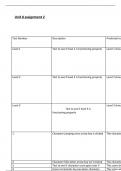
Test Number Description Predicted res
Level 1 Test to see if level 1 is functioning properly Level 1 shou
Level 2 Test to see if level 2 is functioning properly Level 2 shou
Level 3 Level 3 shou
Test to see if level 3 is
functioning properly
1 Character jumping once arrow key is clicked The characte
2 Character falls when arrow key isn’t clicked The characte
3 Test to see if character score goes over 5 The score sh
4 Score increments by one when character The score wi
,12 Testing to see if background changes once The backgrou
user goes to a different level
13 Testing to see if character falls but doesn’t The user rest
hit an obstacle the user still needs to restart doesn’t hit a
14 Testing to see if the character is blue The characte
15 Testing to see if the obstacles are green The obstacle
Test Plan
During this assignment I will be discussing my designs of the game I have created and the wa
requirements. Also, I will be receiving feedback from other people regarding the improveme
design of the game.
Level 1 design interface:
,This image displays the second level of the game which when clicked navigates the player to
in this level is a bird manoeuvring through pipe objects and if it hits It an error message will d
the player will lose and to avoid this the player must time their jumping with the bird by tapp
hitting the button too hard can make the bird hit an obstacle. There is a timer that is include
which is less than the last level by 2 minutes and the score is implemented which increases b
obstacles. The colour of the background is blue, the colour of the obstacle is green and the o
its colour is blue. This level is slightly different to the first level but the timer is significantly le
different with the pipes having smaller gaps in between making it more difficult for the playe
pipes.
Level 3 design interface:
, This image displays the third level of the game and the object in this level is a bird manoeuvr
if it hits a pipe an error message will display saying game over and the player will lose and to
time their jumping with the bird by tapping the arrow key precisely as hitting the button too
obstacle. There is a timer that is included in the top left-hand corner which is less than the la
implemented which increments based on the bird going past obstacles. The colour of the ba
background to ensure it is visually appealing to this young audience, the colour of the obstac
the game is a bird and its colour is blue. This level is slightly different to the previous levels b
less and the background is different with the pipes having smaller gaps in between making it
to manoeuvre between the pipes.
Test Number Description Predicted res
Level 1 Test to see if level 1 is functioning properly Level 1 shou
Level 2 Test to see if level 2 is functioning properly Level 2 shou
Level 3 Level 3 shou
Test to see if level 3 is
functioning properly
1 Character jumping once arrow key is clicked The characte
2 Character falls when arrow key isn’t clicked The characte
3 Test to see if character score goes over 5 The score sh
4 Score increments by one when character The score wi
,12 Testing to see if background changes once The backgrou
user goes to a different level
13 Testing to see if character falls but doesn’t The user rest
hit an obstacle the user still needs to restart doesn’t hit a
14 Testing to see if the character is blue The characte
15 Testing to see if the obstacles are green The obstacle
Test Plan
During this assignment I will be discussing my designs of the game I have created and the wa
requirements. Also, I will be receiving feedback from other people regarding the improveme
design of the game.
Level 1 design interface:
,This image displays the second level of the game which when clicked navigates the player to
in this level is a bird manoeuvring through pipe objects and if it hits It an error message will d
the player will lose and to avoid this the player must time their jumping with the bird by tapp
hitting the button too hard can make the bird hit an obstacle. There is a timer that is include
which is less than the last level by 2 minutes and the score is implemented which increases b
obstacles. The colour of the background is blue, the colour of the obstacle is green and the o
its colour is blue. This level is slightly different to the first level but the timer is significantly le
different with the pipes having smaller gaps in between making it more difficult for the playe
pipes.
Level 3 design interface:
, This image displays the third level of the game and the object in this level is a bird manoeuvr
if it hits a pipe an error message will display saying game over and the player will lose and to
time their jumping with the bird by tapping the arrow key precisely as hitting the button too
obstacle. There is a timer that is included in the top left-hand corner which is less than the la
implemented which increments based on the bird going past obstacles. The colour of the ba
background to ensure it is visually appealing to this young audience, the colour of the obstac
the game is a bird and its colour is blue. This level is slightly different to the previous levels b
less and the background is different with the pipes having smaller gaps in between making it
to manoeuvre between the pipes.


