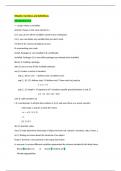
RStudio: functions and definitions
Introduction in R
<-: assign values to variables
print(a): shows us the value stored in a
ls (): you can see all the variables saved in your workspace
rm (): you can delete any variable that you don’t want
rm (list=ls ()): remove all objects at once
#: commenting your code
install. Packages (): are installed in R not RStudio.
installed. Packages (): to see which packages you already have installed.
library (): loading a package.
data (): you can see all the available datasets.
seq (): creates a vector of numbers
seq (1, 10) or 1:10 1 defines start, 10 defines end
seq (1, 10, 2) 1 defines start, 10 defines end, 2 how much to jump by
1 3 5 7 9
seq (1, 15, length = 5) sequences of 5 numbers equally spaced between 1 and 15
1.0 4.5 8.0 11.5 15.0
sum (): adds numbers up
c (): concatenate: it will join the numbers 1,3,2,5 and save them as a vector named x
when type x, it gives us back the vector
> x <- c (1, 3, 2, 5)
>x
[1] 1 3 2 5
abs (): absolute value
class (): helps determine what type of object we have (vb. numeric, character, data. frame…)
str (): finding out more about the structure of an object
head (): the first n rows present in the input data frame
$: accessor: to access different variables represented by columns included in this data frame
Record$student_id or record [[“student_id”]]
Murders$population
Introduction in R
<-: assign values to variables
print(a): shows us the value stored in a
ls (): you can see all the variables saved in your workspace
rm (): you can delete any variable that you don’t want
rm (list=ls ()): remove all objects at once
#: commenting your code
install. Packages (): are installed in R not RStudio.
installed. Packages (): to see which packages you already have installed.
library (): loading a package.
data (): you can see all the available datasets.
seq (): creates a vector of numbers
seq (1, 10) or 1:10 1 defines start, 10 defines end
seq (1, 10, 2) 1 defines start, 10 defines end, 2 how much to jump by
1 3 5 7 9
seq (1, 15, length = 5) sequences of 5 numbers equally spaced between 1 and 15
1.0 4.5 8.0 11.5 15.0
sum (): adds numbers up
c (): concatenate: it will join the numbers 1,3,2,5 and save them as a vector named x
when type x, it gives us back the vector
> x <- c (1, 3, 2, 5)
>x
[1] 1 3 2 5
abs (): absolute value
class (): helps determine what type of object we have (vb. numeric, character, data. frame…)
str (): finding out more about the structure of an object
head (): the first n rows present in the input data frame
$: accessor: to access different variables represented by columns included in this data frame
Record$student_id or record [[“student_id”]]
Murders$population