2.3: E-communication
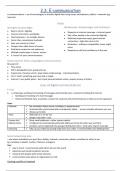
e-communications = use of technologies to transfer digital data using comp, smartphones, tablets + networks (eg.
Internet)
Intro
Strengths & advantages Weaknesses, disadvantages and limitations
• Easy to comm. digitally
• Depends on internet coverage + internet speed
• Connect and comm. worldwide
• Req. other people to be connected digitally
• Used wherever + on multiple devices
• Relatively expensive equip, good internet
• Faster than conventional methods connection + high data costs in SA
• Save you money on travel • Hardware + software compatibility issues might
• Cheaper than older forms of comm. occur
• Distribute content to vast audiences • Depends on skill and confidence of the user
• Multiple media types in comm. session
• A ‘record’ of your communications
Good practices when using digital communications
Be aware of:
• Time zones
• Diff in bandwidth (cost, speed and cap
• Impersonal + faceless comm. (expt video conferencing) – misinterpretation
• Can’t ‘undo’ something you have said or typed.
• Internet = very public place – don’t post personal details online, respect privacy of others
Uses of digital communications
E-mail
• = composing, sending and receiving of messages electronically over a network including the internet
o Sending and receiving of e-mail messages
o Gmail and Outlook have a calendar, contact list, tasks list and archive features to help you to be organised
Uses:
Calendar ✓ Set reminders about events, birthdays or appointments
✓ Automatically synchronised with smartphone/ tablet access schedule wherever you are
✓ Always up to date
Tasks ✓ Add tasks to a ‘to-do’ list.
✓ Assign a due date + sort
Contact list/ ✓ Store email addresses + other contact details
Address book ✓ Configured to automatically add email addresses to the list when you use them
✓ Contacts can be organised into groups (distribution lists) – send same msg to many ppl
Archiving ✓ Tidy up your inbox by moving msgs from your inbox → archive folder w/o deleting them
Social networking sites
= site where individuals can post likes, dislikes, interests, comments, photos, activities for other to see
Eg. Facebook, LinkedIn, Twitter, Pinterest, Instagram
Use:
✓ stay in touch + communicate with others all over the world
✓ advertise and market products/ services
✓ network with people with similar interests
✓ communicate news about an organisation or club
Creating a profile on Facebook
e-communications = use of technologies to transfer digital data using comp, smartphones, tablets + networks (eg.
Internet)
Intro
Strengths & advantages Weaknesses, disadvantages and limitations
• Easy to comm. digitally
• Depends on internet coverage + internet speed
• Connect and comm. worldwide
• Req. other people to be connected digitally
• Used wherever + on multiple devices
• Relatively expensive equip, good internet
• Faster than conventional methods connection + high data costs in SA
• Save you money on travel • Hardware + software compatibility issues might
• Cheaper than older forms of comm. occur
• Distribute content to vast audiences • Depends on skill and confidence of the user
• Multiple media types in comm. session
• A ‘record’ of your communications
Good practices when using digital communications
Be aware of:
• Time zones
• Diff in bandwidth (cost, speed and cap
• Impersonal + faceless comm. (expt video conferencing) – misinterpretation
• Can’t ‘undo’ something you have said or typed.
• Internet = very public place – don’t post personal details online, respect privacy of others
Uses of digital communications
• = composing, sending and receiving of messages electronically over a network including the internet
o Sending and receiving of e-mail messages
o Gmail and Outlook have a calendar, contact list, tasks list and archive features to help you to be organised
Uses:
Calendar ✓ Set reminders about events, birthdays or appointments
✓ Automatically synchronised with smartphone/ tablet access schedule wherever you are
✓ Always up to date
Tasks ✓ Add tasks to a ‘to-do’ list.
✓ Assign a due date + sort
Contact list/ ✓ Store email addresses + other contact details
Address book ✓ Configured to automatically add email addresses to the list when you use them
✓ Contacts can be organised into groups (distribution lists) – send same msg to many ppl
Archiving ✓ Tidy up your inbox by moving msgs from your inbox → archive folder w/o deleting them
Social networking sites
= site where individuals can post likes, dislikes, interests, comments, photos, activities for other to see
Eg. Facebook, LinkedIn, Twitter, Pinterest, Instagram
Use:
✓ stay in touch + communicate with others all over the world
✓ advertise and market products/ services
✓ network with people with similar interests
✓ communicate news about an organisation or club
Creating a profile on Facebook