Microsoft®
Excel 2016
Quick Reference Card
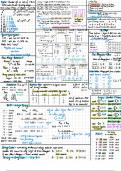
The Excel 2016 Screen Keyboard Shortcuts
Quick Access Toolbar Title bar
Formula Bar Close button General
Open a Workbook Ctrl + O
File tab Create New Ctrl + N
Ribbon Save Ctrl + S
Preview and Print Ctrl + P
Name Close a Workbook Ctrl + W
box
Active cell Help F1
Run Spelling Check F7
Columns Calculate worksheets F9
Create an absolute, F4
normal, or mixed reference
Rows
Scroll Navigation:
bars
Move Between Cells , ,
,
Right One Cell Tab
Left One Cell Shift + Tab
Down One Cell Enter
Worksheet tabs
View buttons Zoom slider Up One Cell Shift
+Enter Down One Screen Page
The Fundamentals Down Up One Screen Page Up
To Cell A1 Ctrl + Home
The File tab menu and Backstage view contain commands Cell addresses: Cells are referenced by
for working with a program’s files, such as Open, Save, addresses made from their column letter To Last Cell Ctrl + End
Close, New, and Print. and row number, such as cell A1, A2, B1, Go To Dialog Box F5
B2, etc. You can find the address of a cell
To Create a New Workbook: Click
by looking at the Name Box under the Editing
the File tab, select New, and
clipboard Cut Ctrl + X
double-click workbook, or press Ctrl
+ N. To Select a Cell: Click a cell or use the Copy Ctrl + C
keyboard arrow keys to select it. Paste Ctrl + V
To Open a Workbook: Click the File
tab and select Open, or press To Select a Cell Range: Click and drag to Undo Ctrl + Z
Ctrl + O. select a range of cells. Or, press and hold Redo Ctrl + Y
down the Shift key while using the arrow Find Ctrl + F
To Save a Workbook: Click the
Save button on the Quick Access keys to move the mouse pointer to the Replace Ctrl + H
last cell of the range. Select All Ctrl + A
Toolbar, or press Ctrl + S.
To Preview and Print a Workbook:
To Select an Entire Worksheet: Click the Edit active cell F2
Click the File tab and select Print, or Select All button where column and Clear cell contents Delete
press Ctrl + P. row headings meet. Or press Ctrl + A.
To Minimize the Ribbon: Click the Formatting
To Undo: Click the Undo
button on the Quick Access Toolbar, Minimize Ribbon button on the Ribbon. Bold Ctrl + B
or press Ctrl + Z. Or, press Ctrl + F1. Or, right-click a tab Italics Ctrl + I
and select Unpin the Ribbon from the
To Redo or Repeat: Click the contextual menu. Underline Ctrl + U
Redo button on the Quick
Open Format Cells Ctrl + Shift
Access Toolbar, or press Ctrl + Y. To Change Program Settings: Click the
File tab and select Options. Dialog Box +F
To Close a Workbook: Click the
To Use Zoom: Click and drag the zoom Select All Ctrl + A
Close button, or press Ctrl +
slider to the left or right. Or, click the Select entire row Shift+Space
W.
Zoom Out and Zoom In buttons on Select entire column Ctrl + Space
To Get Help: Press F1 to open the the slider.
Hide selected rows Ctrl + 9
Help window. Type your question
To Change Views: Click a View button in
and press Enter. Hide selected Ctrl + 0
the status bar. Or, click the View tab and columns
select a view.
. TechView Team
Excel 2016
Quick Reference Card
The Excel 2016 Screen Keyboard Shortcuts
Quick Access Toolbar Title bar
Formula Bar Close button General
Open a Workbook Ctrl + O
File tab Create New Ctrl + N
Ribbon Save Ctrl + S
Preview and Print Ctrl + P
Name Close a Workbook Ctrl + W
box
Active cell Help F1
Run Spelling Check F7
Columns Calculate worksheets F9
Create an absolute, F4
normal, or mixed reference
Rows
Scroll Navigation:
bars
Move Between Cells , ,
,
Right One Cell Tab
Left One Cell Shift + Tab
Down One Cell Enter
Worksheet tabs
View buttons Zoom slider Up One Cell Shift
+Enter Down One Screen Page
The Fundamentals Down Up One Screen Page Up
To Cell A1 Ctrl + Home
The File tab menu and Backstage view contain commands Cell addresses: Cells are referenced by
for working with a program’s files, such as Open, Save, addresses made from their column letter To Last Cell Ctrl + End
Close, New, and Print. and row number, such as cell A1, A2, B1, Go To Dialog Box F5
B2, etc. You can find the address of a cell
To Create a New Workbook: Click
by looking at the Name Box under the Editing
the File tab, select New, and
clipboard Cut Ctrl + X
double-click workbook, or press Ctrl
+ N. To Select a Cell: Click a cell or use the Copy Ctrl + C
keyboard arrow keys to select it. Paste Ctrl + V
To Open a Workbook: Click the File
tab and select Open, or press To Select a Cell Range: Click and drag to Undo Ctrl + Z
Ctrl + O. select a range of cells. Or, press and hold Redo Ctrl + Y
down the Shift key while using the arrow Find Ctrl + F
To Save a Workbook: Click the
Save button on the Quick Access keys to move the mouse pointer to the Replace Ctrl + H
last cell of the range. Select All Ctrl + A
Toolbar, or press Ctrl + S.
To Preview and Print a Workbook:
To Select an Entire Worksheet: Click the Edit active cell F2
Click the File tab and select Print, or Select All button where column and Clear cell contents Delete
press Ctrl + P. row headings meet. Or press Ctrl + A.
To Minimize the Ribbon: Click the Formatting
To Undo: Click the Undo
button on the Quick Access Toolbar, Minimize Ribbon button on the Ribbon. Bold Ctrl + B
or press Ctrl + Z. Or, press Ctrl + F1. Or, right-click a tab Italics Ctrl + I
and select Unpin the Ribbon from the
To Redo or Repeat: Click the contextual menu. Underline Ctrl + U
Redo button on the Quick
Open Format Cells Ctrl + Shift
Access Toolbar, or press Ctrl + Y. To Change Program Settings: Click the
File tab and select Options. Dialog Box +F
To Close a Workbook: Click the
To Use Zoom: Click and drag the zoom Select All Ctrl + A
Close button, or press Ctrl +
slider to the left or right. Or, click the Select entire row Shift+Space
W.
Zoom Out and Zoom In buttons on Select entire column Ctrl + Space
To Get Help: Press F1 to open the the slider.
Hide selected rows Ctrl + 9
Help window. Type your question
To Change Views: Click a View button in
and press Enter. Hide selected Ctrl + 0
the status bar. Or, click the View tab and columns
select a view.
. TechView Team