Detecting collisions with ‘walls’ made of labels
Here’s a quick way to detect if your player is colliding
with ‘walls’ made of labels
1. Open a new project – call it- MazeWallCollisions
2. Add a panel to the form
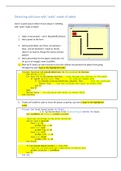
3. Add several labels, size them, set autosize =
false, and set backcolor = black as shown
{there’s no need to change the names of these
labels!}
4. Add a picturebox for the player, backcolor red
[or put in an image], name it picMan
5. Now we’ll create our own function to test the collision and prevent the player from going
throught the wall [type in the highlighted code]
Private Function CollidesWithWall(pic As PictureBox) As Boolean
Dim ctl As Control
For Each ctl In Me.Panel1.Controls 'loop through all controls in the panel
If TypeOf ctl Is Label Then 'if they are labels then
If ctl.Bounds.IntersectsWith(pic.Bounds) Then 'test for collision
Return True 'pic has collided with walls so return TRUE
End If
End If
Next
Return False 'no collision with walls so return FALSE
End Function
6. Finally we’ll add the code to move the player using Key_Up event…[type in the highlighted
code]
Private Sub Form1_KeyUp(sender As Object, _
e As System.Windows.Forms.KeyEventArgs) Handles Me.KeyUp
Dim locB4Move As Point = picMan.Location
'move man according to key press direction
Select Case e.KeyCode
Case Keys.Up
picMan.Top -= 10
Case Keys.Down
picMan.Top += 10
Case Keys.Left
picMan.Left -= 10
Case Keys.Right
picMan.Left += 10
End Select
If CollidesWithWall(picMan) = True Then
'man has collide with wall reposition to before move
picMan.Location = locB4Move
End If
End Sub
Here’s a quick way to detect if your player is colliding
with ‘walls’ made of labels
1. Open a new project – call it- MazeWallCollisions
2. Add a panel to the form
3. Add several labels, size them, set autosize =
false, and set backcolor = black as shown
{there’s no need to change the names of these
labels!}
4. Add a picturebox for the player, backcolor red
[or put in an image], name it picMan
5. Now we’ll create our own function to test the collision and prevent the player from going
throught the wall [type in the highlighted code]
Private Function CollidesWithWall(pic As PictureBox) As Boolean
Dim ctl As Control
For Each ctl In Me.Panel1.Controls 'loop through all controls in the panel
If TypeOf ctl Is Label Then 'if they are labels then
If ctl.Bounds.IntersectsWith(pic.Bounds) Then 'test for collision
Return True 'pic has collided with walls so return TRUE
End If
End If
Next
Return False 'no collision with walls so return FALSE
End Function
6. Finally we’ll add the code to move the player using Key_Up event…[type in the highlighted
code]
Private Sub Form1_KeyUp(sender As Object, _
e As System.Windows.Forms.KeyEventArgs) Handles Me.KeyUp
Dim locB4Move As Point = picMan.Location
'move man according to key press direction
Select Case e.KeyCode
Case Keys.Up
picMan.Top -= 10
Case Keys.Down
picMan.Top += 10
Case Keys.Left
picMan.Left -= 10
Case Keys.Right
picMan.Left += 10
End Select
If CollidesWithWall(picMan) = True Then
'man has collide with wall reposition to before move
picMan.Location = locB4Move
End If
End Sub