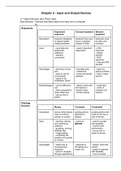
Chapter 2 - Input and Output Devices
2.1 Input Devices and Their Uses
Input devices - Devices that allow data to be input into a computer
ex.
Keyboards
Ergonomic Concept keyboard Numeric
keyboard keyboard
Description keyboard designed keyboard that uses keyboard used
to reduce health - icons or phrases to enter only
related problems instead of letter numbers
Uses - input data into - used in fast-food - ATM
application restaurants machines
softwares - Mobile
- typing in phones
commands - POS
terminals
- Chip and PIN
devices
Advantages - fast entry of new - fast data entry - faster for
text - waterproof typing numbers
- easy to use for - some are tamper - easy to carry
most people resistant around
- easier to do
verification check
Disadvantages - can be difficult to - doesn’t work with - small keys
use text-based or - order of
- slow compared to numeric input numbers not
direct data entry - limited options intuitive
- use up lots of
space
Pointing
Devices
Mouse Touchpad Trackerball
Description device which allows pointing device pointing device with
user to control a attached to a ball on the top or
pointer on screen laptops side of device
Uses - opening, closing - same as - used by people
and minimising MOUSE with disability
software - control room
- grouping. moving, environment
deleting files - luxury cars to
- image editing select functions
- controlling the
position of a pointer
on screen
Advantages - faster way of - attached to - doesn’t need fine
choosing than the laptop as a control
keyboard single unit - easier to operate
- quick to navigate with disability
through applications - more accurate
, - doesn’t take up positioning
lots of space - more robust
- needs little desk
space
Disadvantages - difficult to use for - difficult for - more costly
some some - may need trainer
- easy to damage - more difficult as it is not a
- difficult to use with to control standard equipment
no flat surface - more difficult
to drag and
drop
Remote
Control
Description control other operation of other devices by infrared
waves
Uses TV, satellite systems, DVD players and hi-fi
systems
control multimedia system
industrial applications
Advantages can be operate from any reasonable distance
Disadvantages difficult for some users
easy to block signals
Joysticks
Description a stick which allows user to control a pointer on screen
Uses used in video games
used in simulations
Advantages easier than keyboard to navigate
control is more realistic than mouse
Disadvantages more difficult to control the on-screen pointer
Driving Wheel
Description an example of joystick; simulates the steering wheel
Uses used in video games
used in simulations
Advantages easier than keyboard and joystick to control
steering movement
close driver experience to reality
Disadvantages expensive
movement can be too sensitive = unrealistic
Touch
Screens
Description user can choose options by touching the screen
2.1 Input Devices and Their Uses
Input devices - Devices that allow data to be input into a computer
ex.
Keyboards
Ergonomic Concept keyboard Numeric
keyboard keyboard
Description keyboard designed keyboard that uses keyboard used
to reduce health - icons or phrases to enter only
related problems instead of letter numbers
Uses - input data into - used in fast-food - ATM
application restaurants machines
softwares - Mobile
- typing in phones
commands - POS
terminals
- Chip and PIN
devices
Advantages - fast entry of new - fast data entry - faster for
text - waterproof typing numbers
- easy to use for - some are tamper - easy to carry
most people resistant around
- easier to do
verification check
Disadvantages - can be difficult to - doesn’t work with - small keys
use text-based or - order of
- slow compared to numeric input numbers not
direct data entry - limited options intuitive
- use up lots of
space
Pointing
Devices
Mouse Touchpad Trackerball
Description device which allows pointing device pointing device with
user to control a attached to a ball on the top or
pointer on screen laptops side of device
Uses - opening, closing - same as - used by people
and minimising MOUSE with disability
software - control room
- grouping. moving, environment
deleting files - luxury cars to
- image editing select functions
- controlling the
position of a pointer
on screen
Advantages - faster way of - attached to - doesn’t need fine
choosing than the laptop as a control
keyboard single unit - easier to operate
- quick to navigate with disability
through applications - more accurate
, - doesn’t take up positioning
lots of space - more robust
- needs little desk
space
Disadvantages - difficult to use for - difficult for - more costly
some some - may need trainer
- easy to damage - more difficult as it is not a
- difficult to use with to control standard equipment
no flat surface - more difficult
to drag and
drop
Remote
Control
Description control other operation of other devices by infrared
waves
Uses TV, satellite systems, DVD players and hi-fi
systems
control multimedia system
industrial applications
Advantages can be operate from any reasonable distance
Disadvantages difficult for some users
easy to block signals
Joysticks
Description a stick which allows user to control a pointer on screen
Uses used in video games
used in simulations
Advantages easier than keyboard to navigate
control is more realistic than mouse
Disadvantages more difficult to control the on-screen pointer
Driving Wheel
Description an example of joystick; simulates the steering wheel
Uses used in video games
used in simulations
Advantages easier than keyboard and joystick to control
steering movement
close driver experience to reality
Disadvantages expensive
movement can be too sensitive = unrealistic
Touch
Screens
Description user can choose options by touching the screen