Roland UDVARLAKI – http://www.gsmarea.co.nf/
Unit 28 – Website Production
D3 - Demonstrate that a created website meets the defined requirements and achieves the
defined purpose.
Client Requirements:
1. Colours should match with the company’s logo
2. Search box for easier search on website
3. Easily readable fonts on computers
4. Simple – User Friendly
5. Form on Contact Us page
6. 5 menu buttons including, Home button.
7. Colours would change when hovered over menu buttons
8. Social Media links on the top
9. Login and registration options on website (Not implemented by client’s request – M3)
10. Dedicated reviews section on Home page
11. A list of the latest phones on Home page
12. LOGO must be on the top left corner
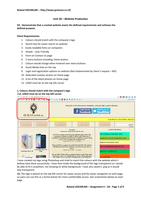
1, Colours should match with the company’s logo
+12, LOGO must be on the top left corner
I have created my logo using Photoshop and tried to match the colours with the website which I
believe have done successfully. I have then made the background of the logo transparent so I would
be able to fit it anywhere, not showing its white background. I have also saved it .png so it would
stay transparent.
12, The logo is placed on the top left corner for easier access and for easier navigation on each page,
so users can use this as a home button for more comfortable access. See screenshots below on each
page.
Roland UDVARLAKI – Assignment 4 – D3 - Page 1 of 9
,Roland UDVARLAKI – http://www.gsmarea.co.nf/
2, Search box for easier search on website
My search box works as it should. By typing in the right keyword, it will search the whole website
using a special engine. (i.e.: I have searched for “Samsung” then clicked on the Search button)
Roland UDVARLAKI – Assignment 4 – D3 - Page 2 of 9
, Roland UDVARLAKI – http://www.gsmarea.co.nf/
Here you can see that my search engine works properly, and shows the results for “Samsung”.
3, Easily readable fonts on computers
As my client said, all fonts and text sizes met with his criteria in M3. I had to adjust the size, so it
would be easily readable without zooming in.
4, Simple – User Friendly
All of my pages include the same design and they all include all the bits on the website, so users will
not get confused about where they are. Users will not get lost, and even if they would manage to get
lost somehow, the user friendly website would be usable with the navigation bar.
Roland UDVARLAKI – Assignment 4 – D3 - Page 3 of 9
Unit 28 – Website Production
D3 - Demonstrate that a created website meets the defined requirements and achieves the
defined purpose.
Client Requirements:
1. Colours should match with the company’s logo
2. Search box for easier search on website
3. Easily readable fonts on computers
4. Simple – User Friendly
5. Form on Contact Us page
6. 5 menu buttons including, Home button.
7. Colours would change when hovered over menu buttons
8. Social Media links on the top
9. Login and registration options on website (Not implemented by client’s request – M3)
10. Dedicated reviews section on Home page
11. A list of the latest phones on Home page
12. LOGO must be on the top left corner
1, Colours should match with the company’s logo
+12, LOGO must be on the top left corner
I have created my logo using Photoshop and tried to match the colours with the website which I
believe have done successfully. I have then made the background of the logo transparent so I would
be able to fit it anywhere, not showing its white background. I have also saved it .png so it would
stay transparent.
12, The logo is placed on the top left corner for easier access and for easier navigation on each page,
so users can use this as a home button for more comfortable access. See screenshots below on each
page.
Roland UDVARLAKI – Assignment 4 – D3 - Page 1 of 9
,Roland UDVARLAKI – http://www.gsmarea.co.nf/
2, Search box for easier search on website
My search box works as it should. By typing in the right keyword, it will search the whole website
using a special engine. (i.e.: I have searched for “Samsung” then clicked on the Search button)
Roland UDVARLAKI – Assignment 4 – D3 - Page 2 of 9
, Roland UDVARLAKI – http://www.gsmarea.co.nf/
Here you can see that my search engine works properly, and shows the results for “Samsung”.
3, Easily readable fonts on computers
As my client said, all fonts and text sizes met with his criteria in M3. I had to adjust the size, so it
would be easily readable without zooming in.
4, Simple – User Friendly
All of my pages include the same design and they all include all the bits on the website, so users will
not get confused about where they are. Users will not get lost, and even if they would manage to get
lost somehow, the user friendly website would be usable with the navigation bar.
Roland UDVARLAKI – Assignment 4 – D3 - Page 3 of 9