Roland UDVARLAKI
M2 - Explain the tools and techniques used in the creation of an interactive website.
In this section I am going to talk about the tools and techniques I used to create my interactive
website that is working properly.
-Maps
I have added Maps to my website, so people would be able find my place in a much easier way. The
code I used to make the map work and be visible on the website can be found below.
<iframe frameborder="0" scrolling="no" marginheight="0" marginwidth="0"width="642"
height="443" src="https://maps.google.com/maps?hl=en&q=Booth Ln N, Northampton NN3
3RF&ie=UTF8&t=roadmap&z=13&iwloc=B&output=embed"><div><small><a
href="http://embedgooglemaps.com">embedgooglemaps.com</a></small></div><div><small><a
href="http://buyproxies.io/">buyproxies.io</a></small></div></iframe>
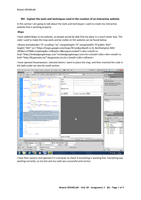
I have opened Dreamweaver, selected where I want to place the map, and then inserted the code in
the Split (code can also be used) section.
I have then saved it and opened it in a browser to check if everything is working fine. Everything was
working correctly, so my test and my code was successful and correct.
Roland UDVARLAKI – Unit 28 – Assignment 3 – M2 - Page 1 of 5
M2 - Explain the tools and techniques used in the creation of an interactive website.
In this section I am going to talk about the tools and techniques I used to create my interactive
website that is working properly.
-Maps
I have added Maps to my website, so people would be able find my place in a much easier way. The
code I used to make the map work and be visible on the website can be found below.
<iframe frameborder="0" scrolling="no" marginheight="0" marginwidth="0"width="642"
height="443" src="https://maps.google.com/maps?hl=en&q=Booth Ln N, Northampton NN3
3RF&ie=UTF8&t=roadmap&z=13&iwloc=B&output=embed"><div><small><a
href="http://embedgooglemaps.com">embedgooglemaps.com</a></small></div><div><small><a
href="http://buyproxies.io/">buyproxies.io</a></small></div></iframe>
I have opened Dreamweaver, selected where I want to place the map, and then inserted the code in
the Split (code can also be used) section.
I have then saved it and opened it in a browser to check if everything is working fine. Everything was
working correctly, so my test and my code was successful and correct.
Roland UDVARLAKI – Unit 28 – Assignment 3 – M2 - Page 1 of 5