Using a Comma Delimited File for Storing Game Data
Object-Oriented way to create a game data User control for storing Game Data.
1. Open a new project called ReadCommaDelimitedFiles
2. Add a user control call it: ucTexhFileHandling.vb
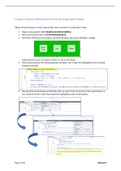
3. Add three buttons to the control, call them btnSave, btnLoad, btnDelete; change
sizes/colours to suit, but keep it similar in size to the above.
4. View Code and type the following global variables, don’t type the highlighted text [it should
already be there!]
5. Now go back to the design and double-click on each control to get the initial subroutines, or
you could do it from code view to get the highlighted code shown below…
Page 1 of 3 JL©Jan19
Object-Oriented way to create a game data User control for storing Game Data.
1. Open a new project called ReadCommaDelimitedFiles
2. Add a user control call it: ucTexhFileHandling.vb
3. Add three buttons to the control, call them btnSave, btnLoad, btnDelete; change
sizes/colours to suit, but keep it similar in size to the above.
4. View Code and type the following global variables, don’t type the highlighted text [it should
already be there!]
5. Now go back to the design and double-click on each control to get the initial subroutines, or
you could do it from code view to get the highlighted code shown below…
Page 1 of 3 JL©Jan19