

100% satisfaction guarantee Immediately available after payment Both online and in PDF No strings attached 4.2 TrustPilot
logo-home
Exam (elaborations)

Crash Course on Python By Google Exam Pack 2020

Rating
-
Sold
-
Pages
28
Grade
A+
Uploaded on
22-01-2021
Written in
2020/2021

Module 1 Graded Assessment 1. Question 1 What is a computer program? 1 point A file that gets printed by the Python interpreter. The syntax and semantics of Python. The overview of what the computer will have to do to solve some automation problem. A step-by-step recipe of what needs to be done to complete a task, that gets executed by the computer. 2. Question 2 What’s automation? 1 point The inputs and outputs of a program. The process of replacing a manual step with one that happens automatically. The checkout processes at a grocery store. The process of getting a haircut. 3. Question 3 Which of the following tasks are good candidates for automation? Check all that apply. 1 point Writing a computer program. Creating a report of how much each sales person has sold in the last month. Setting the home directory and access permissions for new employees joining your company. Designing the new webpage for your company. Taking pictures of friends and family at a wedding. Populating your company's e-commerce site with the latest products in the catalog. 4. Question 4 What are some characteristics of the Python programming language? Check all that apply. 1 point Python programs are easy to write and understand. The Python interpreter reads our code and transforms it into computer instructions. It's an outdated language that's barely in use anymore. We can practice Python using web interpreters or codepads as well as executing it locally. 5. Question 5 How does Python compare to other programming languages? 1 point Python is the only programming language that is worth learning. Each programming language has its advantages and disadvantages. It's always better to use an OS specific language like Bash or Powershell than using a generic language like Python. Programming languages are so different that learning a second one is harder than learning the first one. 6. Question 6 Write a Python script that outputs "Automating with Python is fun!" to the screen. 1 point 1 print("Automating with Python is fun!") Reset 7. Question 7 Fill in the blanks so that the code prints "Yellow is the color of sunshine". 1 point 123 color = "Yellow" thing = "sunshine" print(color + " is the color of " + thing) Reset 8. Question 8 Keeping in mind there are 86400 seconds per day, write a program that calculates how many seconds there are in a week, if a week is 7 days. Print the result on the screen. Note: Your result should be in the format of just a number, not a sentence. 1 point 12 seconds=86400*7 print(seconds) Reset 9. Question 9 Use Python to calculate how many different passwords can be formed with 6 lower case English letters. For a 1 letter password, there would be 26 possibilities. For a 2 letter password, each letter is independent of the other, so there would be 26 times 26 possibilities. Using this information, print the amount of possible passwords that can be formed with 6 letters. 1 point 12 x=26**6 print(x) Reset 10. Question 10 Most hard drives are divided into sectors of 512 bytes each. Our disk has a size of 16 GB. Fill in the blank to calculate how many sectors the disk has. Note: Your result should be in the format of just a number, not a sentence. 1 point 12345 disk_size = 16*1024*1024*1024 sector_size = 512 sector_amount = disk_size/sector_size print(sector_amount) Reset Module 2 Graded Assessment 1. Question 1 Complete the function by filling in the missing parts. The color_translator function receives the name of a color, then prints its hexadecimal value. Currently, it only supports the three additive primary colors (red, green, blue), so it returns "unknown" for all other colors. 1 point def color_translator(color): if color == "red": hex_color = "#ff0000" elif color == "green": hex_color = "#00ff00" elif color == "blue": hex_color = "#0000ff" else: hex_color = "unknown" return hex_color Reset 2. Question 2 What's the value of this Python expression: "big" > "small" 1 point True False big small 3. Question 3 What is the elif keyword used for? 1 point To mark the end of the if statement To handle more than two comparison cases To replace the "or" clause in the if statement Nothing - it's a misspelling of the else-if keyword 4. Question 4 Students in a class receive their grades as Pass/Fail. Scores of 60 or more (out of 100) mean that the grade is "Pass". For lower scores, the grade is "Fail". In addition, scores above 95 (not included) are graded as "Top Score". Fill in this function so that it returns the proper grade. 1 point 415 def exam_grade(score): if score: grade = "Top Score" elif score: grade = "Pass" else: grade = "Fail" return grade print(exam_grade(65)) # Should be Pass Reset 5. Question 5 What's the value of this Python expression: 11 % 5? 1 point 2.2 2 1 0 6. Question 6 Complete the body of the format_name function. This function receives the first_name and last_name parameters and then returns a properly formatted string. Specifically: If both the last_name and the first_name parameters are supplied, the function should return like so: 12 print(format_name("Ella", "Fitzgerald")) Name: Fitzgerald, Ella If only one name parameter is supplied (either the first name or the last name) , the function should return like so: 12 print(format_name("Adele", "")) Name: Adele or 12 print(format_name("", "Einstein")) Name: Einstein Finally, if both names are blank, the function should return the empty string: 12 print(format_name("", "")) Implement below: 1 point 324 def format_name(first_name, last_name): # code goes here string = "Name: " if first_name != "" and last_name != "": string += last_name + ", " + first_name elif first_name != "" and last_name == "": string += first_name elif first_name == "" and last_name != "": string += last_name else: Reset 7. Question 7 The longest_word function is used to compare 3 words. It should return the word with the most number of characters (and the first in the list when they have the same length). Fill in the blank to make this happen. 1 point def longest_word(word1, word2, word3): if len(word1) >= len(word2) and len(word1) >= len(word3): word = word1 elif len(word2) >= len(word1) and len(word2) >= len(word3): word = word2 else: word = word3 return(word) print(longest_word("chair", "couch", "table")) Reset 8. Question 8 What’s the output of this code? 123 def sum(x, y): return(x+y) print(sum(sum(1,2), sum(3,4))) 1 point 10 9. Question 9 What's the value of this Python expression? ((10 >= 5*2) and (10 <= 5*2)) 1 point True False 10 5*2 10. Question 10 The fractional_part function divides the numerator by the denominator, and returns just the fractional part (a number between 0 and 1). Complete the body of the function so that it returns the right number. Note: Since division by 0 produces an error, if the denominator is 0, the function should return 0 instead of attempting the division. 1 point 41516 def fractional_part(numerator, denominator): # Operate with numerator and denominator to if denominator: res = numerator/denominator else: res = 0 res = res - int(res) # keep just the fractional part of the quotient return res Module 3 Graded Assessment 1. Question 1 Fill in the blanks of this code to print out the numbers 1 through 7. 1 point 1234 number = 1 while number <= 7: print(number, end=" ") number += 1 Reset 2. Question 2 The show_letters function should print out each letter of a word on a separate line. Fill in the blanks to make that happen. 1 point def show_letters(word): for letter in word: print(letter) show_letters("Hello") # Should print one line per letter Reset 3. Question 3 Complete the function digits(n) that returns how many digits the number has. For example: 25 has 2 digits and 144 has 3 digits. Tip: you can figure out the digits of a number by dividing it by 10 once per digit until there are no digits left. 1 point 4 import math def digits(n): count = 0 if n == 0: return 1 while (n>0): count += 1 n = (n/10) return count Reset 4. Question 4 This function prints out a multiplication table (where each number is the result of multiplying the first number of its row by the number at the top of its column). Fill in the blanks so that calling multiplication_table(1, 3) will print out: 1 2 3 2 4 6 3 6 9 1 point def multiplication_table(start, stop): for x in range(start, stop+1): for y in range(start, stop+1): print(x*y, end=" ") print() multiplication_table(1, 3) # Should print the multiplication table shown above Reset 5. Question 5 The counter function counts down from start to stop when start is bigger than stop, and counts up from start to stop otherwise. Fill in the blanks to make this work correctly. 1 point def counter(start, stop): x = start if start > stop: return_string = "Counting down: " while x >= stop: return_string += str(x) if x != stop: return_string += "," x -= 1 Reset 6. Question 6 The even_numbers function returns a space-separated string of all positive numbers that are divisible by 2, up to and including the maximum that's passed into the function. For example, even_numbers(6) returns “2 4 6”. Fill in the blank to make this work. 1 point def loop(start, stop, step): return_string = "" if step == 0: step = 1 if start > stop: step = abs(step) * -1 else: step = abs(step) for count in range(start,stop,step): return_string += str(count) + " " Reset 7. Question 7 The following code raises an error when executed. What's the reason for the error? 1234 def decade_counter(): while year < 50: year += 10 return year 1 point Incrementing by 10 instead of 1 Failure to initialize variables Nothing is happening inside the while loop Wrong comparison operator 8. Question 8 What is the value of x at the end of the following code? 12 for x in range(1, 10, 3): print(x) 1 point 7 9. Question 9 What is the value of y at the end of the following code? 123 for x in range(10): for y in range(x): print(y) 1 point 8 10. Question 10 How does this function need to be called to print yes, no, and maybe as possible options to vote for? 1234 def votes(params): for vote in params: print("Possible option:" + vote) 1 point votes("yes", "no", "maybe") votes(yes, no, maybe) votes([yes, no, maybe]) votes(['yes', 'no', 'maybe']) Module 4 Graded Assessment 1. Question 1 The format_address function separates out parts of the address string into new strings: house_number and street_name, and returns: "house number X on street named Y". The format of the input string is: numeric house number, followed by the street name which may contain numbers, but never by themselves, and could be several words long. For example, "123 Main Street", "1001 1st Ave", or "55 North Center Drive". Fill in the gaps to complete this function. 1 point def format_address(address_string): # Declare variables house_no = "" street_no = "" # Separate the address string into parts sep_addr = address_() # Traverse through the address parts for addr in sep_addr: # Determine if the address part is the if it(): Reset 2. Question 2 The highlight_word function changes the given word in a sentence to its upper-case version. For example, highlight_word("Have a nice day", "nice") returns "Have a NICE day". Can you write this function in just one line? 1 point def highlight_word(sentence, word): return(ce(word,())) print(highlight_word("Have a nice day", "nice")) print(highlight_word("Shhh, don't be so loud!", "loud")) print(highlight_word("Automating with Python is fun", "fun")) Reset 3. Question 3 A professor with two assistants, Jamie and Drew, wants an attendance list of the students, in the order that they arrived in the classroom. Drew was the first one to note which students arrived, and then Jamie took over. After the class, they each entered their lists into the computer and emailed them to the professor, who needs to combine them into one, in the order of each student's arrival. Jamie emailed a follow-up, saying that her list is in reverse order. Complete the steps to combine them into one list as follows: the contents of Drew's list, followed by Jamie's list in reverse order, to get an accurate list of the students as they arrived. 1 point 10 def combine_lists(list1, list2): # Generate a new list containing the elements of list2 # Followed by the elements of list1 in reverse order new_list = list2 for i in reversed(range(len(list1))): new_d(list1[i]) return new_list Jamies_list = ["Alice", "Cindy", "Bobby", "Jan", "Peter"] Drews_list = ["Mike", "Carol", "Greg", "Marcia"] Reset 4. Question 4 Use a list comprehension to create a list of squared numbers (n*n). The function receives the variables start and end, and returns a list of squares of consecutive numbers between start and end inclusively. For example, squares(2, 3) should return [4, 9]. 1 point def squares(start, end): return [(x*x) for x in range(start,end+1)] print(squares(2, 3)) # Should be [4, 9] print(squares(1, 5)) # Should be [1, 4, 9, 16, 25] print(squares(0, 10)) # Should be [0, 1, 4, 9, 16, 25, 36, 49, 64, 81, 100] Reset 5. Question 5 Complete the code to iterate through the keys and values of the car_prices dictionary, printing out some information about each one. 1 point def car_listing(car_prices): result = "" for key,value in car_(): result += "{} costs {} dollars".format(key,value) + "n" return result print(car_listing({"Kia Soul":19000, "Lamborghini Diablo":55000, "Ford Fiesta":13000, "Toyota Prius":24000})) Reset 6. Question 6 Taylor and Rory are hosting a party. They sent out invitations, and each one collected responses into dictionaries, with names of their friends and how many guests each friend is bringing. Each dictionary is a partial list, but Rory's list has more current information about the number of guests. Fill in the blanks to combine both dictionaries into one, with each friend listed only once, and the number of guests from Rory's dictionary taking precedence, if a name is included in both dictionaries. Then print the resulting dictionary. 1 point from copy import deepcopy def combine_guests(guests1, guests2): backup = deepcopy(guests1) e(guests2) for guest in guests1: if guest in backup: guests1[guest] = backup[guest] return guests1 Reset 7. Question 7 Use a dictionary to count the frequency of letters in the input string. Only letters should be counted, not blank spaces, numbers, or punctuation. Upper case should be considered the same as lower case. For example, count_letters("This is a sentence.") should return {'t': 2, 'h': 1, 'i': 2, 's': 3, 'a': 1, 'e': 3, 'n': 2, 'c': 1}. 1 point def count_letters(text): elements = ce(" ","").lower() result = {} for letter in elements: if ha(): if letter not in result: result[letter] = 1 else: result[letter] +=1 return result Reset 8. Question 8 What do the following commands return when animal = "Hippopotamus"? 1234 >>> print(animal[3:6]) >>> print(animal[-5]) >>> print(animal[10:]) 1 point ppo, t, mus ppop, o, s pop, t, us popo, t, mus 9. Question 9 What does the list "colors" contain after these commands are executed? 123 colors = ["red", "white", "blue"] t(2, "yellow") 1 point ['red', 'white', 'yellow', 'blue'] ['red', 'yellow', 'white', 'blue'] ['red', 'yellow', 'blue'] ['red', 'white', 'yellow'] 10. Question 10 What do the following commands return? 123 host_addresses = {"router": "192.168.1.1", "localhost": "127.0.0.1", "google": "8.8.8.8"} host_() 1 point {"router": "192.168.1.1", "localhost": "127.0.0.1", "google": "8.8.8.8"} ["router", "192.168.1.1", "localhost", "127.0.0.1", "google", "8.8.8.8"] ['192.168.1.1', '127.0.0.1', '8.8.8.8'] ['router', 'localhost', 'google']

Show more Read less
Institution
Course


Whoops! We can’t load your doc right now. Try again or contact support.

Written for

Course

Document information

Uploaded on
January 22, 2021
Number of pages
28
Written in
2020/2021
Type
Exam (elaborations)
Contains
Questions & answers

Subjects

Content preview

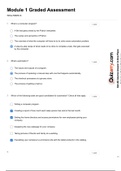
Module 1 Graded Assessment
TOTAL POINTS 10


1. What is a computer program? 1 point


A file that gets printed by the Python interpreter.

The syntax and semantics of Python.

The overview of what the computer will have to do to solve some automation problem.

A step-by-step recipe of what needs to be done to complete a task, that gets executed
by the computer.


2. What’s automation? 1 point


The inputs and outputs of a program.

The process of replacing a manual step with one that happens automatically.

The checkout processes at a grocery store.

The process of getting a haircut.


3. Which of the following tasks are good candidates for automation? Check all that apply. 1 point


Writing a computer program.


Creating a report of how much each sales person has sold in the last month.


Setting the home directory and access permissions for new employees joining your
company.


Designing the new webpage for your company.


Taking pictures of friends and family at a wedding.


Populating your company's e-commerce site with the latest products in the catalog.


4. 1 point

1/3

, What are some characteristics of the Python programming language? Check all that
apply.


Python programs are easy to write and understand.


The Python interpreter reads our code and transforms it into computer instructions.


It's an outdated language that's barely in use anymore.


We can practice Python using web interpreters or codepads as well as executing it
locally.


5. How does Python compare to other programming languages? 1 point


Python is the only programming language that is worth learning.

Each programming language has its advantages and disadvantages.

It's always better to use an OS specific language like Bash or Powershell than using a
generic language like Python.

Programming languages are so different that learning a second one is harder than
learning the first one.


6. Write a Python script that outputs "Automating with Python is fun!" to the screen. 1 point


1 print("Automating with Python is fun!")

Run

Reset


Automating with Python is fun!


7. Fill in the blanks so that the code prints "Yellow is the color of sunshine". 1 point


1 color = "Yellow"
2 thing = "sunshine"
3 print(color + " is the color of " + thing) Run

Reset


Yellow is the color of sunshine


2/3

, 8. Keeping in mind there are 86400 seconds per day, write a program that calculates how 1 point
many seconds there are in a week, if a week is 7 days. Print the result on the screen.

Note: Your result should be in the format of just a number, not a sentence.

1 seconds=86400*7
2 print(seconds)
Run

Reset


604800


9. Use Python to calculate how many different passwords can be formed with 6 lower case 1 point
English letters. For a 1 letter password, there would be 26 possibilities. For a 2 letter
password, each letter is independent of the other, so there would be 26 times 26
possibilities. Using this information, print the amount of possible passwords that can be
formed with 6 letters.

1 x=26**6
2 print(x)
Run

Reset


308915776


10. Most hard drives are divided into sectors of 512 bytes each. Our disk has a size of 16 1 point
GB. Fill in the blank to calculate how many sectors the disk has.

Note: Your result should be in the format of just a number, not a sentence.

1 disk_size = 16*1024*1024*1024
2 sector_size = 512
3 sector_amount = disk_size/sector_size
4 Run
5 print(sector_amount)
Reset


33554432.0


3/3

Get to know the seller

Seller avatar
Reputation scores are based on the amount of documents a seller has sold for a fee and the reviews they have received for those documents. There are three levels: Bronze, Silver and Gold. The better the reputation, the more your can rely on the quality of the sellers work.
CourseHeroes Science College
Follow You need to be logged in order to follow users or courses
Sold
117
Member since
5 year
Number of followers
113
Documents
29
Last sold
1 month ago
AskSamar

Get All Course/Questions Answer/Documents/Flashcards/Bundles Without Any Hassle.

3.9

21 reviews

5
14
4
1
3
0
2
2
1
4

Recently viewed by you

Why students choose Stuvia

Created by fellow students, verified by reviews

Quality you can trust: written by students who passed their tests and reviewed by others who've used these notes.

Didn't get what you expected? Choose another document

No worries! You can instantly pick a different document that better fits what you're looking for.

Pay as you like, start learning right away

No subscription, no commitments. Pay the way you're used to via credit card and download your PDF document instantly.

Student with book image

“Bought, downloaded, and aced it. It really can be that simple.”

Alisha Student

Frequently asked questions
