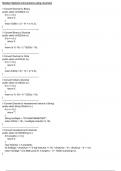
STRINGBUFFER DATA TYPE
You can declare an object of StringBuffer type. This creates reasonable space in the mem
called Buffer to contain a string. The following statements are used to create StringBu2
objects:
" StringBuffer m=new StringBuffer( );
This allocates an empty space in the memory to store a string.
" StringBuffer m=new StringBuffer("COMPUTER");
The above statement allocates memory for variable m and initialises it with su
"COMPUTER".
"StringBuffer m=new StringBuffer(25); maximum
The above statement allocates memory space for storing astring up to a
25 characters.
characteristo
Once an Object is created as possesses the following
StringBuffer
() It refers to as a specific length in type, it po
(ii) The length can be memorv to contain characters. Programmersbyus
SetLength( ) function.changed according to the need of the charate
(ii) If a string has bigger object, then the
length than the size of
exceeding the size are
(i0) If a string is truncated. StringButter contains
smaller than the size of the then it
characters (\u0000) in the empty
space.
StringButfer object,
, sIringBufferFunctions
Therearesonme functions especially used on the StringBuffer object. These functions are
discussedbelow:
Append(
)
Thisfunction is used to add a string at the end of another string.
$yntax: StringBuffer variable1.append(StringBuffer variable2);
Forexample,
rBuffer k =new StringBuffer("COMPUTER"):
StringBufter p= new StringBufer("APPLICATIONS");
kappend(p):
the value for 'k' as COMPUTERAPPLICATIONS.
Itreturns
Note: You must keep in your mind that a StringBuffer function doesn't use extra variable for
storingthe result. The change is saved in the current object through which the function is
called.
setCharAt()
specified index.
This function can be used toreplace a character with another character at
Character):
Syntax: StringBuffer variable.setCharAt(Index,
For example,
StringBuffer s=new StringBuffer("COMMUTER");
S.setCharAt(3, 'P');
It will return the value for s as COMPUTER.
insert()
specified index into another string.
Ihis function allows you to insert a string at a
variable2);
Syntax: StringBuffer variablel.insert(index, StringBuffer
For example,
DtingBuffer s=new StringBuffer("COMPUTER FUN");
DUngBuffer p=new StringBuffer(" 1S;
sinsert(8, p): IS FUN.
It will return the value for s as COMPUTER
delete()
This function is used to deletethe characters from one index to another index of
a string.
variable.delete(index1, index2);
Synt a x: : StringBuffer thanindex2
index2 would mean atleast 1 position less
Here,
For example,
StringBuffer S=neW StringBuffer("COMPUTER");
from
characters positioned
s.Itdelwielte(3,return5); the value for S as COMTER,
as it removesthe
hdex 3 to index
(5-1).
You can declare an object of StringBuffer type. This creates reasonable space in the mem
called Buffer to contain a string. The following statements are used to create StringBu2
objects:
" StringBuffer m=new StringBuffer( );
This allocates an empty space in the memory to store a string.
" StringBuffer m=new StringBuffer("COMPUTER");
The above statement allocates memory for variable m and initialises it with su
"COMPUTER".
"StringBuffer m=new StringBuffer(25); maximum
The above statement allocates memory space for storing astring up to a
25 characters.
characteristo
Once an Object is created as possesses the following
StringBuffer
() It refers to as a specific length in type, it po
(ii) The length can be memorv to contain characters. Programmersbyus
SetLength( ) function.changed according to the need of the charate
(ii) If a string has bigger object, then the
length than the size of
exceeding the size are
(i0) If a string is truncated. StringButter contains
smaller than the size of the then it
characters (\u0000) in the empty
space.
StringButfer object,
, sIringBufferFunctions
Therearesonme functions especially used on the StringBuffer object. These functions are
discussedbelow:
Append(
)
Thisfunction is used to add a string at the end of another string.
$yntax: StringBuffer variable1.append(StringBuffer variable2);
Forexample,
rBuffer k =new StringBuffer("COMPUTER"):
StringBufter p= new StringBufer("APPLICATIONS");
kappend(p):
the value for 'k' as COMPUTERAPPLICATIONS.
Itreturns
Note: You must keep in your mind that a StringBuffer function doesn't use extra variable for
storingthe result. The change is saved in the current object through which the function is
called.
setCharAt()
specified index.
This function can be used toreplace a character with another character at
Character):
Syntax: StringBuffer variable.setCharAt(Index,
For example,
StringBuffer s=new StringBuffer("COMMUTER");
S.setCharAt(3, 'P');
It will return the value for s as COMPUTER.
insert()
specified index into another string.
Ihis function allows you to insert a string at a
variable2);
Syntax: StringBuffer variablel.insert(index, StringBuffer
For example,
DtingBuffer s=new StringBuffer("COMPUTER FUN");
DUngBuffer p=new StringBuffer(" 1S;
sinsert(8, p): IS FUN.
It will return the value for s as COMPUTER
delete()
This function is used to deletethe characters from one index to another index of
a string.
variable.delete(index1, index2);
Synt a x: : StringBuffer thanindex2
index2 would mean atleast 1 position less
Here,
For example,
StringBuffer S=neW StringBuffer("COMPUTER");
from
characters positioned
s.Itdelwielte(3,return5); the value for S as COMTER,
as it removesthe
hdex 3 to index
(5-1).