HTML: Tutorial QUESTIONS &
ANSWERS 100% CORRECT!!
Overview of HTML - ANSWERDevelopers use HyperText Markup Language (HTML)
to code documents that specify the content and structure of a website. The purpose
of HTML is to identify and describe the various components of a web page. Unlike
programming languages, such as Java and C++, it does not perform any operations
on data. Documents with HTML code are saved with the .html extension.
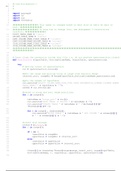
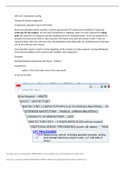
The image shows the HTML code of a simple web page. The first line in this code is
a <!DOCTYPE html> declaration. It states the HTML version used on the page. The
code also shows angle brackets that enclose the HTML tags (in purple font). These
tags occur in pairs. Notice that the second tag in each pair has a slash (/) in it. Each
pair of tags encloses an element of the web page. The opening tag marks the
beginning of the element, and the closing tag marks its end.
There can also be a pair of tags within another pair of tags. These tags define nested
elements, which allow you to organize content in a logical order. Note that the tags
don't appear on the web page seen in the browser—they are only visible in the code.
Besides specifying what the browser will display, HTML tags also add meaning to
the content. For this purpose, the tags allow you to assign user-defined classes to
the content. For example, marking text as a heading shows the importance of those
words on the web page. - ANSWERSemantic markup refers to HTML tags that
describe the meaning of the content. They include <form>, <table>, <img>, and so
on. Such tags describe the meaning of the element to the browser and to the
developer. Semantic markup also makes it easier to apply general formatting rules
throughout a web page. Additionally, it helps search engines evaluate the
importance of information on the web pages.
When you code your web page in HTML, it is more likely that the page will come up
in search results. The code is generally shorter and better organized as compared to
the code generated by a website design tool. You may also need to change the code
generated by a tool to get the desired results.
Which HTML tags describe the meaning of the content?
___________ elements describe the meaning of the content. - ANSWERSemantic
The HTML Head - ANSWERThe head section of an HTML document includes global
formatting or style information. The <head> element of your document contains
metadata. Metadata is data about data. Meta elements specify page description,
keywords, author of the document, and so on. Let's look at the tags that describe
metadata.
- <title>: Use the <title> tag to define the title of the HTML document. You write the
title in this format:
, <title>Title name</title>.
- <style>: Use the <style> tag to change the color of the text, convert text to an
image, and so on. You use this tag in this format:
<style>p {color:blue;}</style>.
more info: - ANSWER- <link>: Use the <link> tag to define a link between the
document and an external source. You write the link in this format:
<link href="default.css" rel="stylesheet" title="default style">.
- <meta>: Use the <meta> tag to provide metadata about the HTML document. You
write the metadata in this format:
<meta name="keywords" content="HTML">.
- <script>: Use the <script> tag to define a client-side script, such as JavaScript. You
write the script in this format:
<script>src="javascript.js"</script>.
- <base>: Use the <base> tag to define the base URL in an HTML document. You
specify the URL in this format:
<base href="URL name">.
HTML Tags - ANSWERNow that you know what HTML tags are, let's discuss the
different types of HTML tags. An HTML document has two parts: a head and a body.
The HTML Body - ANSWERThe <body> element of your HTML document contains
text, hyperlinks, images, tables, lists, and other elements. Let's look at some
important body tags.
- <html>: Use the <html> tag to tell the browser that your document is in HTML
format. This tag is the root of the document. You write the tag in this format:
<!DOCTYPE HTML><html><head><title>Title </title></head>.
- <p>: Use the <p> tag to define a paragraph. You write a paragraph in this format:
<p>This is a paragraph</p>.
- <br>: Use the <br> tag to add a line break. You can add multiple line breaks in your
document.
- <h1> to <h6>: Use these tags to define different levels of headings in your
document. You write the heading in this format:
<h1>Heading 1</h1>.
- <img>: Use the <img> tag to define an image. You can add an image using this
format:
<img src="image name">.
List Tags - ANSWERSometimes, you may want or need to list items on your web
page. There are three types of HTML list tags used to list items. Let's discuss them
one by one.
The Unordered List Tag: <ul> - ANSWERYou can use an unordered list tag to create
a bulleted list of items. Changing the order of the items does not change the
meaning of the list. For example, if you want to create an unordered list of fruit
names, first write the opening unordered list tag: <ul>. Then, add the list header
using the <lh>title</lh> tag. Next, write the <li> tag, followed by the first list item.
Continue writing the remaining items in the same way. Finally, write the closing
ANSWERS 100% CORRECT!!
Overview of HTML - ANSWERDevelopers use HyperText Markup Language (HTML)
to code documents that specify the content and structure of a website. The purpose
of HTML is to identify and describe the various components of a web page. Unlike
programming languages, such as Java and C++, it does not perform any operations
on data. Documents with HTML code are saved with the .html extension.
The image shows the HTML code of a simple web page. The first line in this code is
a <!DOCTYPE html> declaration. It states the HTML version used on the page. The
code also shows angle brackets that enclose the HTML tags (in purple font). These
tags occur in pairs. Notice that the second tag in each pair has a slash (/) in it. Each
pair of tags encloses an element of the web page. The opening tag marks the
beginning of the element, and the closing tag marks its end.
There can also be a pair of tags within another pair of tags. These tags define nested
elements, which allow you to organize content in a logical order. Note that the tags
don't appear on the web page seen in the browser—they are only visible in the code.
Besides specifying what the browser will display, HTML tags also add meaning to
the content. For this purpose, the tags allow you to assign user-defined classes to
the content. For example, marking text as a heading shows the importance of those
words on the web page. - ANSWERSemantic markup refers to HTML tags that
describe the meaning of the content. They include <form>, <table>, <img>, and so
on. Such tags describe the meaning of the element to the browser and to the
developer. Semantic markup also makes it easier to apply general formatting rules
throughout a web page. Additionally, it helps search engines evaluate the
importance of information on the web pages.
When you code your web page in HTML, it is more likely that the page will come up
in search results. The code is generally shorter and better organized as compared to
the code generated by a website design tool. You may also need to change the code
generated by a tool to get the desired results.
Which HTML tags describe the meaning of the content?
___________ elements describe the meaning of the content. - ANSWERSemantic
The HTML Head - ANSWERThe head section of an HTML document includes global
formatting or style information. The <head> element of your document contains
metadata. Metadata is data about data. Meta elements specify page description,
keywords, author of the document, and so on. Let's look at the tags that describe
metadata.
- <title>: Use the <title> tag to define the title of the HTML document. You write the
title in this format:
, <title>Title name</title>.
- <style>: Use the <style> tag to change the color of the text, convert text to an
image, and so on. You use this tag in this format:
<style>p {color:blue;}</style>.
more info: - ANSWER- <link>: Use the <link> tag to define a link between the
document and an external source. You write the link in this format:
<link href="default.css" rel="stylesheet" title="default style">.
- <meta>: Use the <meta> tag to provide metadata about the HTML document. You
write the metadata in this format:
<meta name="keywords" content="HTML">.
- <script>: Use the <script> tag to define a client-side script, such as JavaScript. You
write the script in this format:
<script>src="javascript.js"</script>.
- <base>: Use the <base> tag to define the base URL in an HTML document. You
specify the URL in this format:
<base href="URL name">.
HTML Tags - ANSWERNow that you know what HTML tags are, let's discuss the
different types of HTML tags. An HTML document has two parts: a head and a body.
The HTML Body - ANSWERThe <body> element of your HTML document contains
text, hyperlinks, images, tables, lists, and other elements. Let's look at some
important body tags.
- <html>: Use the <html> tag to tell the browser that your document is in HTML
format. This tag is the root of the document. You write the tag in this format:
<!DOCTYPE HTML><html><head><title>Title </title></head>.
- <p>: Use the <p> tag to define a paragraph. You write a paragraph in this format:
<p>This is a paragraph</p>.
- <br>: Use the <br> tag to add a line break. You can add multiple line breaks in your
document.
- <h1> to <h6>: Use these tags to define different levels of headings in your
document. You write the heading in this format:
<h1>Heading 1</h1>.
- <img>: Use the <img> tag to define an image. You can add an image using this
format:
<img src="image name">.
List Tags - ANSWERSometimes, you may want or need to list items on your web
page. There are three types of HTML list tags used to list items. Let's discuss them
one by one.
The Unordered List Tag: <ul> - ANSWERYou can use an unordered list tag to create
a bulleted list of items. Changing the order of the items does not change the
meaning of the list. For example, if you want to create an unordered list of fruit
names, first write the opening unordered list tag: <ul>. Then, add the list header
using the <lh>title</lh> tag. Next, write the <li> tag, followed by the first list item.
Continue writing the remaining items in the same way. Finally, write the closing