
Assignment 2 – Spreadsheet
Modeling
Task a
A sentence about each screenshot
Any formulas used
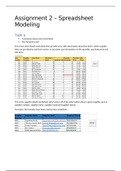
This is the stock details worksheet that provides you with information about the items, which supplier
they are provided by and their names. It also gives you information on the quantity, purchase price and
sale price
This is the supplier details worksheet which stores all of the information about a given supplier such as
supplier number, supplier name, supplier email and supplier phone.
Formulas: No formulas have been used on this worksheet
, Tis worksheet hold all of the customer details. It will hold their names, gender, title, address 1
and address 2 if they have one, postcode, email address, phone number, date joined and
discount level. The discount is calculated by looking at the date joined and the current date, if
they have been a member for longer than a year.
Formulas:
=IF((TODAY()>=[Date Joined]+365),(10%),(5%))
This worksheet holds all of the sales information, Mem ID, Supp ID, Sale Date, Sale Month, Item No,
Item, Name, Quantity, Price per item, Price without discount, Discount Final Price. Formulas are used to
calculate the total price as well as the discounted price.
Formulas:
='Sales Details'!G3
=D3-E3
=I3-I3*J3
Modeling
Task a
A sentence about each screenshot
Any formulas used
This is the stock details worksheet that provides you with information about the items, which supplier
they are provided by and their names. It also gives you information on the quantity, purchase price and
sale price
This is the supplier details worksheet which stores all of the information about a given supplier such as
supplier number, supplier name, supplier email and supplier phone.
Formulas: No formulas have been used on this worksheet
, Tis worksheet hold all of the customer details. It will hold their names, gender, title, address 1
and address 2 if they have one, postcode, email address, phone number, date joined and
discount level. The discount is calculated by looking at the date joined and the current date, if
they have been a member for longer than a year.
Formulas:
=IF((TODAY()>=[Date Joined]+365),(10%),(5%))
This worksheet holds all of the sales information, Mem ID, Supp ID, Sale Date, Sale Month, Item No,
Item, Name, Quantity, Price per item, Price without discount, Discount Final Price. Formulas are used to
calculate the total price as well as the discounted price.
Formulas:
='Sales Details'!G3
=D3-E3
=I3-I3*J3



