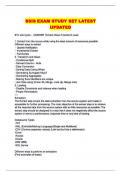
SSIS EXAM STUDY SET LATEST
UPDATED
ETL Life Cycle - ANSWER Extract-Clean-Transform-Load
1. Extract from the source while using the least amount of resources possible.
Different ways to extract
- Update Notification
- Incremental Extract
- Full Extract
2. Transform and Clean
- Conditional Split
- Derived Column - Nulls
- Data Conversion
- Sorting Data (Using What)
- Generating Surrogate Keys?
- Generating Aggregates
- Making Sure Identifiers are unique
- Join Data using (Union All, Merge, Look Up, Merge Join)
3. Loading
- Disable Constraints and indexes when loading
- Proper Permissions
----
Extraction:
The Extract step covers the data extraction from the source system and makes it
accessible for further processing. The main objective of the extract step is to retrieve
all the required data from the source system with as little resources as possible. The
extract step should be designed in a way that it does not negatively affect the source
system in terms or performance, response time or any kind of locking.
Datasource Types
-TXT
-XML (ExtinsibleMarkup Language)(Single and Multilevel)
-CSV (Comma seperator values) (Liek text but has a deliminator)
-Excel
-Access
-Oracle
-DB2 (IBM)
-SQL Server
Different ways to perform an extraction:
(Find examples of these)
, Update notification - if the source system is able to provide a notification that a
record has been changed and describe the change, this is the easiest way to get the
data.
Incremental extract - some systems may not be able to provide notification that an
update has occurred, but they are able to identify which records have been modified
and provide an extract of such records. During further ETL steps, the system needs
to identify changes and propagate it down. Note, that by using daily extract, we may
not be able to handle deleted records properly.
Full extract - some systems are not able to identify which data has bee
5 Transformations that I have used in SSIS - ANSWER Researching
Describe Delay Validation - ANSWER DelayValidation Property is available on
Task level, Connection Manager, Container and on Package level. By default the
value of this property is set to false that means that when the package start
execution, It validates all the Tasks, Containers, Connection Managers and objects(
Tables,Views, Stored Procedures etc.) used by them. If any object such as table or
destination file etc. is not available then Package validation fails and Package stop
execution.
By setting this property to True, We enforce our SSIS Package not to validate that
Task, Connection Manager or entire Package at start but validate at run time.
Describe an instance when I have used this:
http://www.techbrothersit.com/2014/09/ssis-what-is-delay-validation-property.html
The 5 package configurations - ANSWER 1. XML configuration file - An XML file
contains the configurations. The XML file can include multiple configurations.
2. Environment variable - An environment variable contains the configuration.
3. Registry entry - A Registry entry contains the configuration.
4. Parent package variable - A variable in the package contains the configuration.
This configuration type is typically used to update properties in child packages.
5. SQL Server table - A table in a SQL Server database contains the configuration.
The table can include multiple configurations.
Practice with these
UPDATED
ETL Life Cycle - ANSWER Extract-Clean-Transform-Load
1. Extract from the source while using the least amount of resources possible.
Different ways to extract
- Update Notification
- Incremental Extract
- Full Extract
2. Transform and Clean
- Conditional Split
- Derived Column - Nulls
- Data Conversion
- Sorting Data (Using What)
- Generating Surrogate Keys?
- Generating Aggregates
- Making Sure Identifiers are unique
- Join Data using (Union All, Merge, Look Up, Merge Join)
3. Loading
- Disable Constraints and indexes when loading
- Proper Permissions
----
Extraction:
The Extract step covers the data extraction from the source system and makes it
accessible for further processing. The main objective of the extract step is to retrieve
all the required data from the source system with as little resources as possible. The
extract step should be designed in a way that it does not negatively affect the source
system in terms or performance, response time or any kind of locking.
Datasource Types
-TXT
-XML (ExtinsibleMarkup Language)(Single and Multilevel)
-CSV (Comma seperator values) (Liek text but has a deliminator)
-Excel
-Access
-Oracle
-DB2 (IBM)
-SQL Server
Different ways to perform an extraction:
(Find examples of these)
, Update notification - if the source system is able to provide a notification that a
record has been changed and describe the change, this is the easiest way to get the
data.
Incremental extract - some systems may not be able to provide notification that an
update has occurred, but they are able to identify which records have been modified
and provide an extract of such records. During further ETL steps, the system needs
to identify changes and propagate it down. Note, that by using daily extract, we may
not be able to handle deleted records properly.
Full extract - some systems are not able to identify which data has bee
5 Transformations that I have used in SSIS - ANSWER Researching
Describe Delay Validation - ANSWER DelayValidation Property is available on
Task level, Connection Manager, Container and on Package level. By default the
value of this property is set to false that means that when the package start
execution, It validates all the Tasks, Containers, Connection Managers and objects(
Tables,Views, Stored Procedures etc.) used by them. If any object such as table or
destination file etc. is not available then Package validation fails and Package stop
execution.
By setting this property to True, We enforce our SSIS Package not to validate that
Task, Connection Manager or entire Package at start but validate at run time.
Describe an instance when I have used this:
http://www.techbrothersit.com/2014/09/ssis-what-is-delay-validation-property.html
The 5 package configurations - ANSWER 1. XML configuration file - An XML file
contains the configurations. The XML file can include multiple configurations.
2. Environment variable - An environment variable contains the configuration.
3. Registry entry - A Registry entry contains the configuration.
4. Parent package variable - A variable in the package contains the configuration.
This configuration type is typically used to update properties in child packages.
5. SQL Server table - A table in a SQL Server database contains the configuration.
The table can include multiple configurations.
Practice with these