Adobe Photoshop Certification
Exam 3
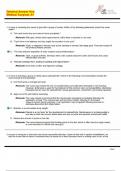
Use the dropdowns to complete the following statements. - -RGB color mode
uses an additive type of mixing method.
CMYK color mode uses a subtractive type of mixing method.
- Which of the following is a technique that allows you to make changes to
an image without overwriting the original image data? - -Nondestructive
editing allows you to make changes to an image without overwriting the
original image data.
- Which of the following is not a selection method in Photoshop CC? - -The
Hand tool is not a selection method in Photoshop CC.
- Which of the following features preserves an image's source content with
all its original characteristics (non-destructive editing)? - -Smart Objects
preserve an image's source content with all its original characteristics (non-
destructive editing).
- Which of the following Photoshop print features include little marks that
indicate where the print should be trimmed? - -Crop marks include little
marks that indicate where the print should be trimmed.
- Change the font size of the Explore text object to be 100 pt, and then
change the text color to be the same color as the Get Started button. - --
Click to select the Explore text layer.
-Open the Character panel (Window > Character).
-Enter 100 pt as the font size.
-Click the color swatch box next to the Color option to choose a new color.
-Use the eyedropper and click on the teal Get Started button in the
document to select that color.
-Click OK.
- Create a new document made for Art & Illustration using the Poster preset.
Name the document Festival and give it a CMYK color mode. Accept all other
defaults. - --Click the File menu and select New.
-Click the Art & Illustration preset and select Poster.
-For the name, type Festival.
-Click the dropdown next to Color Mode and select CMYK.
-Accept all other defaults and click Create.
, - Duplicate the Flowers layer and name it Wreath. - -Right-click the Flowers
layer and select Duplicate Layer.
Remove the name Flowers copy and replace it with Wreath.
Click OK.
- Remove the layer style from the Frame layer and add the Sepia Tone
image style to the Photograph layer. - --Right-click the Frame layer and
select Clear Layer Style.
-Click the Photograph layer to select it.
-Open the Styles panel (Window > Styles) and select the Sepia Tone style
(4th row, 1st column).
- Select all the nontransparent pixels on the Flowers layer and save it as a
new selection named Foreground. - -Hold Ctrl on your keyboard and click on
the layer icon of the Flower layer.
Click the Select menu and choose Save Selection.
For the name, type Foreground.
Accept all other defaults and click OK.
- Convert the Button shape into a Smart Object. - -In the Layers panel, scroll
down to find the Button shape layer.
Right-click the Button shape layer and select Convert to Smart Object.
- Determine whether each statement regarding Content-Aware Fill is
accurate by choosing Yes for accurate statements or No for inaccurate
statements. - -Accurate statements:
You have control over the sampling area that fills the selected portion of the
image.
The Rotation Adaptation fill setting is more effective at matching content
with rotated or curved patterns.
Inaccurate statements:
Once an area has been filled using Content-Aware Fill, it cannot be undone.
- Change the foreground color to 2ad3b9. Save that color as a New Swatch
named Seafoam. - --Click the foreground color swatch in the left toolbar to
open the color picker.
-For the hex number at the bottom, type 2ad3b9 and click OK.
-At the bottom of the Swatches panel, click the Create -New Swatch icon.
-For the name, type Seafoam, and then deselect the Add to my current
library checkbox.
-Accept all other defaults and click OK.
Exam 3
Use the dropdowns to complete the following statements. - -RGB color mode
uses an additive type of mixing method.
CMYK color mode uses a subtractive type of mixing method.
- Which of the following is a technique that allows you to make changes to
an image without overwriting the original image data? - -Nondestructive
editing allows you to make changes to an image without overwriting the
original image data.
- Which of the following is not a selection method in Photoshop CC? - -The
Hand tool is not a selection method in Photoshop CC.
- Which of the following features preserves an image's source content with
all its original characteristics (non-destructive editing)? - -Smart Objects
preserve an image's source content with all its original characteristics (non-
destructive editing).
- Which of the following Photoshop print features include little marks that
indicate where the print should be trimmed? - -Crop marks include little
marks that indicate where the print should be trimmed.
- Change the font size of the Explore text object to be 100 pt, and then
change the text color to be the same color as the Get Started button. - --
Click to select the Explore text layer.
-Open the Character panel (Window > Character).
-Enter 100 pt as the font size.
-Click the color swatch box next to the Color option to choose a new color.
-Use the eyedropper and click on the teal Get Started button in the
document to select that color.
-Click OK.
- Create a new document made for Art & Illustration using the Poster preset.
Name the document Festival and give it a CMYK color mode. Accept all other
defaults. - --Click the File menu and select New.
-Click the Art & Illustration preset and select Poster.
-For the name, type Festival.
-Click the dropdown next to Color Mode and select CMYK.
-Accept all other defaults and click Create.
, - Duplicate the Flowers layer and name it Wreath. - -Right-click the Flowers
layer and select Duplicate Layer.
Remove the name Flowers copy and replace it with Wreath.
Click OK.
- Remove the layer style from the Frame layer and add the Sepia Tone
image style to the Photograph layer. - --Right-click the Frame layer and
select Clear Layer Style.
-Click the Photograph layer to select it.
-Open the Styles panel (Window > Styles) and select the Sepia Tone style
(4th row, 1st column).
- Select all the nontransparent pixels on the Flowers layer and save it as a
new selection named Foreground. - -Hold Ctrl on your keyboard and click on
the layer icon of the Flower layer.
Click the Select menu and choose Save Selection.
For the name, type Foreground.
Accept all other defaults and click OK.
- Convert the Button shape into a Smart Object. - -In the Layers panel, scroll
down to find the Button shape layer.
Right-click the Button shape layer and select Convert to Smart Object.
- Determine whether each statement regarding Content-Aware Fill is
accurate by choosing Yes for accurate statements or No for inaccurate
statements. - -Accurate statements:
You have control over the sampling area that fills the selected portion of the
image.
The Rotation Adaptation fill setting is more effective at matching content
with rotated or curved patterns.
Inaccurate statements:
Once an area has been filled using Content-Aware Fill, it cannot be undone.
- Change the foreground color to 2ad3b9. Save that color as a New Swatch
named Seafoam. - --Click the foreground color swatch in the left toolbar to
open the color picker.
-For the hex number at the bottom, type 2ad3b9 and click OK.
-At the bottom of the Swatches panel, click the Create -New Swatch icon.
-For the name, type Seafoam, and then deselect the Add to my current
library checkbox.
-Accept all other defaults and click OK.