Use of input and output devices
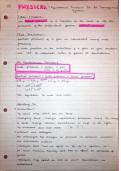
When you are designing you will have a range of input devices;
keyboard, mouse, touch screen.
Inputs allows users to use the devices properly.
The usability of an input device depends on the provision and
appropriate feedback of the system
Input Devices
- Keyboard
- Mouse
- Touch Screen
- Scanner
- Joy stick
- Microphone
Types of keyboard
- Qwerty Keyboard: Used most common alphabetic character
arrangement. Good for variable data entry and flexible. Fast
trained touch typists. Keyboard use different layouts for
different languages.
- Chord: Can be used to text on mobile. Various arrangement.
Words formed by combinations of keys being pressed.
Pointing Devices
- Indirect and direct devices
- Indirect: Uses a secondary device
- Direct: Allows the user to point directly
Examples
- 3D trackers (Relays position and orientation to a receiver)
- Joystick (Small stick, movable in any direction in a fixed socket)
- Mouse (Continuous input device)
- Trackball (Rotatable ball in a fixed socket)
- Mole (Foot mouse)
Touch-sensitive screen
- Special screen that detects the position of a finger touching it
When you are designing you will have a range of input devices;
keyboard, mouse, touch screen.
Inputs allows users to use the devices properly.
The usability of an input device depends on the provision and
appropriate feedback of the system
Input Devices
- Keyboard
- Mouse
- Touch Screen
- Scanner
- Joy stick
- Microphone
Types of keyboard
- Qwerty Keyboard: Used most common alphabetic character
arrangement. Good for variable data entry and flexible. Fast
trained touch typists. Keyboard use different layouts for
different languages.
- Chord: Can be used to text on mobile. Various arrangement.
Words formed by combinations of keys being pressed.
Pointing Devices
- Indirect and direct devices
- Indirect: Uses a secondary device
- Direct: Allows the user to point directly
Examples
- 3D trackers (Relays position and orientation to a receiver)
- Joystick (Small stick, movable in any direction in a fixed socket)
- Mouse (Continuous input device)
- Trackball (Rotatable ball in a fixed socket)
- Mole (Foot mouse)
Touch-sensitive screen
- Special screen that detects the position of a finger touching it