Presentations:
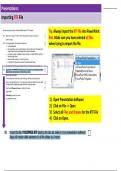
Importing RTF File
Tip: Always import the RTF file into PowerPoint
first. Make sure you have selected all files
when trying to import the file.
1) Open Presentation Software
2) Click on File >> Open
3) Select all Files and Browse for the RTF File
4) Click on Open.
, Presentations:
Slide Master
If you work on the top level master slide then all layouts will
incorporate master slide elements including shapes, lines,
colours, images, text footers etc.
You would use the 3rd level master slide if
you do not want to show master slide
elements on some slide layouts including
the Title Slide.
Importing RTF File
Tip: Always import the RTF file into PowerPoint
first. Make sure you have selected all files
when trying to import the file.
1) Open Presentation Software
2) Click on File >> Open
3) Select all Files and Browse for the RTF File
4) Click on Open.
, Presentations:
Slide Master
If you work on the top level master slide then all layouts will
incorporate master slide elements including shapes, lines,
colours, images, text footers etc.
You would use the 3rd level master slide if
you do not want to show master slide
elements on some slide layouts including
the Title Slide.