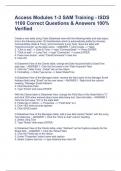
Access Modules 1-3 SAM Training - ISDS 1100 Correct Questions & Answers 100% Verified
Access Modules 1-3 SAM Training - ISDS 1100 Correct Questions & Answers 100% VerifiedAccess Modules 1-3 SAM Training - ISDS 1100 Correct Questions & Answers 100% VerifiedAccess Modules 1-3 SAM Training - ISDS 1100 Correct Questions & Answers 100% VerifiedAccess Modules 1-3 SAM Training - ISDS 1100 Correct Questions & Answers 100% Verified‘ Create a new table using Table Datasheet view with the following fields and data types, and in the following order: ID (AutoNumber which is automatically added by Access), CommentDate (Date & Time), and Comments (Long Text). Save the table with "ClientComments" as the table name. - ANSWER 1. Click create --> Table 2. "Click to add" --> Date & Time --> type "CommentDate" --> Press ENTER 3. "Click to add" --> Long Text --> type "Comments" --> press ENTER 4. Press save button - enter "ClientComments" in text box 5. Click OK In Datasheet View of the Clients table, change the Date Acquired field to Data/Time data type. - ANSWER 1. Click the first value in the "Date Acquired" field. 2. Click the "Table Tools - Fields" tab on the ribbon. 3. Formatting --> Data Type arrow --> Select Date/Time In Datasheet View of the Managers table, rename the field name of the Manager Email Address field using "Email" as the new name. - ANSWER 1. Right-click the column heading, "Manager Email Address" 2. Click Rename Field 3. Type "Email" and press ENTER With the Clients table in Datasheet View, change the Field Size of the State field to "2" and click YES when warned about some data being lost. Save the table. - ANSWER 1. Click the first value "TX" in the state field.
Written for
- Institution
- Access Modules 1-3 SAM Training - ISDS 1100
- Course
- Access Modules 1-3 SAM Training - ISDS 1100
Document information
- Uploaded on
- November 14, 2023
- Number of pages
- 13
- Written in
- 2023/2024
- Type
- Exam (elaborations)
- Contains
- Questions & answers
Subjects
-
access modules 1 3 sam training isds 1100 correc
-
access modules 1 3 sam training isds 1100 stuvia
-
create a new table using table datasheet view w
-
in datasheet view of the clients table change th

Also available in package deal