Cvent Certification Latest Update (2023/2024) Rated A+
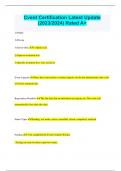
Cvent Certification Latest Update (2023/2024) Rated A+ 1) Public 2) Private 3) Invite-Only 1) Open to all 2) Open to invitation lists 3) Specific invitation lists, very exclusive Event Capacity Once the event reaches a certain capacity (set by the administrator) the event will close automatically Registration Deadline The last date that an individual can register on. The event will automatically close after this date. Status Types Pending, test mode, active, cancelled, closed, completed, archived Pending -You completed the Event Creation Wizard. -Testing can only be done in preview mode. -All items and fees can be added, edited, or removed. Pending (Test-Mode) -You clicked "Move to Test Mode" on the Overview page. -You can test registration in its entirety. -All items and fees can be added, edited, or removed. -Online payments cannot be processed. Active -You clicked "Launch Event" on the Overview page. -The website opens. -Registration items can no longer be deleted, only deactivated. -This is the only point where invitees can register on their own. Closed -Registration has reached capacity or the deadline has passed. -The website remains open. -Registration is closed, but registrants can still access their information and pay online. -You can modify registrations, issue refunds, or register latecomers on the back end. Completed -The end date has passed. -The website remains open. -Registration is closed, but registrants can still access their information and pay online. -You can modify registrations, issue refunds, or register latecomers on the back end. Archived -The archive date has passed. -The website is closed. -Registrants will no longer be able to view their information, pay online, or give feedback. -You can still modify registrations, issue refunds, or register latecomers on the back end. Test Actions (Email) Specify the contact type, invitation list, and email. Test Actions (Website) If you're arriving at your event website through an email, determine your contact type, invitation list, and starting page. If you're arriving through a generic weblink, simply select a starting page. Test Actions (Registration Process) If you're arriving to registration through an email, determine your contact type and invitation list. If you're arriving to registration from a path-specific weblink, simply select the registration path. When you initiate the test, registration opens in a new window. Registration Type Registration types determine what groups of people see during registration, what they can select, and how much those items cost. Registrants can only have one registration type per event, but they can use a different one for a different event. After all, today's speaker could be tomorrow's attendee. Admission Item Is your ticket to the event. What pass for the event - VIP Pass, Standard Pass - or 1-day pass. Will only see the sessions association with the admission item selected. Session A presentation, discussion, or activity you've added that invitees can register for or that's included automatically with registration. Optional Item Raffle tickets, T-shirts, and memberships are examples of optional items, which are anything that can be purchased or added during registration and in one of these four categories: quantity items, membership items, group items, and donation items. Session Groups A way to organize multiple optional sessions. Since an invitee can only select one session from a session group, they can be used to prevent scheduling conflicts, limit an invitee's selection, or simply shorten the registration process. Session Category Designed to organize your agenda based on topics, session categories lump related sessions together so that invitees can more easily find the ones that interest them while registering. Included Session what's already on the agenda for the event and it's set up for the attendee - No additional fees or additional capacity Optional Session list of sessions the attendee can go and select them to add to their agenda. Can have a capacity and can have additional costs on each session. Track These are bundles of sessions. Designed to streamline registration, invitees can select a track with one click rather than scouring a lengthy agenda to find what matters to them. In paid events, tracks can also be used to discount bulk purchases. Since an individual session's fees become void when offered as part of a track, you could combine six sessions, each costing $100, and price the bundle at $500. Admin Contact No matter how enticing the subject line, if readers don't recognize who's sending them an email, they're probably going to delete it. This is why adding an account email address that is familiar to your audience can make all the difference. Overview Tab Shows the analytics of registration, invitees, sessions, fees, and budget Event Details Tab General, Planning, Agenda Items, Pricing, and Travel Website Registration Tab Website, Registration, Surveys, Onsite Promotion & Communication Tab Web, Email, Alerts Invitee Management Tab Manage, Quick Action, Import, and Assign Reporting Tab Reports and Summary View Benefits of Using Cvent -20% increase event attendance when using event management Software -27% increase in team productivity when using event management software -15% Cost Saving when using tools like Cvent Supplier Network for finding venues -It's a platform for the entire event life cycle Support Center -Located at the top right corner of any page -Lots of training videos, glossary, and customer service -You can also use the Cvent community Event Wizard The one- to three-step process you'll walk through whenever you create an event. Once you complete the wizard, you'll rely on the menu bar to edit the details and flesh out your website and registration. Why Add a Staff Member? Event planning is nothing more than the chaotic pursuit of harmonized human interaction. Ensuring the right questions get to the right people can go miles in that effort. The Staff page is designed for just that, giving you an easy way of relaying the names, roles, and contact information of event personnel to your invitees. Why Add Speakers? "You worked hard locking down that amazing speaker. Why not show them off? Within an event, you can add speakers individually or import up to 500 at once." Categories Designed to organize your agenda based on topics, session categories lump related sessions together so that invitees can more easily find the ones that interest them. Items with a Fee Cvent lets you add a fee to almost anything within your event: admission items, sessions, and other goods and services. As illustrated below, different types of invitees can be charged different amounts for the same item. How does refund policies/early-bird discounts save you time? Managing money is hard enough without having to worry about giving it back. Creating a refund policy will save you an extra step. When an invitee pays online in full while registering, they'll be automatically refunded if they cancel. Unfortunately, you'll still need to refund registrants that paid offline the old fashioned way. Why use discount codes? Anyone can say "no" to an event, but an event that's also a bargain is harder to ignore. Make registration even more enticing by using any or all of the three ways to provide discounts outlined below. Why use Service Fees? Service fees allow you to charge registrants for situational costs, such as a 2% processing fee for credit cards or a $5 convenience fee for registering guests. The fees display at the end of registration and appear in all payment records. Taxes - Configuring Pricing & Fees Account for one of life's few certainties by applying those government-demanded sums to your event. Once added, taxes can be compounded and appear as a line item anywhere a registrant's order is displayed.
Written for
- Institution
- Cvent Certification
- Module
- Cvent Certification
Document information
- Uploaded on
- September 19, 2023
- Number of pages
- 9
- Written in
- 2023/2024
- Type
- Exam (elaborations)
- Contains
- Questions & answers
Subjects
-
cvent certification latest update rate

Also available in package deal