Data file handling in Python - Learn the basics
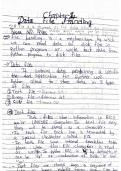
Data file handling in Python refers to the process of reading from and writing to files that contain data. Python provides built-in functions and modules for performing various file handling operations, allowing developers to manipulate data stored in files seamlessly. File handling is essential for tasks such as data storage, data retrieval, data analysis, and data manipulation. Python offers several file handling modes, including reading, writing, appending, and updating files, enabling users to perform different operations based on their requirements. Key Concepts in Data File Handling: Opening and Closing Files: Before performing any operation on a file, it needs to be opened using the open() function. This function takes the file name and mode as parameters and returns a file object. After completing the file operations, it is crucial to close the file using the close() method to release system resources. File Modes: Python supports different file modes for handling various file operations. Some commonly used file modes include: "r": Read mode, used to read data from an existing file. "w": Write mode, used to write data to a file. It creates a new file or overwrites the existing one. "a": Append mode, used to add data to the end of an existing file. "x": Exclusive creation mode, used to create a new file. It raises an error if the file already exists. "t": Text mode, used to handle text files. This is the default mode. "b": Binary mode, used to handle binary files. Reading from Files: Once a file is opened in read mode, Python provides various methods to read the file's contents, such as read(), readline(), and readlines(). These methods allow reading the entire file, a single line, or multiple lines, respectively. Writing to Files: When a file is opened in write mode, Python allows writing data to the file using the write() method. It is important to note that the write operation overwrites the existing content of the file. Appending to Files: In append mode, data can be added to the end of an existing file using the write() method. The append operation does not overwrite the existing content but adds the new data at the end. Exception Handling: During file handling, it is important to handle potential errors or exceptions that may occur. Python provides mechanisms, such as try-except blocks, to catch and handle exceptions gracefully. Data file handling in Python provides a flexible and powerful way to work with data stored in files. It is widely used for tasks ranging from reading and writing configuration files, processing large datasets, performing data analysis, and working with various file formats such as CSV, JSON, and XML.
Escuela, estudio y materia
- Institución
- TECHCODE UNIVERSITY
- Grado
- 1013 (1004)
Información del documento
- Subido en
- 10 de julio de 2023
- Número de páginas
- 38
- Escrito en
- 2022/2023
- Tipo
- NOTAS DE LECTURA
- Profesor(es)
- Cs
- Contiene
- Todas las clases
Temas
-
python
-
data file handling
-
file operations
-
file handling methods
-
text files
-
csv files
-
file paths
-
error handling
-
data file handlin
-
python
-
computer science basics
-
computer s
-
file inputoutput
-
json files

Documento también disponible en un lote