P2
Vector Graphics
Vector Graphics are usually made from objects and you can individually edit the
objects (Shapes, lines, Arcs), this is why vector graphics are typically used for logos
as they can be scaled up or down without losing quality. Furthermore vector graphics
have a small file size as the computer stores the mathematical information such as
the point locations requiring less memory to display the image. However the biggest
disadvantage of vector graphics is that they do not look realistic (more cartoony like).
Some common file formats this is usually store in .cgm, .svg, .odg, .eps, .xml.
Bitmap Graphics
Bitmap Graphics are made up from pixels each assigned a different colour from the
RGB Colour pallet. If you zoom in closely to a Bitmap image you can see each
individual pixel which can also be edited. However because the computer has to
store the detail of each pixel such as its colour and location the file size can be larger
than a vector image. Also if you upscale or downscale the image it will lose quality
because the computer has to create more pixels that are not there. The biggest
difference between vector graphics is that bitmap looks more realistic that’s why
graphics designers tend to use this graphic type more. Some common file formats
for vector graphics are .bmp, .jpeg, .gif, .tiff, .png
Lossy Compression
Lossy file compression usually results in data from the original image being lost
which results in the image quality being lower such as when you increase the image
size. This file compression method is useful for because it results in the file size
being much smaller allow it to take less disk space. An example were this is used is
mobile apps such as Whatsapp, when you send an image over this app it will
automatically compress the image removing pixels so you can transfer the file much
faster furthermore the image will look identical to the original so you cannot notice
the difference. A typical file type associated with this is JPEG because it is the most
commonly used image format however it can also be used on audio files such as
MP3. Lossy compression would typically be used if the file is too big to be
transferred quickly
Lossless compression
On the other hand lossless compression reduces the file size without it affecting the
image quality unlike lossy compression it does not remove data from the image.
Lossless compression compresses important data from the file and then restores it in
a much more efficient way after the file is uncompressed. However this can result in
a much bigger file size than lossy compression. Lossless compression can be used
in certain file types such as PNG, TIFF and FLAC. However this technique is also
used in in text/ spreadsheet files and GIF image format.
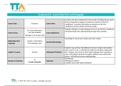
Format Typical Use Features Limitations
JPEG Photographs relatively small file size does not
16.7 million different support
colours transparency
Vector Graphics
Vector Graphics are usually made from objects and you can individually edit the
objects (Shapes, lines, Arcs), this is why vector graphics are typically used for logos
as they can be scaled up or down without losing quality. Furthermore vector graphics
have a small file size as the computer stores the mathematical information such as
the point locations requiring less memory to display the image. However the biggest
disadvantage of vector graphics is that they do not look realistic (more cartoony like).
Some common file formats this is usually store in .cgm, .svg, .odg, .eps, .xml.
Bitmap Graphics
Bitmap Graphics are made up from pixels each assigned a different colour from the
RGB Colour pallet. If you zoom in closely to a Bitmap image you can see each
individual pixel which can also be edited. However because the computer has to
store the detail of each pixel such as its colour and location the file size can be larger
than a vector image. Also if you upscale or downscale the image it will lose quality
because the computer has to create more pixels that are not there. The biggest
difference between vector graphics is that bitmap looks more realistic that’s why
graphics designers tend to use this graphic type more. Some common file formats
for vector graphics are .bmp, .jpeg, .gif, .tiff, .png
Lossy Compression
Lossy file compression usually results in data from the original image being lost
which results in the image quality being lower such as when you increase the image
size. This file compression method is useful for because it results in the file size
being much smaller allow it to take less disk space. An example were this is used is
mobile apps such as Whatsapp, when you send an image over this app it will
automatically compress the image removing pixels so you can transfer the file much
faster furthermore the image will look identical to the original so you cannot notice
the difference. A typical file type associated with this is JPEG because it is the most
commonly used image format however it can also be used on audio files such as
MP3. Lossy compression would typically be used if the file is too big to be
transferred quickly
Lossless compression
On the other hand lossless compression reduces the file size without it affecting the
image quality unlike lossy compression it does not remove data from the image.
Lossless compression compresses important data from the file and then restores it in
a much more efficient way after the file is uncompressed. However this can result in
a much bigger file size than lossy compression. Lossless compression can be used
in certain file types such as PNG, TIFF and FLAC. However this technique is also
used in in text/ spreadsheet files and GIF image format.
Format Typical Use Features Limitations
JPEG Photographs relatively small file size does not
16.7 million different support
colours transparency