The yellow boxes show an
action, this one is about the
robot moving at a constant
speed because this would
P6- Design
be the most logical step.
This is the start of the MO
Way Robots program.
This is the first sensor I
implemented into the robot
which was a detection sensor
for the left sensor, the sensor
The direction the arrow is
underneath was for the right
pointing is important as it
sensor.
shows which way the program
needs to go for in this case it
was right. If the arrow was
connected the other way round
the program will not function
properly.
This is another detection This tick box shows if the sensor if
sensor which is purple. This is the is detected then this direction
This is a simple action which variable so in this case the is the way the program will
tells the robot to do robot will monitor the follow. However if the cross going
something, normally it is in brightness if it is less than downwards shows the opposite,
yellow. 50%. so if nothing is detected it will
follow the program downwards.
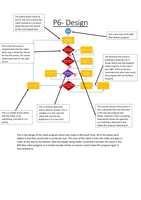
This is the design of the robot program which was made in Microsoft Visio. All of the boxes were
added in and then joined with a connector tool. This start of the robot is from the robot and goes in
order all the way to the bottom. With the design being made I could then recreate this easily in the
MO Way robot program as it looked visually similar so anyone could create this program again if
they wanted to.
action, this one is about the
robot moving at a constant
speed because this would
P6- Design
be the most logical step.
This is the start of the MO
Way Robots program.
This is the first sensor I
implemented into the robot
which was a detection sensor
for the left sensor, the sensor
The direction the arrow is
underneath was for the right
pointing is important as it
sensor.
shows which way the program
needs to go for in this case it
was right. If the arrow was
connected the other way round
the program will not function
properly.
This is another detection This tick box shows if the sensor if
sensor which is purple. This is the is detected then this direction
This is a simple action which variable so in this case the is the way the program will
tells the robot to do robot will monitor the follow. However if the cross going
something, normally it is in brightness if it is less than downwards shows the opposite,
yellow. 50%. so if nothing is detected it will
follow the program downwards.
This is the design of the robot program which was made in Microsoft Visio. All of the boxes were
added in and then joined with a connector tool. This start of the robot is from the robot and goes in
order all the way to the bottom. With the design being made I could then recreate this easily in the
MO Way robot program as it looked visually similar so anyone could create this program again if
they wanted to.